Operating System Organization
A key requirement for an operating system is to support several activities at once. Using the system call interface a process can start new processes with fork. The operating system must time-share the resources of the computer among these processes so that all of them make progress, even if there are more processes than hardware CPUs. It must also provide isolation between processes so that a failure in one does not break another. At the same time, processes must be able to interact—for example with pipelines. An operating system must therefore deliver multiplexing, isolation, and interaction.
This chapter sketches how operating systems are organized to achieve those requirements. There are many designs, but we focus on mainstream monolithic kernels used by many Unix systems. We trace the creation of the first process when xv6 boots to see how its abstractions interact and how they satisfy multiplexing, isolation, and interaction. xv6 avoids special-casing the first process and reuses normal code paths. Later chapters dive deeper into each abstraction.
Xv6 runs on Intel 80386 or later (x86) processors on a PC platform. Much of its low-level implementation is x86-specific. Some familiarity with machine-level programming is helpful; x86-specific ideas are introduced as needed.
Abstracting physical resources
Why have an operating system at all? One could imagine implementing the system call interface as a library linked into each application. Each application could tailor its own library, talk directly to hardware, and perhaps squeeze out maximum performance. Some embedded and real-time systems use this model.
The drawback is that multiple applications would have to cooperate. Each would need to voluntarily yield the CPU, and bugs could easily let one misbehaving application starve others. Trust and correctness are hard to guarantee.
To achieve strong isolation, applications are forbidden from directly touching sensitive hardware. Instead, resources are exposed as services. For example, applications use open, read, write, and close rather than raw disk I/O. That gives convenient pathnames and lets the OS manage the disk. Unix transparently time-shares CPUs by saving and restoring registers, so applications need not care about scheduling. Programs use exec to build their memory image, letting the OS choose where memory lives and even push some data to disk when memory is tight. File descriptors abstract data sources and sinks, simplifying interaction—for instance, when a process in a pipeline dies, the next process sees end-of-file.
The Unix system call interface is designed to balance convenience and strong isolation. It is not the only possible interface, but it has proven effective.
User mode, kernel mode, and system calls
Strong isolation requires a hard boundary between applications and the operating system. An application bug should not crash the OS or other applications; the OS must be able to clean up and continue. Applications must not read or modify OS data structures or other processes' memory.
Processors provide hardware support for this boundary. On x86, execution can run in kernel mode or user mode. Kernel mode allows privileged instructions such as device I/O; user mode does not. If user code tries to execute a privileged instruction, the processor traps into the kernel, which can then clean up or terminate the offending process. Applications run in user space; kernel code runs in kernel space and forms the kernel.
To perform I/O like file access, an application must transition into the kernel, because only the kernel can execute the needed I/O instructions. Processors provide a special instruction to switch to kernel mode at an entry point chosen by the kernel (on x86, int). Once in kernel mode, the kernel validates arguments, decides whether the operation is allowed, and performs or rejects it. It is crucial that the kernel controls the entry point; otherwise a malicious program could skip validation.
Kernel organization
What runs in kernel mode? One option is to place the entire OS in the kernel, so all system call implementations run with full privilege. This is a monolithic kernel. It is convenient because all OS code can cooperate directly (for example, the buffer cache can be shared between the file system and virtual memory system) and because the designer need not decide which code lacks privilege.
The downside is that interfaces between kernel components are complex, making it easy to introduce fatal bugs. A bug in kernel mode can crash the whole computer, taking down all applications.
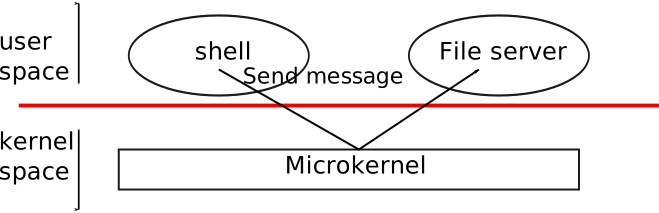
To reduce risk, designers can run only a small kernel in privileged mode and move most OS services to user mode. This is a microkernel design. Figure illustrates it: services like the file system run as user-level servers, and the kernel supplies low-level primitives (start processes, send messages, access devices). Applications communicate with servers via inter-process messaging; for example, the shell sends a request to the file server to read or write a file.
Xv6 follows the Unix tradition of a monolithic kernel: the kernel interface is the operating system interface. Because xv6 offers relatively few services, its kernel is smaller than some microkernels.
Process overview
The unit of isolation in xv6 is the process. It protects each process's memory, CPU, file descriptors, and so on from other processes and from the kernel itself. The kernel must implement processes carefully to prevent buggy or malicious code from breaking isolation. Mechanisms include user/kernel mode, address spaces, and time-slicing threads.
The process abstraction makes a program feel like it has its own private machine: its own address space (private memory) and its own CPU. Xv6 uses page tables to give each process its own address space. The x86 page table maps virtual addresses (used by instructions) to physical addresses (sent to memory).
Each process has its own page table defining its address space. Conceptually an address space contains user memory starting at virtual address zero: first instructions, then global variables, then the stack, and finally a heap that can grow. Each address space also maps kernel code and data. System calls execute in the kernel mappings of the current process's address space so kernel code can directly refer to user memory. To leave plenty of room for user memory, xv6 maps the kernel at high addresses, starting at 0xFFFF800000100000.
The kernel tracks per-process state in struct proc (see proc.h). Key pieces include the page table, kernel stack, and run state. We'll write p->xxx to refer to fields in struct proc.
Each process has a thread of execution that can be suspended and resumed. The kernel switches threads to time-share the CPU. Thread state such as local variables and return addresses lives on stacks. Every process has a user stack and a kernel stack (p->kstack). While executing user code, only the user stack is used. When entering the kernel (via a system call or interrupt), execution moves to the kernel stack; the user stack still holds saved data but is idle. The kernel stack is separate and protected so the kernel can run even if user code has corrupted its own stack.
On a system call, the processor switches to the kernel stack, raises privilege, and starts the kernel code. On return, privilege drops, execution switches back to the user stack, and user instructions resume after the system call. A thread may block in the kernel waiting for I/O and later resume.
p->state records whether the process slot is free, runnable, running, waiting for I/O, or exiting. p->pgdir holds the process page table in the hardware format. The paging hardware uses p->pgdir when the process runs, and the page table records which physical pages hold the process's memory.
Code: the first address space
To make xv6's organization concrete, we examine how the kernel creates its first address space, creates and starts the first process, and handles that process's first system call. The first step is setting up the kernel to run in its own address space.
When a PC powers on, firmware loads a boot loader from disk and executes it. The xv6 boot loader loads the kernel from disk and jumps to mboot_entry (in entry.S). Paging hardware is initially off, so virtual and physical addresses are the same.
The boot loader places the kernel at physical address 0x100000 rather than 0xFFFF800000100000 (where the kernel expects to run) because small machines may lack RAM that high. It also avoids 0xa0000:0x100000, which contains I/O devices.
To let the rest of the kernel run at high addresses, mboot_entry sets up a page table mapping virtual addresses starting at 0xFFFF800000000000 (named KERNBASE in memlayout.h) to physical addresses starting at 0x0. This is a common page table trick: two virtual ranges map to the same physical memory.
The initial page table uses the first several pages (at 0x1000) to set up a temporary page table.
Entry 0 maps virtual 0:1GB to physical 0:1GB, allowing code to keep running at low addresses until the switch is complete. Entry 256 maps virtual KERNBASE:KERNBASE+1GB to physical 0:1GB, letting the kernel find its instructions and data at their expected high virtual addresses.
entry32mp loads the physical address of that initial page table into control register cr3 (mov $1000, %eax; mov %eax, %cr3) and sets the CR0_PG bit in cr0 to turn on paging. Execution continues at low addresses because kpgdir still maps them; without that mapping the CPU would crash immediately after paging was enabled.
entry64high then needs to run C code at high addresses. It sets the stack pointer (rsp) to a stack in high memory (0xFFFF800000010000), so the stack remains valid even after low mappings disappear. Finally it jumps to main (also a high address). main cannot return because there is no return PC on the stack. At this point the kernel is running at high addresses in main (main.c).
Code: creating the first process
After main initializes devices and subsystems, it creates the first process by calling userinit (proc.c). userinit first calls allocproc, which finds a free struct proc slot in the process table, marks it EMBRYO, assigns a unique pid, and allocates a kernel stack. If the stack allocation fails it frees the slot and returns 0.
allocproc prepares the new process's kernel stack so that when it first runs it will “return” into user space. It arranges return program counters so the kernel thread begins in forkret and then trapret (proc.c and trapasm.S). The context-switch code (swtch.S) will load p->context into the hardware registers, so setting p->context->rip to forkret causes execution to start there. forkret returns to the address placed just above the context on the stack—trapret. trapret restores user registers from the top of the kernel stack and jumps into user space. This setup is used both for normal fork and for the very first process.
As Chapter 4 explains, control transfers into the kernel via the interrupt mechanism (used for system calls, interrupts, and exceptions). When that happens the hardware and trap entry code save user registers on the process's kernel stack. userinit writes values to the top of the new stack that mimic an interrupt frame, so the normal return-from-trap code works. These values form a struct trapframe. The stack now matches the layout shown in figure newkernelstack.
The first process will run the tiny program initcode.S (initcode.S). It needs physical memory to hold that program and a page table mapping user addresses to it. userinit calls setupkvm (vm.c) to create a page table containing only kernel mappings at first. setupkvm and userinit then build an address space like figure as.
During the kernel build, the linker embeds the compiled initcode.S binary in the kernel and defines _binary_initcode_start and _binary_initcode_size to locate it. userinit copies the binary into the new process's memory by calling inituvm, which allocates one physical page, maps virtual address 0 to it, and copies the binary (vm.c).
userinit sets up the trap frame (struct trapframe in x86.h) for initial user mode: segment selectors SEG_UCODE/SEG_UDATA at privilege level DPL_USER, the interrupt-enable flag FL_IF, the stack pointer rsp to p->sz, and the instruction pointer to 0 (the entry of initcode). It names the process "initcode" for debugging and sets p->cwd (see namei in Chapter 7). Finally it marks the process runnable by setting p->state = RUNNABLE.
Code: running the first process
With the first process initialized, the kernel runs it. After calling userinit, mpmain invokes scheduler (main.c). scheduler (proc.c) searches for a process with p->state == RUNNABLE; initially only initproc qualifies. It sets the per-CPU proc variable and calls switchuvm to load the process's page table (vm.c). All processes' page tables share identical kernel mappings thanks to setupkvm, so changing page tables while in the kernel is safe. switchuvm also sets up the task state segment SEG_TSS so interrupts and system calls use the process's kernel stack.
scheduler sets p->state = RUNNING and calls swtch (swtch.S) to context switch to the process's kernel thread. swtch saves the current registers (the current context is the per-CPU scheduler context, stored in cpu->scheduler) and loads the saved registers from p->context, including stack and instruction pointer. The final ret in swtch pops the target rip, finishing the switch. Now the CPU runs on the process's kernel stack.
allocproc set initproc's p->context->rip to forkret, so execution begins there. On this first invocation forkret runs initialization that must occur in a normal process context with its own kernel stack, then returns. allocproc arranged the next return address to be trapret, so trapret now executes with rsp pointing at p->tf. trapret restores registers from the trap frame (via popal, popl of segment registers, skipping trapno/errcode) and executes iret, which pops cs, rip, flags, rsp, and ss. The CPU state now matches the trap frame, so execution continues at the user instruction pointer: for initproc, virtual address 0, the first instruction of initcode.S.
At this moment rip is 0 and rsp is 4096—virtual addresses within the process. Paging hardware translates them to physical addresses. allocuvm set up the page table so virtual 0 refers to the physical page allocated for this process and marked it PTE_U so user code may access it. Because userinit configured cs for CPL=3, user code can access only pages marked PTE_U and cannot touch privileged registers like cr3. The process is confined to its own memory.
The first system call: exec
Now we can see how a user process re-enters the kernel to request services it cannot perform itself. The first action of initcode.S is to invoke the exec system call. exec replaces the current process's memory and registers with a new program while leaving file descriptors, process ID, and parent unchanged.
initcode.S pushes three values on the stack—$argv, $init, and $0—sets rax to SYS_exec, and executes the syscall instruction, asking the kernel to run exec. If successful, exec never returns; it starts running the program named by $init, which points to the NUL-terminated string "/init". The second argument is the argv array of command-line arguments, terminated by a zero. If exec fails and returns, initcode loops calling the exit system call, which should not return.
This code hand-crafts the first system call to resemble an ordinary one, reusing the standard path instead of special-casing the first process. Chapter 4 covers the mechanism in detail. Chapter 3 will cover exec itself: it replaces initcode with the /init binary loaded from the file system. Once /init runs, it creates a console device file if needed, opens it as file descriptors 0, 1, and 2, starts a console shell, reaps orphaned zombies until the shell exits, and repeats. The system is up.
Real world
Both monolithic kernels and microkernels exist in practice. Many Unix kernels are monolithic (Linux, for example), though some OS functions such as the window system may run in user space. L4, Minix, and QNX use microkernel designs with servers and are widely deployed in embedded systems.
Most operating systems adopt the process concept, and most processes resemble xv6's. A production OS would find free proc structures via a constant-time free list rather than xv6's linear scan; xv6 uses the scan for simplicity.
Exercises
- Set a breakpoint at
swtch. Single-step with GDB'sstepithrough therettoforkret, then usefinishto proceed totrapret, thenstepiuntil you reachinitcodeat virtual address zero. KERNBASElimits the memory a single process can use, which is annoying on a machine with 4 GB of RAM. Would raisingKERNBASEallow a process to use more memory?