Introduction
This course introduces the principles and practice of operating systems using the xv6 teaching operating system. Through lectures and hands-on exercises, you will learn about processes, memory management, file systems, concurrency, and synchronization by reading and modifying xv6's source code.
This online book is adapted from MIT's xv6 materials. We thank the MIT faculty and staff for open-sourcing this fantastic course, and Prof. Jacob Erickson for his contributions and guidance. The book documents and explains our x86-64 version of xv6.
Operating System Interfaces
The job of an operating system is to share a computer among multiple programs and to provide a more useful set of services than the hardware alone supports. The operating system manages and abstracts the low-level hardware, so that, for example, a word processor need not concern itself with which type of disk hardware is being used. It also shares the hardware among multiple programs so that they run (or appear to run) at the same time. Finally, operating systems provide controlled ways for programs to interact, so that they can share data or work together.
An operating system provides services to user programs through an interface. Designing a good interface turns out to be difficult. On the one hand, we would like the interface to be simple and narrow because that makes it easier to get the implementation right. On the other hand, we may be tempted to offer many sophisticated features to applications. The trick in resolving this tension is to design interfaces that rely on a few mechanisms that can be combined to provide much generality.
This book uses a single operating system as a concrete example to illustrate operating system concepts. That operating system, xv6, provides the basic interfaces introduced by Ken Thompson and Dennis Ritchie's Unix operating system, as well as mimicking Unix's internal design. Unix provides a narrow interface whose mechanisms combine well, offering a surprising degree of generality. This interface has been so successful that modern operating systems — BSD, Linux, Mac OS X, Solaris, and even, to a lesser extent, Microsoft Windows — have Unix-like interfaces. Understanding xv6 is a good start toward understanding any of these systems and many others.
As shown in Figure, xv6 takes the traditional form of a kernel, a special program that provides services to running programs. Each running program, called a process, has memory containing instructions, data, and a stack. The instructions implement the program's computation. The data are the variables on which the computation acts. The stack organizes the program's procedure calls.
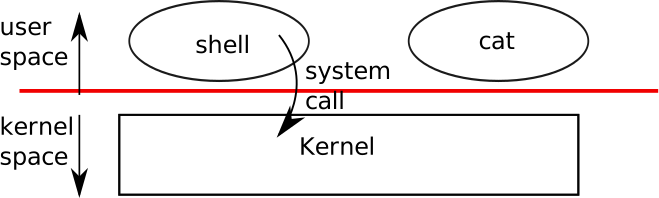
When a process needs to invoke a kernel service, it invokes a procedure call in the operating system interface. Such a procedure is called a system call. The system call enters the kernel; the kernel performs the service and returns. Thus a process alternates between executing in user space and kernel space.
The kernel uses the CPU's hardware protection mechanisms to ensure that each process executing in user space can access only its own memory. The kernel executes with the hardware privileges required to implement these protections; user programs execute without those privileges. When a user program invokes a system call, the hardware raises the privilege level and starts executing a pre-arranged function in the kernel.
The collection of system calls that a kernel provides is the interface that user programs see. The xv6 kernel provides a subset of the services and system calls that Unix kernels traditionally offer. Figure lists all of xv6's system calls.
| System call | Description |
|---|---|
fork() | Create a process |
exit() | Terminate the current process |
wait() | Wait for a child process to exit |
kill(pid) | Terminate process pid |
getpid() | Return the current process’s pid |
sleep(n) | Sleep for n clock ticks |
exec(filename, *argv) | Load a file and execute it |
sbrk(n) | Grow process’s memory by n bytes |
open(filename, flags) | Open a file; the flags indicate read/write |
read(fd, buf, n) | Read n bytes from an open file into buf |
write(fd, buf, n) | Write n bytes to an open file |
close(fd) | Release open file fd |
dup(fd) | Duplicate fd |
pipe(p) | Create a pipe and return descriptors in p |
chdir(dirname) | Change the current directory |
mkdir(dirname) | Create a new directory |
mknod(name, major, minor) | Create a device file |
fstat(fd) | Return info about an open file |
link(f1, f2) | Create another name (f2) for the file f1 |
unlink(filename) | Remove a file |
The rest of this chapter outlines xv6's services — processes, memory, file descriptors, pipes, and file system — and illustrates them with code snippets and discussions of how the shell, which is the primary user interface to traditional Unix-like systems, uses them.
The shell's use of system calls illustrates how carefully they have been designed.
The shell is an ordinary program that reads commands from the user and executes them. The fact that the shell is a user program, not part of the kernel, illustrates the power of the system call interface: there is nothing special about the shell. It also means that the shell is easy to replace; as a result, modern Unix systems have a variety of shells to choose from, each with its own user interface and scripting features. The xv6 shell is a simple implementation of the essence of the Unix Bourne shell. Its implementation can be found at line 148 of sh.c.
Processes and memory
An xv6 process consists of user-space memory (instructions, data, and stack) and per-process state private to the kernel.
Xv6 can time-share processes: it transparently switches the available CPUs among the set of processes waiting to execute.
When a process is not executing, xv6 saves its CPU registers, restoring them when it next runs the process.
The kernel associates a process identifier, or pid, with each process.
A process may create a new process using the fork system call.
Fork creates a new process, called the child process, with exactly the same memory contents as the calling process, called the parent process.
Fork returns in both the parent and the child.
In the parent, fork returns the child's pid; in the child, it returns zero.
For example, consider the following program fragment:
int pid = fork();
if(pid > 0){
  printf("parent: child=%d\en", pid);
  pid = wait();
  printf("child %d is done\en", pid);
} else if(pid == 0){
  printf("child: exiting\en");
  exit();
} else {
  printf("fork error\en");
}
The exit system call causes the calling process to stop executing and to release resources such as memory and open files.
The wait system call returns the pid of an exited child of the current process; if none of the caller's children has exited, wait waits for one to do so.
In the example, the output lines
parent: child=1234
child: exiting
might come out in either order, depending on whether the parent or child gets to its printf call first.
After the child exits the parent's wait returns, causing the parent to print
parent: child 1234 is done
Although the child has the same memory contents as the parent initially, the parent and child are executing with different memory and different registers: changing a variable in one does not affect the other. For example, when the return value of wait is stored into pid in the parent process, it doesn't change the variable pid in the child. The value of pid in the child will still be zero.
The exec system call replaces the calling process's memory with a new memory image loaded from a file stored in the file system.
The file must have a particular format, which specifies which part of the file holds instructions, which part is data, at which instruction to start, etc. xv6 uses the ELF format.
When exec succeeds, it does not return to the calling program; instead, the instructions loaded from the file start executing at the entry point declared in the ELF header.
Exec takes two arguments: the name of the file containing the
executable and an array of string arguments.
For example:
char *argv[3];
argv[0] = "echo";
argv[1] = "hello";
argv[2] = 0;
exec("/bin/echo", argv);
printf("exec error\en");
This fragment replaces the calling program with an instance of the program /bin/echo running with the argument list echo hello.
Most programs ignore the first argument, which is conventionally the name of the program.
The xv6 shell uses the above calls to run programs on behalf of users. The main structure of the shell is simple; see main line 148 of sh.c.
The main loop reads a line of input from the user with getcmd.
Then it calls fork, which creates a copy of the shell process. The parent calls wait, while the child runs the command. For example, if the user had typed
"echo hello" to the shell, runcmd would have been called with "echo hello" as the argument.
runcmd runs the actual command. For "echo hello", it would call execline 148 of sh.c.
If exec succeeds then the child will execute instructions from echo instead of runcmd.
At some point echo will call exit, which will cause the parent to return from wait in main. You might wonder why fork and exec are not combined in a single call; we will see later that separate calls for creating a process and loading a program is a clever design.
Xv6 allocates most user-space memory implicitly: fork allocates the memory required for the child's copy of the parent's memory, and exec allocates enough memory to hold the executable file.
A process that needs more memory at run-time (perhaps for
malloc) can call sbrk(n) to grow its data memory by n bytes; sbrk returns the location of the new memory.
Xv6 does not provide a notion of users or of protecting one user from another; in Unix terms, all xv6 processes run as root.
I/O and File descriptors
A file descriptor is a small integer representing a kernel-managed object that a process may read from or write to. A process may obtain a file descriptor by opening a file, directory, or device, or by creating a pipe, or by duplicating an existing descriptor. For simplicity we'll often refer to the object a file descriptor refers to as a "file"; the file descriptor interface abstracts away the differences between files, pipes, and devices, making them all look like streams of bytes.
Internally, the xv6 kernel uses the file descriptor as an index into a per-process table, so that every process has a private space of file descriptors starting at zero. By convention, a process reads from file descriptor 0 (standard input), writes output to file descriptor 1 (standard output), and writes error messages to file descriptor 2 (standard error). As we will see, the shell exploits the convention to implement I/O redirection and pipelines. The shell ensures that it always has three file descriptors open which are by default file descriptors for the console.
The read and write system calls read bytes from and write bytes to open files named by file descriptors.
The call read(fd, buf, n) reads at most n bytes from the file descriptor fd, copies them into buf, and returns the number of bytes read.
Each file descriptor that refers to a file has an offset associated with it.
Read reads data from the current file offset and then advances that offset by the number of bytes read: a subsequent read will return the bytes following the ones returned by the first read.
When there are no more bytes to read, read returns zero to signal the end of the file.
The call write(fd, buf, n) writes n bytes from buf
to the file descriptor fd and returns the number of bytes written.
Fewer than n bytes are written only when an error occurs.
Like read, write writes data at the current file offset and then advances that offset by the number of bytes written: each write picks up where the previous one left off.
The following program fragment (which forms the essence of
cat) copies data from its standard input to its standard output. If an error occurs, it writes a message to the standard error.
char buf[512];
int n;
for(;;){
  n = read(0, buf, sizeof buf);
  if(n == 0)
    break;
  if(n < 0){
    fprintf(2, "read error\en");
    exit();
  }
  if(write(1, buf, n) != n){
    fprintf(2, "write error\en");
    exit();
  }
}
The important thing to note in the code fragment is that cat doesn't know whether it is reading from a file, console, or a pipe.
Similarly cat doesn't know whether it is printing to a console, a file, or whatever.
The use of file descriptors and the convention that file descriptor 0 is input and file descriptor 1 is output allows a simple implementation of cat.
The close system call releases a file descriptor, making it free for reuse by a future open, pipe, or dup system call (see below).
A newly allocated file descriptor is always the lowest-numbered unused descriptor of the current process.
File descriptors and fork interact to make I/O redirection easy to implement.
Fork copies the parent's file descriptor table along with its memory, so that the child starts with exactly the same open files as the parent.
The system call exec replaces the calling process's memory but preserves its file table.
This behavior allows the shell to implement I/O redirection by forking, reopening chosen file descriptors, and then execing the new program.
Here is a simplified version of the code a shell runs for the command cat < input.txt:
char *argv[2];
argv[0] = "cat";
argv[1] = 0;
if(fork() == 0) {
  close(0);
  open("input.txt", O_RDONLY);
  exec("cat", argv);
}
After the child closes file descriptor 0, open is guaranteed to use that file descriptor for the newly opened
input.txt: 0 will be the smallest available file descriptor.
Cat then executes with file descriptor 0 (standard input) referring to input.txt.
The code for I/O redirection in the xv6 shell works in exactly this way. Recall that at this point in the code the shell has already forked the child shell and that runcmd
will call exec to load the new program. Now it should be clear why it is a good idea that fork and exec are separate calls. Because if they are separate, the shell can fork a child, use open, close, dup in the child to change the standard input and output file descriptors, and then exec .
No changes to the program being exec-ed (cat in our example) are required.
If fork and exec were combined into a single system call, some other (probably more complex) scheme would be required for the shell to redirect standard input and output, or the program itself would have to understand how to redirect I/O.
Although fork copies the file descriptor table, each underlying file offset is shared between parent and child.
Consider this example:
if(fork() == 0) {
  write(1, "hello ", 6);
  exit();
} else {
  wait();
  write(1, "world\en", 6);
}
At the end of this fragment, the file attached to file descriptor 1 will contain the data hello world.
The write in the parent (which, thanks to wait, runs only after the child is done) picks up where the child's
write left off.
This behavior helps produce sequential output from sequences of shell commands, like (echo hello; echo world) >output.txt.
The dup system call duplicates an existing file descriptor, returning a new one that refers to the same underlying I/O object.
Both file descriptors share an offset, just as the file descriptors duplicated by fork do.
This is another way to write hello world into a file:
fd = dup(1);
write(1, "hello ", 6);
write(fd, "world\en", 6);
Two file descriptors share an offset if they were derived from the same original file descriptor by a sequence of fork and dup calls.
Otherwise file descriptors do not share offsets, even if they resulted from opencalls for the same file.
Dup allows shells to implement commands like this:
ls existing-file non-existing-file > tmp1 2>&1.
The 2>&1 tells the shell to give the command a file descriptor 2 that is a duplicate of descriptor 1.
Both the name of the existing file and the error message for the non-existing file will show up in the file tmp1.
The xv6 shell doesn't support I/O redirection for the error file descriptor, but now you know how to implement it.
File descriptors are a powerful abstraction, because they hide the details of what they are connected to: a process writing to file descriptor 1 may be writing to a file, to a device like the console, or to a pipe.
Pipes
A pipe is a small kernel buffer exposed to processes as a pair of file descriptors, one for reading and one for writing. Writing data to one end of the pipe makes that data available for reading from the other end of the pipe. Pipes provide a way for processes to communicate.
The following example code runs the program wc with standard input connected to the read end of a pipe.
int p[2];
char *argv[2];
argv[0] = "wc";
argv[1] = 0;
pipe(p);
if(fork() == 0) {
  close(0);
  dup(p[0]);
  close(p[0]);
  close(p[1]);
  exec("/bin/wc", argv);
} else {
  close(p[0]);
  write(p[1], "hello world\en", 12);
  close(p[1]);
}
The program calls pipe, which creates a new pipe and records the read and write file descriptors in the array p.
After fork, both parent and child have file descriptors referring to the pipe.
The child dups the read end onto file descriptor 0, closes the file descriptors in p, and execs wc.
When wc reads from its standard input, it reads from the pipe.
The parent closes the read side of the pipe, writes to the pipe, and then closes the write side.
If no data is available, a read on a pipe waits for either data to be written or all file descriptors referring to the write end to be closed; in the latter case, read will return 0, just as if the end of a data file had been reached.
The fact that read blocks until it is impossible for new data to arrive is one reason that it's important for the child to close the write end of the pipe before executing wc above: if one of wc's file descriptors referred to the write end of the pipe, wc would never see end-of-file.
The xv6 shell implements pipelines such as grep fork sh.c | wc -l in a manner similar to the above code The child process creates a pipe to connect the left end of the pipeline with the right end. Then it calls fork and runcmd for the left end of the pipeline and fork and runcmd for the right end, and waits for both to finish.
The right end of the pipeline may be a command that itself includes a pipe (e.g., a | b | c) , which itself forks two new child processes (one for b and one for c).
Thus, the shell may create a tree of processes. The leaves of this tree are commands and the interior nodes are processes that wait until the left and right children complete. In principle, you could have the interior nodes run the left end of a pipeline, but doing so correctly would complicate the implementation.
Pipes may seem no more powerful than temporary files: the pipeline
echo hello world | wc
could be implemented without pipes as
echo hello world >/tmp/xyz; wc </tmp/xyz
Pipes have at least four advantages over temporary files
in this situation.
First, pipes automatically clean themselves up; with the file redirection, a shell would have to be careful to remove /tmp/xyz when done.
Second, pipes can pass arbitrarily long streams of data, while file redirection requires enough free space on disk to store all the data.
Third, pipes allow for parallel execution of pipeline stages, while the file approach requires the first program to finish before the second starts.
Fourth, if you are implementing inter-process communication, pipes' blocking reads and writes are more efficient than the non-blocking semantics of files.
File system
The xv6 file system provides data files, which are uninterpreted byte arrays, and directories, which contain named references to data files and other directories.
The directories form a tree, starting at a special directory called the root.
A path like /a/b/c refers to the file or directory named c inside the directory named b inside the directory named a in the root directory /.
Paths that don't begin with / are evaluated relative to the calling process's current directory, which can be changed with the chdir system call.
Both these code fragments open the same file (assuming all the directories involved exist):
chdir("/a");
chdir("b");
open("c", O_RDONLY);
open("/a/b/c", O_RDONLY);
The first fragment changes the process's current directory to /a/b; the second neither refers to nor changes the process's current directory.
There are multiple system calls to create a new file or directory: mkdir creates a new directory, open with the O_CREATE flag creates a new data file, and mknod creates a new device file.
This example illustrates all three:
mkdir("/dir");
fd = open("/dir/file", O_CREATE|O_WRONLY);
close(fd);
mknod("/console", 1, 1);
Mknod creates a file in the file system, but the file has no contents.
Instead, the file's metadata marks it as a device file and records the major and minor device numbers (the two arguments to mknod), which uniquely identify a kernel device.
When a process later opens the file, the kernel diverts read and write system calls to the kernel device implementation instead of passing them to the file system.
fstat retrieves information about the object a file
descriptor refers to.
It fills in a struct stat, defined in stat.h as:
#define T_DIR 1 // Directory
#define T_FILE 2 // File
#define T_DEV 3 // Device
struct stat {
  short type; // Type of file
  int dev; // File system's disk device
  uint ino; // Inode number
  short nlink; // Number of links to file
  uint size; // Size of file in bytes
};
A file's name is distinct from the file itself; the same underlying file, called an inode, can have multiple names, called links.
The link system call creates another file system name referring to the same inode as an existing file.
This fragment creates a new file named both a and b.
open("a", O_CREATE|O_WRONLY);
link("a", "b");
Reading from or writing to a is the same as reading from or writing to b. Each inode is identified by a unique inode number.
After the code sequence above, it is possible to determine that a and b refer to the same underlying contents by inspecting the result of fstat: both will return the same inode number (ino), and the nlink count will be set to 2.
The unlink system call removes a name from the file system.
The file's inode and the disk space holding its content are only freed when the file's link count is zero and no file descriptors refer to it. Thus adding
unlink("a");
to the last code sequence leaves the inode and file content accessible as b. Furthermore,
fd = open("/tmp/xyz", O_CREATE|O_RDWR);
unlink("/tmp/xyz");
is an idiomatic way to create a temporary inode that will be cleaned up when the process closes fd or exits.
Shell commands for file system operations are implemented as user-level programs such as mkdir, ln, rm, etc. This design allows anyone to extend the shell with new user commands by just adding a new user-level program. In hindsight this plan seems obvious, but other systems designed at the time of Unix often built such commands into
the shell (and built the shell into the kernel).
One exception is cd, which is built into the shell cd must change the current working directory of the shell itself. If cd were run as a regular command, then the shell would fork a child process, the child process would run cd, and cd would change the child 's working directory. The parent's (i.e., the shell's) working directory would not change.
Real world
Unix's combination of the "standard" file descriptors, pipes, and convenient shell syntax for operations on them was a major advance in writing general-purpose reusable programs. The idea sparked a whole culture of "software tools" that was responsible for much of Unix's power and popularity, and the shell was the first so-called "scripting language." The Unix system call interface persists today in systems like BSD, Linux, and Mac OS X.
The Unix system call interface has been standardized through the Portable Operating System Interface (POSIX) standard.
Xv6 is not POSIX compliant. It misses system calls (including basic ones such as lseek), it implements systems calls only partially, etc. Our main goals for xv6 are simplicity and clarity while providing a simple UNIX-like system-call interface.
Several people have extended xv6 with a few more basic system calls and a simple C library so that they can run basic Unix programs. Modern kernels, however, provide many more system calls, and many more kinds of kernel services, than xv6. For example, they support networking, windowing systems, user-level threads, drivers for many devices, and so on. Modern kernels evolve continuously and rapidly, and offer many features beyond POSIX.
For the most part, modern Unix-derived operating systems
have not followed the early Unix model of exposing devices as special files, like the console device file discussed above.
The authors of Unix went on to build Plan 9, which applied the "resources are files" concept to modern facilities, representing networks, graphics, and other resources as files or file trees.
The file system abstraction has been a powerful idea. Even so, there are other models for operating system interfaces. Multics, a predecessor of Unix, abstracted file storage in a way that made it look like memory, producing a very different flavor of interface. The complexity of the Multics design had a direct influence on the designers of Unix, who tried to build something simpler.
This book examines how xv6 implements its Unix-like interface, but the ideas and concepts apply to more than just Unix. Any operating system must multiplex processes onto the underlying hardware, isolate processes from each other, and provide mechanisms for controlled inter-process communication. After studying xv6, you should be able to look at other, more complex operating systems and see the concepts underlying xv6 in those systems as well.
Operating System Organization
A key requirement for an operating system is to support several activities at once. Using the system call interface a process can start new processes with fork. The operating system must time-share the resources of the computer among these processes so that all of them make progress, even if there are more processes than hardware CPUs. It must also provide isolation between processes so that a failure in one does not break another. At the same time, processes must be able to interact—for example with pipelines. An operating system must therefore deliver multiplexing, isolation, and interaction.
This chapter sketches how operating systems are organized to achieve those requirements. There are many designs, but we focus on mainstream monolithic kernels used by many Unix systems. We trace the creation of the first process when xv6 boots to see how its abstractions interact and how they satisfy multiplexing, isolation, and interaction. xv6 avoids special-casing the first process and reuses normal code paths. Later chapters dive deeper into each abstraction.
Xv6 runs on Intel 80386 or later (x86) processors on a PC platform. Much of its low-level implementation is x86-specific. Some familiarity with machine-level programming is helpful; x86-specific ideas are introduced as needed.
Abstracting physical resources
Why have an operating system at all? One could imagine implementing the system call interface as a library linked into each application. Each application could tailor its own library, talk directly to hardware, and perhaps squeeze out maximum performance. Some embedded and real-time systems use this model.
The drawback is that multiple applications would have to cooperate. Each would need to voluntarily yield the CPU, and bugs could easily let one misbehaving application starve others. Trust and correctness are hard to guarantee.
To achieve strong isolation, applications are forbidden from directly touching sensitive hardware. Instead, resources are exposed as services. For example, applications use open, read, write, and close rather than raw disk I/O. That gives convenient pathnames and lets the OS manage the disk. Unix transparently time-shares CPUs by saving and restoring registers, so applications need not care about scheduling. Programs use exec to build their memory image, letting the OS choose where memory lives and even push some data to disk when memory is tight. File descriptors abstract data sources and sinks, simplifying interaction—for instance, when a process in a pipeline dies, the next process sees end-of-file.
The Unix system call interface is designed to balance convenience and strong isolation. It is not the only possible interface, but it has proven effective.
User mode, kernel mode, and system calls
Strong isolation requires a hard boundary between applications and the operating system. An application bug should not crash the OS or other applications; the OS must be able to clean up and continue. Applications must not read or modify OS data structures or other processes' memory.
Processors provide hardware support for this boundary. On x86, execution can run in kernel mode or user mode. Kernel mode allows privileged instructions such as device I/O; user mode does not. If user code tries to execute a privileged instruction, the processor traps into the kernel, which can then clean up or terminate the offending process. Applications run in user space; kernel code runs in kernel space and forms the kernel.
To perform I/O like file access, an application must transition into the kernel, because only the kernel can execute the needed I/O instructions. Processors provide a special instruction to switch to kernel mode at an entry point chosen by the kernel (on x86, int). Once in kernel mode, the kernel validates arguments, decides whether the operation is allowed, and performs or rejects it. It is crucial that the kernel controls the entry point; otherwise a malicious program could skip validation.
Kernel organization
What runs in kernel mode? One option is to place the entire OS in the kernel, so all system call implementations run with full privilege. This is a monolithic kernel. It is convenient because all OS code can cooperate directly (for example, the buffer cache can be shared between the file system and virtual memory system) and because the designer need not decide which code lacks privilege.
The downside is that interfaces between kernel components are complex, making it easy to introduce fatal bugs. A bug in kernel mode can crash the whole computer, taking down all applications.
To reduce risk, designers can run only a small kernel in privileged mode and move most OS services to user mode. This is a microkernel design. Figure illustrates it: services like the file system run as user-level servers, and the kernel supplies low-level primitives (start processes, send messages, access devices). Applications communicate with servers via inter-process messaging; for example, the shell sends a request to the file server to read or write a file.
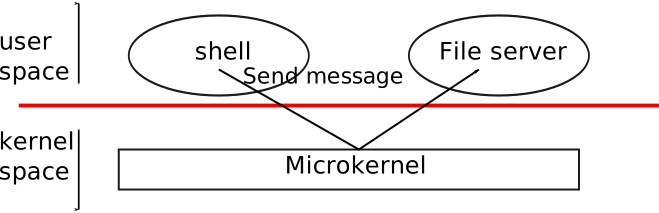
Xv6 follows the Unix tradition of a monolithic kernel: the kernel interface is the operating system interface. Because xv6 offers relatively few services, its kernel is smaller than some microkernels.
Process overview
The unit of isolation in xv6 is the process. It protects each process's memory, CPU, file descriptors, and so on from other processes and from the kernel itself. The kernel must implement processes carefully to prevent buggy or malicious code from breaking isolation. Mechanisms include user/kernel mode, address spaces, and time-slicing threads.
The process abstraction makes a program feel like it has its own private machine: its own address space (private memory) and its own CPU. Xv6 uses page tables to give each process its own address space. The x86 page table maps virtual addresses (used by instructions) to physical addresses (sent to memory).
Each process has its own page table defining its address space. Conceptually an address space contains user memory starting at virtual address zero: first instructions, then global variables, then the stack, and finally a heap that can grow. Each address space also maps kernel code and data. System calls execute in the kernel mappings of the current process's address space so kernel code can directly refer to user memory. To leave plenty of room for user memory, xv6 maps the kernel at high addresses, starting at 0xFFFF800000100000.
The kernel tracks per-process state in struct proc (see proc.h). Key pieces include the page table, kernel stack, and run state. We'll write p->xxx to refer to fields in struct proc.
Each process has a thread of execution that can be suspended and resumed. The kernel switches threads to time-share the CPU. Thread state such as local variables and return addresses lives on stacks. Every process has a user stack and a kernel stack (p->kstack). While executing user code, only the user stack is used. When entering the kernel (via a system call or interrupt), execution moves to the kernel stack; the user stack still holds saved data but is idle. The kernel stack is separate and protected so the kernel can run even if user code has corrupted its own stack.
On a system call, the processor switches to the kernel stack, raises privilege, and starts the kernel code. On return, privilege drops, execution switches back to the user stack, and user instructions resume after the system call. A thread may block in the kernel waiting for I/O and later resume.
p->state records whether the process slot is free, runnable, running, waiting for I/O, or exiting. p->pgdir holds the process page table in the hardware format. The paging hardware uses p->pgdir when the process runs, and the page table records which physical pages hold the process's memory.
Code: the first address space
To make xv6's organization concrete, we examine how the kernel creates its first address space, creates and starts the first process, and handles that process's first system call. The first step is setting up the kernel to run in its own address space.
When a PC powers on, firmware loads a boot loader from disk and executes it. The xv6 boot loader loads the kernel from disk and jumps to mboot_entry (in entry.S). Paging hardware is initially off, so virtual and physical addresses are the same.
The boot loader places the kernel at physical address 0x100000 rather than 0xFFFF800000100000 (where the kernel expects to run) because small machines may lack RAM that high. It also avoids 0xa0000:0x100000, which contains I/O devices.
To let the rest of the kernel run at high addresses, mboot_entry sets up a page table mapping virtual addresses starting at 0xFFFF800000000000 (named KERNBASE in memlayout.h) to physical addresses starting at 0x0. This is a common page table trick: two virtual ranges map to the same physical memory.
The initial page table uses the first several pages (at 0x1000) to set up a temporary page table.
Entry 0 maps virtual 0:1GB to physical 0:1GB, allowing code to keep running at low addresses until the switch is complete. Entry 256 maps virtual KERNBASE:KERNBASE+1GB to physical 0:1GB, letting the kernel find its instructions and data at their expected high virtual addresses.
entry32mp loads the physical address of that initial page table into control register cr3 (mov $1000, %eax; mov %eax, %cr3) and sets the CR0_PG bit in cr0 to turn on paging. Execution continues at low addresses because kpgdir still maps them; without that mapping the CPU would crash immediately after paging was enabled.
entry64high then needs to run C code at high addresses. It sets the stack pointer (rsp) to a stack in high memory (0xFFFF800000010000), so the stack remains valid even after low mappings disappear. Finally it jumps to main (also a high address). main cannot return because there is no return PC on the stack. At this point the kernel is running at high addresses in main (main.c).
Code: creating the first process
After main initializes devices and subsystems, it creates the first process by calling userinit (proc.c). userinit first calls allocproc, which finds a free struct proc slot in the process table, marks it EMBRYO, assigns a unique pid, and allocates a kernel stack. If the stack allocation fails it frees the slot and returns 0.
allocproc prepares the new process's kernel stack so that when it first runs it will “return” into user space. It arranges return program counters so the kernel thread begins in forkret and then trapret (proc.c and trapasm.S). The context-switch code (swtch.S) will load p->context into the hardware registers, so setting p->context->rip to forkret causes execution to start there. forkret returns to the address placed just above the context on the stack—trapret. trapret restores user registers from the top of the kernel stack and jumps into user space. This setup is used both for normal fork and for the very first process.
As Chapter 4 explains, control transfers into the kernel via the interrupt mechanism (used for system calls, interrupts, and exceptions). When that happens the hardware and trap entry code save user registers on the process's kernel stack. userinit writes values to the top of the new stack that mimic an interrupt frame, so the normal return-from-trap code works. These values form a struct trapframe. The stack now matches the layout shown in figure newkernelstack.
The first process will run the tiny program initcode.S (initcode.S). It needs physical memory to hold that program and a page table mapping user addresses to it. userinit calls setupkvm (vm.c) to create a page table containing only kernel mappings at first. setupkvm and userinit then build an address space like figure as.
During the kernel build, the linker embeds the compiled initcode.S binary in the kernel and defines _binary_initcode_start and _binary_initcode_size to locate it. userinit copies the binary into the new process's memory by calling inituvm, which allocates one physical page, maps virtual address 0 to it, and copies the binary (vm.c).
userinit sets up the trap frame (struct trapframe in x86.h) for initial user mode: segment selectors SEG_UCODE/SEG_UDATA at privilege level DPL_USER, the interrupt-enable flag FL_IF, the stack pointer rsp to p->sz, and the instruction pointer to 0 (the entry of initcode). It names the process "initcode" for debugging and sets p->cwd (see namei in Chapter 7). Finally it marks the process runnable by setting p->state = RUNNABLE.
Code: running the first process
With the first process initialized, the kernel runs it. After calling userinit, mpmain invokes scheduler (main.c). scheduler (proc.c) searches for a process with p->state == RUNNABLE; initially only initproc qualifies. It sets the per-CPU proc variable and calls switchuvm to load the process's page table (vm.c). All processes' page tables share identical kernel mappings thanks to setupkvm, so changing page tables while in the kernel is safe. switchuvm also sets up the task state segment SEG_TSS so interrupts and system calls use the process's kernel stack.
scheduler sets p->state = RUNNING and calls swtch (swtch.S) to context switch to the process's kernel thread. swtch saves the current registers (the current context is the per-CPU scheduler context, stored in cpu->scheduler) and loads the saved registers from p->context, including stack and instruction pointer. The final ret in swtch pops the target rip, finishing the switch. Now the CPU runs on the process's kernel stack.
allocproc set initproc's p->context->rip to forkret, so execution begins there. On this first invocation forkret runs initialization that must occur in a normal process context with its own kernel stack, then returns. allocproc arranged the next return address to be trapret, so trapret now executes with rsp pointing at p->tf. trapret restores registers from the trap frame (via popal, popl of segment registers, skipping trapno/errcode) and executes iret, which pops cs, rip, flags, rsp, and ss. The CPU state now matches the trap frame, so execution continues at the user instruction pointer: for initproc, virtual address 0, the first instruction of initcode.S.
At this moment rip is 0 and rsp is 4096—virtual addresses within the process. Paging hardware translates them to physical addresses. allocuvm set up the page table so virtual 0 refers to the physical page allocated for this process and marked it PTE_U so user code may access it. Because userinit configured cs for CPL=3, user code can access only pages marked PTE_U and cannot touch privileged registers like cr3. The process is confined to its own memory.
The first system call: exec
Now we can see how a user process re-enters the kernel to request services it cannot perform itself. The first action of initcode.S is to invoke the exec system call. exec replaces the current process's memory and registers with a new program while leaving file descriptors, process ID, and parent unchanged.
initcode.S pushes three values on the stack—$argv, $init, and $0—sets rax to SYS_exec, and executes the syscall instruction, asking the kernel to run exec. If successful, exec never returns; it starts running the program named by $init, which points to the NUL-terminated string "/init". The second argument is the argv array of command-line arguments, terminated by a zero. If exec fails and returns, initcode loops calling the exit system call, which should not return.
This code hand-crafts the first system call to resemble an ordinary one, reusing the standard path instead of special-casing the first process. Chapter 4 covers the mechanism in detail. Chapter 3 will cover exec itself: it replaces initcode with the /init binary loaded from the file system. Once /init runs, it creates a console device file if needed, opens it as file descriptors 0, 1, and 2, starts a console shell, reaps orphaned zombies until the shell exits, and repeats. The system is up.
Real world
Both monolithic kernels and microkernels exist in practice. Many Unix kernels are monolithic (Linux, for example), though some OS functions such as the window system may run in user space. L4, Minix, and QNX use microkernel designs with servers and are widely deployed in embedded systems.
Most operating systems adopt the process concept, and most processes resemble xv6's. A production OS would find free proc structures via a constant-time free list rather than xv6's linear scan; xv6 uses the scan for simplicity.
Exercises
- Set a breakpoint at
swtch. Single-step with GDB'sstepithrough therettoforkret, then usefinishto proceed totrapret, thenstepiuntil you reachinitcodeat virtual address zero. KERNBASElimits the memory a single process can use, which is annoying on a machine with 4 GB of RAM. Would raisingKERNBASEallow a process to use more memory?
Page Tables
Page tables let the operating system control what memory addresses mean. They allow xv6 to multiplex the address spaces of different processes onto a single physical memory and to protect the memories of different processes. The level of indirection provided by page tables enables many neat tricks. xv6 uses page tables primarily to multiplex address spaces and to protect memory. It also uses a few simple page-table tricks: mapping the same memory (the kernel) in several address spaces, mapping the same memory more than once in one address space (each user page is also mapped into the kernel's physical view of memory), and guarding a user stack with an unmapped page. The rest of this chapter explains the page tables that the x86 hardware provides and how xv6 uses them. Compared to a real-world operating system, xv6's design is restrictive, but it illustrates the key ideas.
Paging hardware
As a reminder, x86 instructions (both user and kernel) manipulate virtual addresses. The machine's RAM, or physical memory, is indexed with physical addresses. The x86 page table hardware connects these two kinds of addresses by mapping each virtual address to a physical address.
On x86-64, address translation uses a multi-level page table. For the common 4 KiB page size, a canonical virtual address is split into a 12-bit page offset and four 9-bit indices (one per level): PML4, page-directory-pointer table (PDPT), page directory (PD), and page table (PT). Each index selects one entry out of 512 (2^9) entries in the corresponding level.
Each entry contains (among other bits) a physical page number (PPN) that points either to the next-level page-table page (for PML4/PDPT/PD entries) or to the final mapped physical page (for a PT entry), plus a set of flags that control access (present, writable, user, execute-disable, etc.).
To translate a virtual address, the hardware starts from the physical base address in cr3 (the PML4), uses the top-level index to fetch a PML4 entry, follows its PPN to the next table, and repeats for PDPT and PD. The final PT entry supplies the PPN of the target physical page. The hardware forms the physical address by concatenating that PPN with the unchanged 12-bit offset. Thus, paging gives the OS control over virtual-to-physical translations at 4 KiB granularity.
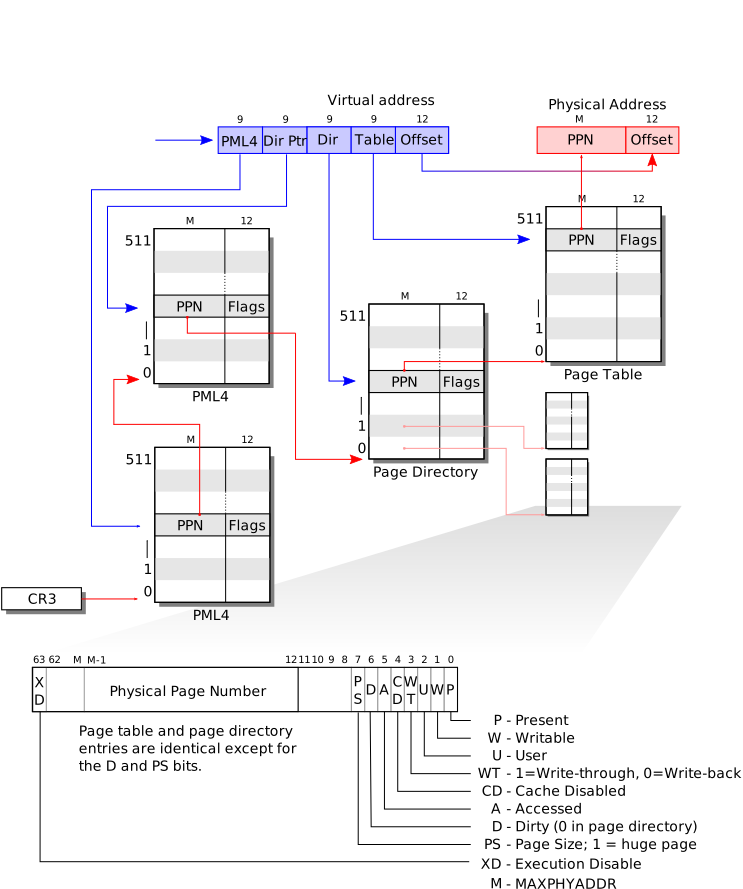
As shown in Figure, x86-64 performs translation by walking up to four page-table levels (for 4 KiB pages). The root is the PML4 page whose physical address is stored in cr3. A PML4 entry points to a PDPT page; a PDPT entry points to a page directory (PD) page; and a PD entry points to a page table (PT) page. Each of these pages is 4096 bytes and contains 512 64-bit entries.
The hardware uses the 9-bit indices from the virtual address to select an entry at each level (PML4 → PDPT → PD → PT). If any required entry is not present, the hardware raises a page-fault exception. This multi-level structure lets a page table omit entire lower-level pages when large ranges of virtual addresses are unmapped, saving memory.
Each entry contains flag bits that tell the paging hardware how the associated virtual address is allowed to be used. For example, the present bit controls whether a translation exists; the writable bit controls whether stores are permitted; the user bit controls whether code running in user mode may access the page; and the execute-disable (XD/NX) bit (if supported and enabled) can prevent instruction fetches from the page. The exact flag definitions used by xv6 live in the paging header (e.g., mmu.h/vm.h, depending on your code base).
A few notes about terms. Physical memory refers to storage cells in DRAM. A byte of physical memory has an address, called a physical address. Instructions use virtual addresses, which the paging hardware translates to physical addresses and then sends to the DRAM hardware to read or write storage. In this discussion, "virtual memory" refers to the abstraction provided by these translations and permissions; the hardware mechanism itself operates on virtual addresses.
Process address space
The page table created by entry has enough mappings to allow the kernel's C code to start running. However, main immediately changes to a new page table by calling kvmalloc (see vm.c), because the kernel has a more elaborate plan for describing process address spaces.
Each process has a separate page table, and xv6 tells the page table hardware to switch page tables when xv6 switches between processes. As shown in Figure, a process's user memory starts at virtual address zero and can grow up to 0x7FFFFFFFFFFF, allowing a process to address up to 128 terabytes of memory. The file memlayout.h declares the constants for xv6's memory layout and macros to convert virtual to physical addresses.
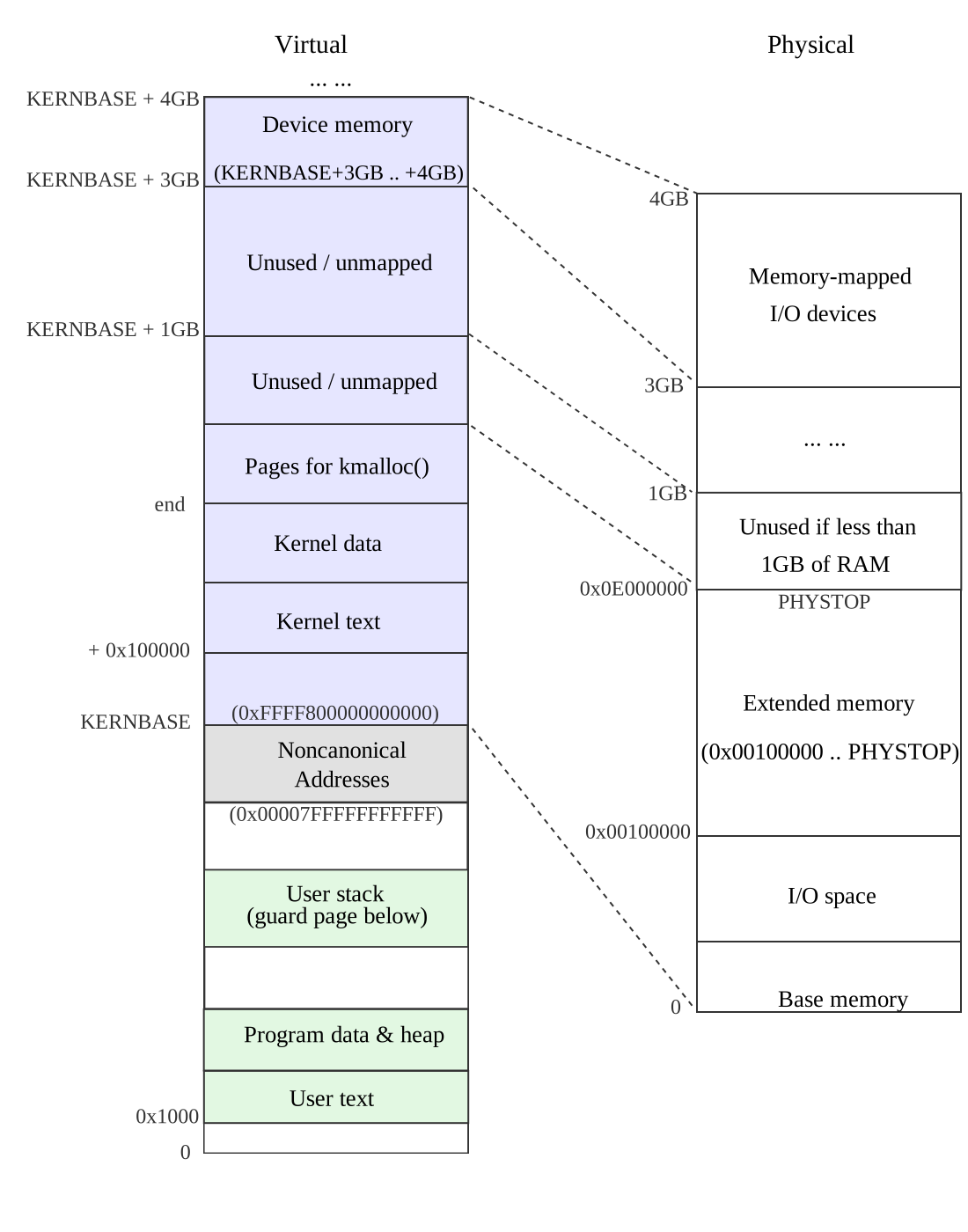
When a process asks xv6 for more memory, xv6 first finds free physical pages to provide the storage, and then adds PTEs to the process's page table that point to the new physical pages. xv6 sets the PTE_U, PTE_W, and PTE_P flags in these PTEs. Most processes do not use the entire user address space; xv6 leaves PTE_P clear in unused PTEs. Different processes' page tables translate user addresses to different pages of physical memory, so that each process has private user memory.
xv6 includes all mappings needed for the kernel to run in every process's page table; these mappings all appear above KERNBASE. It maps virtual addresses KERNBASE:KERNBASE+PHYSTOP to 0:PHYSTOP. One reason for this mapping is so that the kernel can use its own instructions and data. Another reason is that the kernel sometimes needs to be able to write a given page of physical memory, for example when creating page table pages; having every physical page appear at a predictable virtual address makes this convenient.
Some devices that use memory-mapped I/O appear at physical addresses starting at 0xFE000000, so xv6 page tables include a direct mapping for them.
xv6 does not set the PTE_U flag in the PTEs above KERNBASE, so only the kernel can use them.
Having every process's page table contain mappings for both user memory and the entire kernel is convenient when switching from user code to kernel code during system calls and interrupts: such switches do not require page table switches. For the most part the kernel does not have its own page table; it is almost always borrowing some process's page table.
To review, xv6 ensures that each process can use only its own memory. And, each process sees its memory as having contiguous virtual addresses starting at zero, while the process's physical memory can be non-contiguous. xv6 implements the first by setting the PTE_U bit only on PTEs of virtual addresses that refer to the process's own memory. It implements the second using the ability of page tables to translate successive virtual addresses to whatever physical pages happen to be allocated to the process.
Code: creating an address space
main calls kvmalloc to create and switch to a page table with the mappings above KERNBASE that are required for the kernel to run. Most of the work happens in setupkvm (see vm.c). It first allocates a page of memory to hold the page directory. Then it calls mappages to install the translations that the kernel needs, which are described in the kmap array in vm.c. The translations include the kernel's instructions and data, physical memory up to PHYSTOP, and memory ranges that are actually I/O devices. setupkvm does not install any mappings for the user memory; this will happen later.
mappages installs mappings into a page table for a range of virtual addresses to a corresponding range of physical addresses. It does this separately for each virtual address in the range, at page intervals. For each virtual address to be mapped, mappages calls walkpgdir to find the address of the PTE for that address. It then initializes the PTE to hold the relevant physical page number, the desired permissions (PTE_W and/or PTE_U), and PTE_P to mark the PTE as valid.
walkpgdir mimics the actions of the x86 paging hardware as it looks up the PTE for a virtual address. It uses the upper 10 bits of the virtual address to find the page directory entry. If the page directory entry isn't present, then the required page table page hasn't yet been allocated; if the alloc argument is set, walkpgdir allocates it and puts its physical address in the page directory. Finally it uses the next 10 bits of the virtual address to find the address of the PTE in the page table page.
Physical memory allocation
The kernel must allocate and free physical memory at run-time for page tables, process user memory, kernel stacks, and pipe buffers.
xv6 uses the physical memory between the end of the kernel and PHYSTOP for run-time allocation. It allocates and frees whole 4096-byte pages at a time. It keeps track of which pages are free by threading a linked list through the pages themselves. Allocation consists of removing a page from the linked list; freeing consists of adding the freed page to the list.
There is a bootstrap problem: all of physical memory must be mapped in order for the allocator to initialize the free list, but creating a page table with those mappings involves allocating page-table pages. xv6 solves this problem by using a separate page allocator during entry, which allocates memory just after the end of the kernel's data segment. This allocator does not support freeing and is limited by the 4 MB mapping in the entrypgdir, but that is sufficient to allocate the first kernel page table.
Code: physical memory allocator
The allocator's data structure is a free list of physical memory pages that are available for allocation. Each free page's list element is a struct run (see kalloc.c). Where does the allocator get the memory to hold that data structure? It stores each free page's run structure in the free page itself, since there's nothing else stored there. The free list is protected by a spin lock. The list and the lock are wrapped in a struct to make clear that the lock protects the fields in the struct. For now, ignore the lock and the calls to acquire and release; Chapter 5 will examine locking in detail.
The function main calls kinit1 and kinit2 to initialize the allocator (see kalloc.c). The reason for having two calls is that for much of main one cannot use locks or memory above 4 megabytes. The call to kinit1 sets up for lock-less allocation in the first 4 megabytes, and the call to kinit2 enables locking and arranges for more memory to be allocatable. Ideally main would determine how much physical memory is available, but this turns out to be difficult on the x86. Instead it assumes that the machine has 224 megabytes (PHYSTOP) of physical memory, and uses all the memory between the end of the kernel and PHYSTOP as the initial pool of free memory. kinit1 and kinit2 call freerange to add memory to the free list via per-page calls to kfree. A PTE can only refer to a physical address that is aligned on a 4096-byte boundary (is a multiple of 4096), so freerange uses PGROUNDUP to ensure that it frees only aligned physical addresses. The allocator starts with no memory; these calls to kfree give it some to manage.
The allocator refers to physical pages by their virtual addresses as mapped in high memory, not by their physical addresses, which is why kinit uses P2V(PHYSTOP) to translate PHYSTOP (a physical address) to a virtual address. The allocator sometimes treats addresses as integers in order to perform arithmetic on them (for example, traversing all pages in kinit), and sometimes uses addresses as pointers to read and write memory (for example, manipulating the run structure stored in each page); this dual use of addresses is the main reason that the allocator code is full of C type casts. The other reason is that freeing and allocation inherently change the type of the memory.
The function kfree begins by setting every byte in the memory being freed to the value 1. This will cause code that uses memory after freeing it (uses "dangling references") to read garbage instead of the old valid contents; hopefully that will cause such code to break faster. Then kfree casts v to a pointer to struct run, records the old start of the free list in r->next, and sets the free list equal to r. kalloc removes and returns the first element in the free list.
User part of an address space

Figure shows the layout of the user memory of an executing process in xv6. Each user process starts at address 0. The bottom of the address space contains the text for the user program, its data, and its stack. The heap is above the stack so that the heap can expand when the process calls sbrk. Note that the text, data, and stack sections are laid out contiguously in the process's address space but xv6 is free to use non-contiguous physical pages for those sections. For example, when xv6 expands a process's heap, it can use any free physical page for the new virtual page and then program the page table hardware to map the virtual page to the allocated physical page. This flexibility is a major advantage of using paging hardware.
The stack is a single page, and is shown with the initial contents as created by exec. Strings containing the command-line arguments, as well as an array of pointers to them, are at the very top of the stack. Just under that are values that allow a program to start at main as if the function call main(argc, argv) had just started. To guard a stack growing off the stack page, xv6 places a guard page right below the stack. The guard page is not mapped and so if the stack runs off the stack page, the hardware will generate an exception because it cannot translate the faulting address. A real-world operating system might allocate more space for the stack so that it can grow beyond one page.
Code: sbrk
sbrk is the system call for a process to shrink or grow its memory. The system call is implemented by the function growproc (see proc.c). If n is positive, growproc allocates one or more physical pages and maps them at the top of the process's address space. If n is negative, growproc unmaps one or more pages from the process's address space and frees the corresponding physical pages.
To make these changes, xv6 modifies the process's page table. The process's page table is stored in memory, and so the kernel can update the table with ordinary assignment statements, which is what allocuvm and deallocuvm do. The x86 hardware caches page table entries in a Translation Look-aside Buffer (TLB), and when xv6 changes the page tables, it must invalidate the cached entries. If it didn't invalidate the cached entries, then at some point later the TLB might use an old mapping, pointing to a physical page that in the mean time has been allocated to another process, and as a result, a process might be able to scribble on some other process's memory. Xv6 invalidates stale cached entries by reloading cr3, the register that holds the address of the current page table.
Code: exec
exec is the system call that creates the user part of an address space. It initializes the user part of an address space from a file stored in the file system. exec (see exec.c) opens the named binary path using namei, which is explained in Chapter 7. Then, it reads the ELF header. Xv6 applications are described in the widely used ELF format, defined in elf.h. An ELF binary consists of an ELF header, struct elfhdr, followed by a sequence of program section headers, struct proghdr. Each proghdr describes a section of the application that must be loaded into memory; xv6 programs have only one program section header, but other systems might have separate sections for instructions and data.
The first step is a quick check that the file probably contains an ELF binary. An ELF binary starts with the four-byte magic number 0x7F, E, L, F, or ELF_MAGIC. If the ELF header has the right magic number, exec assumes that the binary is well-formed.
exec allocates a new page table with no user mappings with setupkvm, allocates memory for each ELF segment with allocuvm, and loads each segment into memory with loaduvm. allocuvm checks that the virtual addresses requested are below KERNBASE. loaduvm uses walkpgdir to find the physical address of the allocated memory at which to write each page of the ELF segment, and readi to read from the file.
The program section header for /init, the first user program created with exec, looks like this:
# objdump -p _init

_init:	file format elf64-x86-64

Program Header:
    LOAD off    0x0000000000000080 vaddr 0x0000000000001000 paddr 0x0000000000001000 align 2**4
         filesz 0x0000000000000f31 memsz 0x0000000000000f58 flags rwx
The program section header's filesz may be less than the memsz, indicating that the gap between them should be filled with zeroes (for C global variables) rather than read from the file. For /init, filesz is 3,889 bytes and memsz is 3,928 bytes, and thus allocuvm allocates enough physical memory to hold 3,928 bytes, but reads only 3,889 bytes from the file /init.
Now exec allocates and initializes the user stack. It allocates just one stack page. exec copies the argument strings to the top of the stack one at a time, recording the pointers to them in ustack. It places a null pointer at the end of what will be the argv list passed to main. The first three entries in ustack are the fake return PC, argc, and argv pointer.
exec places an inaccessible page just below the stack page, so that programs that try to use more than one page will fault. This inaccessible page also allows exec to deal with arguments that are too large; in that situation, the copyout function that exec uses to copy arguments to the stack will notice that the destination page is not accessible, and will return -1.
During the preparation of the new memory image, if exec detects an error like an invalid program segment, it jumps to the label bad, frees the new image, and returns -1. exec must wait to free the old image until it is sure that the system call will succeed: if the old image is gone, the system call cannot return -1 to it. The only error cases in exec happen during the creation of the image. Once the image is complete, exec can install the new image and free the old one. Finally, exec returns 0.
exec loads bytes from the ELF file into memory at addresses specified by the ELF file. Users or processes can place whatever addresses they want into an ELF file. Thus exec is risky, because the addresses in the ELF file may refer to the kernel, accidentally or on purpose. The consequences for an unwary kernel could range from a crash to a malicious subversion of the kernel's isolation mechanisms (that is, a security exploit). xv6 performs a number of checks to avoid these risks. To understand the importance of these checks, consider what could happen if xv6 didn't check if(ph.vaddr + ph.memsz < ph.vaddr). This is a check for whether the sum overflows a 32-bit integer. The danger is that a user could construct an ELF binary with a ph.vaddr that points into the kernel, and ph.memsz large enough that the sum overflows to 0x1000. Since the sum is small, it would pass the check if(newsz >= KERNBASE) in allocuvm. The subsequent call to loaduvm passes ph.vaddr by itself, without adding ph.memsz and without checking ph.vaddr against KERNBASE, and would thus copy data from the ELF binary into the kernel. This could be exploited by a user program to run arbitrary user code with kernel privileges. As this example illustrates, argument checking must be done with great care. It is easy for a kernel developer to omit a crucial check, and real-world kernels have a long history of missing checks whose absence can be exploited by user programs to obtain kernel privileges. It is likely that xv6 doesn't do a complete job of validating user-level data supplied to the kernel, which a malicious user program might be able to exploit to circumvent xv6's isolation.
Real world
Like most operating systems, xv6 uses the paging hardware for memory protection and mapping. Most operating systems make far more sophisticated use of paging than xv6; for example, xv6 lacks demand paging from disk, copy-on-write fork, shared memory, lazily-allocated pages, and automatically extending stacks.
The x86 supports address translation using segmentation, but xv6 uses segments only for the common trick of implementing per-CPU variables such as proc that are at a fixed address but have different values on different CPUs (see seginit). Implementations of per-CPU (or per-thread) storage on non-segment architectures would dedicate a register to holding a pointer to the per-CPU data area, but the x86 has so few general registers that the extra effort required to use segmentation is worthwhile.
Xv6 maps the kernel in the address space of each user process but sets it up so that the kernel part of the address space is inaccessible when the processor is in user mode. This setup is convenient because after a process switches from user space to kernel space, the kernel can easily access user memory by reading memory locations directly. It is probably better for security, however, to have a separate page table for the kernel and switch to that page table when entering the kernel from user mode, so that the kernel and user processes are more separated from each other. This design, for example, would help mitigate side-channels that are exposed by the Meltdown vulnerability and that allow a user process to read arbitrary kernel memory.
On machines with lots of memory it might make sense to use the x86's 4-megabyte "super pages." Small pages make sense when physical memory is small, to allow allocation and page-out to disk with fine granularity. For example, if a program uses only 8 kilobytes of memory, giving it a 4 megabytes physical page is wasteful. Larger pages make sense on machines with lots of RAM, and may reduce overhead for page-table manipulation.
Xv6 mainly uses 1GB large pages when setting up the kernel page table. In kvmalloc(), it installs entries in the page directory pointer table (PDPT) to create 1GB mappings. In x86-64, each paging structure (PML4, PDPT, PD, and PT) contains 512 entries.
To create a 1GB mapping, xv6 sets the PS (Page Size) bit in a PDPT entry. When the PS bit is set in a PDPT entry in long mode, that entry maps a 1GB region directly to physical memory. The hardware page-walk therefore terminates at the PDPT level and does not access a page directory or page table for addresses within that region.
Using 1GB large pages allows xv6 to map large contiguous regions of physical memory, such as the kernel's direct-mapped region, with a single paging-structure entry, which simplifies the initial kernel memory layout and reduces page-table overhead.
Xv6 should determine the actual RAM configuration, instead of assuming 224 MB. On the x86, there are at least three common algorithms: the first is to probe the physical address space looking for regions that behave like memory, preserving the values written to them; the second is to read the number of kilobytes of memory out of a known 16-bit location in the PC's non-volatile RAM; and the third is to look in BIOS memory for a memory layout table left as part of the multiprocessor tables. Reading the memory layout table is complicated.
Memory allocation was a hot topic a long time ago, the basic problems being efficient use of limited memory and preparing for unknown future requests; see Knuth. Today people care more about speed than space-efficiency. In addition, a more elaborate kernel would likely allocate many different sizes of small blocks, rather than (as in xv6) just 4096-byte blocks; a real kernel allocator would need to handle small allocations as well as large ones.
Exercises
- Look at real operating systems to see how they size memory.
- If xv6 had not used super pages, what would be the right declaration for
entrypgdir? - Write a user program that grows its address space with 1 byte by calling
sbrk(1). Run the program and investigate the page table for the program before the call tosbrkand after the call tosbrk. How much space has the kernel allocated? What does theptefor the new memory contain? - Modify xv6 so that the pages for the kernel are shared among processes, which reduces memory consumption.
- Modify xv6 so that when a user program dereferences a null pointer, it will receive a fault. That is, modify xv6 so that virtual address 0 isn't mapped for user programs.
- Unix implementations of
exectraditionally include special handling for shell scripts. If the file to execute begins with the text#!, then the first line is taken to be a program to run to interpret the file. For example, ifexecis called to runmyprog arg1andmyprog's first line is#!/interp, thenexecruns/interpwith command line/interp myprog arg1. Implement support for this convention in xv6. - Delete the check
if(ph.vaddr + ph.memsz < ph.vaddr)inexec.c, and construct a user program that exploits that the check is missing. - Change xv6 so that user processes run with only a minimal part of the kernel mapped and so that the kernel runs with its own page table that doesn't include the user process.
- How would you improve xv6's memory layout if xv6 were running on a 64-bit processor?
Traps, Interrupts, and Drivers
When running a process, a CPU executes the normal processor loop: read an instruction, advance the program counter, execute the instruction, repeat. But there are events on which control from a user program must transfer back to the kernel instead of executing the next instruction. These events include a device signaling that it wants attention, a user program doing something illegal (for example, referencing a virtual address for which there is no page-table entry), or a user program asking the kernel for a service with a system call. There are three main challenges in handling these events: 1) the kernel must arrange that a processor switches from user mode to kernel mode (and back); 2) the kernel and devices must coordinate their parallel activities; and 3) the kernel must understand the interface of the devices. Addressing these three challenges requires detailed understanding of hardware and careful programming, and can result in opaque kernel code. This chapter explains how xv6 addresses these challenges.
System calls, exceptions, and interrupts
There are three cases when control must be transferred from a user program to the kernel. First, a system call: when a user program asks for an operating system service, as we discussed before. Second, an exception: when a program performs an illegal action. Examples of illegal actions include divide by zero, or trying to access memory that has no page table entry. Third, an interrupt: when a device generates a signal to indicate that it needs attention from the operating system. For example, a clock chip may generate an interrupt every 100 ms to allow the kernel to implement time sharing. As another example, when the disk has read a block, it generates an interrupt to alert the operating system that the block is ready to be retrieved.
The kernel handles all interrupts, rather than processes handling them, because in most cases only the kernel has the required privilege and state. For example, in order to time-slice among processes in response to clock interrupts, the kernel must be involved, if only to force uncooperative processes to yield the processor.
In all three cases, the operating system design must arrange for the following to happen. The system must save the processor's registers for future resume. The system must set up for execution in the kernel. The system must choose a place for the kernel to start executing. The kernel must be able to retrieve information about the event, for example, system call arguments. It must all be done securely; the system must maintain isolation of user processes and the kernel.
To achieve this goal the operating system must be aware of the details of how
the hardware handles system calls, exceptions, and interrupts. In most
processors these three events are handled by a single hardware mechanism. For
example, on the x86, a program invokes a system call by generating an interrupt
using the int instruction. Similarly, exceptions generate an interrupt too.
Thus, if the operating system has a plan for interrupt handling, then the
operating system can handle system calls and exceptions too.
The basic plan is as follows. An interrupt stops the normal processor loop and starts executing a new sequence called an interrupt handler. Before starting the interrupt handler, the processor saves its registers, so that the operating system can restore them when it returns from the interrupt. A challenge in the transition to and from the interrupt handler is that the processor should switch from user mode to kernel mode, and back.
A word on terminology: although the official x86 term is exception, xv6 uses the term trap, largely because it was the term used by the PDP11/40 and therefore is the conventional Unix term. Furthermore, this chapter uses the terms trap and interrupt interchangeably, but it is important to remember that traps are caused by the current process running on a processor (for example, the process makes a system call and as a result generates a trap), and interrupts are caused by devices and may not be related to the currently running process. For example, a disk may generate an interrupt when it is done retrieving a block for one process, but at the time of the interrupt some other process may be running. This property of interrupts makes thinking about interrupts more difficult than thinking about traps, because interrupts happen concurrently with other activities. Both rely, however, on the same hardware mechanism to transfer control between user and kernel mode securely, which we will discuss next.
x86 protection
The x86 has four protection levels, numbered 0 (most privilege) to 3 (least
privilege). In practice, most operating systems use only levels 0 and 3, which
are then called kernel mode and user mode, respectively. The current
privilege level with which the x86 executes instructions is stored in the
cs register, in the field CPL.
On the x86, interrupt handlers are defined in the interrupt descriptor table
(IDT). The IDT has 256 entries, each giving the cs and rip to be used when
handling the corresponding interrupt.
To make a system call on the x86, a program invokes the int n instruction,
where n specifies the index into the IDT. The int instruction performs the
following steps:
- Fetch the
n'th descriptor from the IDT. - Check that CPL in
csis <= DPL, where DPL is the privilege level in the descriptor. - Save
rspandssin CPU-internal registers, but only if the target segment selector's privilege level is lower than CPL. - Load
ssandrspfrom a task segment descriptor. - Push
ss,rsp,rflags,cs, andrip. - Clear the
IFbit inrflags, but only on an interrupt. - Set
csandripto the values in the descriptor.
The int instruction is a complex instruction, and one might wonder whether
all these actions are necessary. For example, the check CPL <= DPL allows the
kernel to forbid int calls to inappropriate IDT entries such as device
interrupt routines. For a user program to execute int, the IDT entry's DPL
must be 3. If the user program doesn't have the appropriate privilege, then
int will result in interrupt 13, which is a general protection fault. As
another example, the int instruction cannot use the user stack to save
values, because the process may not have a valid stack pointer; instead, the
hardware uses the stack specified in the task segment, which is set by the
kernel.

intkstack shows the stack after
an int instruction completes and there was a privilege-level change (the
privilege level in the descriptor is lower than CPL). If the int instruction
didn't require a privilege-level change, the x86 won't save ss and rsp.
After both cases, rip is pointing to the address specified in the descriptor
table, and the instruction at that address is the next instruction to be
executed and the first instruction of the handler for interrupt n. It is the
job of the operating system to implement these handlers, and below we will see
what xv6 does.
An operating system can use the iret instruction to return from an int
instruction. It pops the values that were saved during the int instruction
from the stack, and resumes execution at the saved rip.
Trap example: the system call
Earlier we saw initcode.S invoke a system call (search for T_SYSCALL in that
file). The process pushed the arguments for an exec call on the process's
stack, and put the system call number in rax. The system call numbers match
the entries in the syscalls array, a table of function pointers in
syscall.c. In earlier systems, the int instruction was used to implement system calls by explicitly triggering a software interrupt. In our recent kernel, however, system calls are invoked using the syscall instruction instead of int.
Regardless of the mechanism, the goal is the same: we must arrange for a system call to switch the processor from user mode to kernel mode, invoke the correct kernel function (for example, sys_exec), and allow the kernel to retrieve the arguments for that function. The next few subsections describe how xv6 arranges this for system calls using the syscall instruction. We will then see that much of the same infrastructure can also be reused for handling interrupts and exceptions.
Code: assembly trap handlers
Xv6 must set up the x86 hardware to do something sensible on encountering an
int instruction, which causes the processor to generate a trap. The x86
allows for 256 different interrupts. Interrupts 0-31 are defined for software
exceptions, like divide errors or attempts to access invalid memory addresses.
Xv6 maps the 32 hardware interrupts to the range 32-63.
tvinit in trap.c, called from main, sets up the 256 entries in the table
idt. Interrupt i is handled by the code at the address in vectors[i].
Each entry point is different, because the x86 does not provide the trap number
to the interrupt handler. Using 256 different handlers is the only way to
distinguish the 256 cases.
tvinit handles T_SYSCALL, the user system call trap, specially: it
specifies that the gate is of type “trap” by passing a value of 1 as second
argument. Trap gates don't clear the IF flag, allowing other interrupts during
the system call handler.
The kernel also sets the system call gate privilege to DPL_USER, which allows
a user program to generate the trap with an explicit int instruction. xv6
doesn't allow processes to raise other interrupts (for example, device
interrupts) with int; if they try, they will encounter a general protection
exception, which goes to vector 13.
When changing protection levels from user to kernel mode, the kernel shouldn't
use the stack of the user process, because it may not be valid. The user
process may be malicious or contain an error that causes the user rsp to
contain an address that is not part of the process's user memory. Xv6 programs
the x86 hardware to perform a stack switch on a trap by setting up a task
segment descriptor through which the hardware loads a stack segment selector
and a new value for rsp. The function switchuvm stores the address of the
top of the kernel stack of the user process into the task segment descriptor.
When a trap occurs, the processor hardware does the following. If the processor
was executing in user mode, it loads rsp and ss from the task segment
descriptor, and pushes the old user ss and rsp onto the new stack. If the
processor was executing in kernel mode, none of the above happens. The
processor then pushes the rflags, cs, and rip registers. For some traps
(for example, a page fault), the processor also pushes an error word. The
processor then loads rip and cs from the relevant IDT entry.
Xv6 uses a Perl script (vectors.pl) to generate the entry points that the IDT
entries point to. Each entry pushes an error code if the processor didn't,
pushes the interrupt number, and then jumps to alltraps.

alltraps in trapasm.S continues to save processor registers: it pushes ds,
es, fs, gs, and the general-purpose registers. The result of this effort
is that the kernel stack now contains a struct trapframe containing the
processor registers at the time of the trap (see
Figure). The processor pushes ss,
rsp, rflags, cs, and rip. The processor or the trap vector pushes an
error number, and alltraps pushes the rest. The trap frame contains all the
information necessary to restore the user-mode processor registers when
the kernel returns to the current process, so that the processor can continue
exactly as it was when the trap started. Recall from the page-table chapter
that userinit built a trap frame by hand to achieve this goal (see the figure
newkernelstack in the earlier chapter).
In the case of the first system call, the saved rip is the address of the
instruction right after the int instruction. cs is the user code segment
selector. rflags is the content of the rflags register at the point of
executing the int instruction. As part of saving the general-purpose
registers, alltraps also saves rax, which contains the system call number
for the kernel to inspect later.
Now that the user-mode processor registers are saved, alltraps can finish
setting up the processor to run kernel C code. The processor set the selectors
cs and ss before entering the handler; alltraps sets ds and es.
Once the segments are set properly, alltraps can call the C trap handler
trap. It pushes rsp, which points at the trap frame it just constructed,
onto the stack as an argument to trap, and then calls it. After trap
returns, alltraps pops the argument off the stack by adding to the stack
pointer and then starts executing the code at label trapret. We traced
through this code in the page-table chapter when the first user process ran it
to exit to user space. The same sequence happens here: popping through the trap
frame restores the user-mode registers and then iret jumps back into user
space.
The discussion so far has talked about traps occurring in user mode, but traps
can also happen while the kernel is executing. In that case the hardware does
not switch stacks or save the stack pointer or stack segment selector;
otherwise the same steps occur as in traps from user mode, and the same xv6
trap handling code executes. When iret later restores a kernel-mode cs, the
processor continues executing in kernel mode.
Code: C trap handler
We saw in the last section that each handler sets up a trap frame and then
calls the C function trap. trap (in trap.c) looks at the hardware trap
number tf->trapno to decide why it has been called and what needs to be done.
If the trap is T_SYSCALL, trap calls the system call handler syscall.
(We'll revisit the proc->killed checks in the scheduling chapter.)
After checking for a system call, trap looks for hardware interrupts (which
we discuss below). In addition to the expected hardware devices, a trap can be
caused by a spurious interrupt, an unwanted hardware interrupt.
If the trap is not a system call and not a hardware device looking for
attention, trap assumes it was caused by incorrect behavior (for example,
divide by zero) as part of the code that was executing before the trap. If the
code that caused the trap was a user program, xv6 prints details and then sets
proc->killed to remember to clean up the user process. We will look at how
xv6 does this cleanup in the scheduling chapter.
If it was the kernel running, there must be a kernel bug: trap prints details
about the surprise and then calls panic.
Code: system calls
For system calls, trap invokes syscall. syscall loads the system call
number from the trap frame, which contains the saved rax, and indexes into
the system call table. For the first system call, rax contains the value
SYS_exec, and syscall will invoke the SYS_exec entry of the system call
table, which corresponds to invoking sys_exec.
syscall records the return value of the system call function in rax. When
the trap returns to user space, it will load the values from proc->tf into the
machine registers. Thus, when exec returns, it will return the value that the
system call handler returned. System calls conventionally return negative
numbers to indicate errors, positive numbers for success. If the system call
number is invalid, syscall prints an error and returns -1.
Later chapters will examine the implementation of particular system calls. This
chapter is concerned with the mechanisms for system calls. There is one bit of
mechanism left: finding the system call arguments. The helper functions
argint, argptr, argstr, and argfd retrieve the nth system call
argument, as either an integer, pointer, a string, or a file descriptor.
argint uses the user-space rsp register to locate the nth argument: rsp
points at the return address for the system call stub. The arguments are right
above it, at rsp+8. Then the nth argument is at rsp+8+8*n.
argint calls fetchint to read the value at that address from user memory
and write it to *ip. fetchint can simply cast the address to a pointer,
because the user and the kernel share the same page table, but the kernel must
verify that the pointer lies within the user part of the address space. The
kernel has set up the page-table hardware to make sure that the process cannot
access memory outside its local private memory: if a user program tries to read
or write memory at an address of p->sz or above, the processor will cause a
segmentation trap, and trap will kill the process, as we saw above. The
kernel, however, can dereference any address that the user might have passed,
so it must check explicitly that the address is below p->sz.
argptr fetches the nth system call argument and checks that this argument is a
valid user-space pointer. Note that two checks occur during a call to
argptr. First, the user stack pointer is checked during the fetching of the
argument. Then the argument, itself a user pointer, is checked.
argstr interprets the nth argument as a pointer. It ensures that the pointer
points at a NUL-terminated string and that the complete string is located below
the end of the user part of the address space.
Finally, argfd uses argint to retrieve a file descriptor number, checks if
it is a valid file descriptor, and returns the corresponding struct file.
The system call implementations (for example, sysproc.c and sysfile.c) are
typically wrappers: they decode the arguments using argint, argptr, and
argstr and then call the real implementations. In the page-table chapter,
sys_exec uses these functions to get at its arguments.
Code: interrupts
Devices on the motherboard can generate interrupts, and xv6 must set up the hardware to handle these interrupts. Devices usually interrupt in order to tell the kernel that some hardware event has occurred, such as I/O completion. Interrupts are usually optional in the sense that the kernel could instead periodically check (or “poll”) the device hardware to check for new events. Interrupts are preferable to polling if the events are relatively rare, so that polling would waste CPU time. Interrupt handling shares some of the code already needed for system calls and exceptions.
Interrupts are similar to system calls, except devices generate them at any time. There is hardware on the motherboard to signal the CPU when a device needs attention (for example, the user has typed a character on the keyboard). We must program the device to generate an interrupt, and arrange that a CPU receives the interrupt.
Let's look at the timer device and timer interrupts. We would like the timer hardware to generate an interrupt, say, 100 times per second so that the kernel can track the passage of time and so the kernel can time-slice among multiple running processes. The choice of 100 times per second allows for decent interactive performance while not swamping the processor with handling interrupts.
Like the x86 processor itself, PC motherboards have evolved, and the way
interrupts are provided has evolved too. The early boards had a simple
programmable interrupt controller (called the PIC). With the advent of
multiprocessor PC boards, a new way of handling interrupts was needed, because
each CPU needs an interrupt controller to handle interrupts sent to it, and
there must be a method for routing interrupts to processors. This way consists
of two parts: a part that is in the I/O system (the IO APIC, ioapic.c), and a
part that is attached to each processor (the local APIC, lapic.c). Xv6 is
designed for a board with multiple processors: it ignores interrupts from the
PIC, and configures the IOAPIC and local APIC.
The IO APIC has a table and the processor can program entries in the table through memory-mapped I/O. During initialization, xv6 programs to map interrupt 0 to IRQ 0, and so on, but disables them all. Specific devices enable particular interrupts and say to which processor the interrupt should be routed. For example, xv6 routes keyboard interrupts to processor 0. Xv6 routes disk interrupts to the highest numbered processor on the system, as we will see below.
The timer chip is inside the LAPIC, so that each processor can receive timer
interrupts independently. Xv6 sets it up in lapicinit. The key line is the
one that programs the timer and tells the LAPIC to periodically generate an
interrupt at IRQ_TIMER, which is IRQ 0. Another line enables interrupts on a
CPU's LAPIC, which will cause it to deliver interrupts to the local processor.
A processor can control if it wants to receive interrupts through the IF flag
in the rflags register. The instruction cli disables interrupts on the
processor by clearing IF, and sti enables interrupts on a processor. Xv6
disables interrupts during booting of the main CPU and the other processors.
The scheduler on each processor enables interrupts. To control that certain
code fragments are not interrupted, xv6 disables interrupts during these code
fragments (for example, see switchuvm).
The timer interrupts through vector 32 (which xv6 chose to handle IRQ 0), which
xv6 sets up in idtinit. The only difference between vector 32 and vector 64
(used for legacy xv6 system calls) is that vector 32 is an interrupt gate instead of a
trap gate. Interrupt gates clear IF, so that the interrupted processor
doesn't receive interrupts while it is handling the current interrupt. From
here on until trap, interrupts follow the same code path as system calls and
exceptions, building up a trap frame.
trap for a timer interrupt does just two things: increment the ticks
variable, and call wakeup. The latter, as we will see in the scheduling
chapter, may cause the interrupt to return in a different process.
Drivers
A driver is the code in an operating system that manages a particular device: it tells the device hardware to perform operations, configures the device to generate interrupts when done, and handles the resulting interrupts. Driver code can be tricky to write because a driver executes concurrently with the device that it manages. In addition, the driver must understand the device's interface (for example, which I/O ports do what), and that interface can be complex and poorly documented.
The disk driver provides a good example. The disk driver copies data from and
back to the disk. Disk hardware traditionally presents the data on the disk as
a numbered sequence of 512-byte blocks (also called sectors): sector 0
is the first 512 bytes, sector 1 is the next, and so on. The block size that an
operating system uses for its file system may be different than the sector size
that a disk uses, but typically the block size is a multiple of the sector
size. Xv6's block size is identical to the disk's sector size. To represent a
block xv6 has a structure struct buf (see buf.h). The data stored in this
structure is often out of sync with the disk: it might not yet have been read
in from disk (the disk is working on it but hasn't returned the sector's
content yet), or it might have been updated but not yet written out. The driver
must ensure that the rest of xv6 doesn't get confused when the structure is out
of sync with the disk.
Code: disk driver
The IDE device provides access to disks connected to the PC standard IDE controller. IDE is now falling out of fashion in favor of SCSI and SATA, but the interface is simple and lets us concentrate on the overall structure of a driver instead of the details of a particular piece of hardware.
Xv6 represents file system blocks using struct buf. BSIZE (from fs.h) is
identical to the IDE's sector size and thus each buffer represents the contents
of one sector on a particular disk device. The dev and sector fields give
the device and sector number and the data field is an in-memory copy of the
disk sector. Although the xv6 file system chooses BSIZE to be identical to
the IDE's sector size, the driver can handle a BSIZE that is a multiple of
the sector size. Operating systems often use bigger blocks than 512 bytes to
obtain higher disk throughput.
The flags track the relationship between memory and disk: the B_VALID flag
means that data has been read in, and the B_DIRTY flag means that data
needs to be written out.
The kernel initializes the disk driver at boot time by calling ideinit from
main. ideinit calls ioapicenable to enable the IDE_IRQ interrupt. The
call to ioapicenable enables the interrupt only on the last CPU (ncpu-1);
on a two-processor system, CPU 1 handles disk interrupts.
Next, ideinit probes the disk hardware. It begins by calling idewait to
wait for the disk to be able to accept commands. A PC motherboard presents the
status bits of the disk hardware on I/O port 0x1f7. idewait polls the
status bits until the busy bit (IDE_BSY) is clear and the ready bit
(IDE_DRDY) is set.
Now that the disk controller is ready, ideinit can check how many disks are
present. It assumes that disk 0 is present, because the boot loader and the
kernel were both loaded from disk 0, but it must check for disk 1. It writes to
I/O port 0x1f6 to select disk 1 and then waits a while for the status bit to
show that the disk is ready. If not, ideinit assumes the disk is absent.
After ideinit, the disk is not used again until the buffer cache calls
iderw, which updates a locked buffer as indicated by the flags. If B_DIRTY
is set, iderw writes the buffer to the disk; if B_VALID is not set, iderw
reads the buffer from the disk.
Disk accesses typically take milliseconds, a long time for a processor. The
boot loader issues disk read commands and reads the status bits repeatedly until
the data is ready (see the boot appendix). This polling or busy waiting
is fine in a boot loader, which has nothing better to do. In an operating
system, however, it is more efficient to let another process run on the CPU and
arrange to receive an interrupt when the disk operation has completed. iderw
takes this latter approach, keeping the list of pending disk requests in a
queue and using interrupts to find out when each request has finished. Although
iderw maintains a queue of requests, the simple IDE disk controller can only
handle one operation at a time. The disk driver maintains the invariant that it
has sent the buffer at the front of the queue to the disk hardware; the others
are simply waiting their turn.
iderw adds the buffer b to the end of the queue. If the buffer is at the
front of the queue, iderw must send it to the disk hardware by calling
idestart; otherwise the buffer will be started once the buffers ahead of it
are taken care of.
idestart issues either a read or a write for the buffer's device and sector,
according to the flags. If the operation is a write, idestart must supply the
data now. idestart moves the data to a buffer in the disk controller using
the outsl instruction; using CPU instructions to move data to/from device
hardware is called programmed I/O. Eventually the disk hardware will raise an
interrupt to signal that the data has been written to disk. If the operation is
a read, the interrupt will signal that the data is ready, and the handler will
read it. Note that idestart has detailed knowledge about the IDE device, and
writes the right values at the right ports. If any of these outb statements
is wrong, the IDE will do something different than what we want. Getting these
details right is one reason why writing device drivers is challenging.
Having added the request to the queue and started it if necessary, iderw must
wait for the result. As discussed above, polling does not make efficient use of
the CPU. Instead, iderw yields the CPU for other processes by sleeping,
waiting for the interrupt handler to record in the buffer's flags that the
operation is done. While this process is sleeping, xv6 will schedule other
processes to keep the CPU busy.
Eventually, the disk will finish its operation and trigger an interrupt. trap
will call ideintr to handle it. ideintr consults the first buffer in the
queue to find out which operation was happening. If the buffer was being read
and the disk controller has data waiting, ideintr reads the data from a
buffer in the disk controller into memory with insl. Now the buffer is ready:
ideintr sets B_VALID, clears B_DIRTY, and wakes up any process sleeping
on the buffer. Finally, ideintr must pass the next waiting buffer to the
disk.
Real world
Supporting all the devices on a PC motherboard in its full glory is much work, because there are many devices, the devices have many features, and the protocol between device and driver can be complex. In many operating systems, the drivers together account for more code in the operating system than the core kernel.
Actual device drivers are far more complex than the disk driver in this chapter, but the basic ideas are the same: typically devices are slower than CPU, so the hardware uses interrupts to notify the operating system of status changes. Modern disk controllers typically accept a batch of disk requests at a time and even reorder them to make most efficient use of the disk arm. When disks were simpler, operating systems often reordered the request queue themselves.
Many operating systems have drivers for solid-state disks because they provide much faster access to data. But, although a solid-state disk works very differently from a traditional mechanical disk, both devices provide block-based interfaces and reading/writing blocks on a solid-state disk is still more expensive than reading/writing RAM.
Other hardware is surprisingly similar to disks: network device buffers hold
packets, audio device buffers hold sound samples, graphics card buffers hold
video data and command sequences. High-bandwidth devices—disks, graphics cards,
and network cards—often use direct memory access (DMA) instead of programmed
I/O (insl, outsl). DMA allows the device direct access to physical memory.
The driver gives the device the physical address of the buffer's data and the
device copies directly to or from main memory, interrupting once the copy is
complete. DMA is faster and more efficient than programmed I/O and is less
taxing for the CPU's memory caches.
Some drivers dynamically switch between polling and interrupts, because using interrupts can be expensive, but using polling can introduce delay until the driver processes an event. For example, a network driver that receives a burst of packets may switch from interrupts to polling since it knows that more packets must be processed and it is less expensive to process them using polling. Once no more packets need to be processed, the driver may switch back to interrupts, so that it will be alerted immediately when a new packet arrives.
The IDE driver routes interrupts statically to a particular processor. Some drivers configure the IO APIC to route interrupts to multiple processors to spread out the work of processing packets. For example, a network driver might arrange to deliver interrupts for packets of one network connection to the processor that is managing that connection, while interrupts for packets of another connection are delivered to another processor. This routing can get quite sophisticated; for example, if some network connections are short lived while others are long lived and the operating system wants to keep all processors busy to achieve high throughput.
If a program reads a file, the data for that file is copied twice. First, it is
copied from the disk to kernel memory by the driver, and then later it is
copied from kernel space to user space by the read system call. If the
program then sends the data over the network, the data is copied twice more:
from user space to kernel space and from kernel space to the network device. To
support applications for which efficiency is important (for example, serving
popular images on the Web), operating systems use special code paths to avoid
copies. As one example, in real-world operating systems, buffers typically
match the hardware page size, so that read-only copies can be mapped into a
process's address space using the paging hardware, without any copying.
Exercises
- Set a breakpoint at the first instruction of
syscallto catch the very first system call (for example,br syscall). What values are on the stack at this point? Explain the output ofx/37x $rspat that breakpoint with each value labeled as to what it is (for example, saved%ebpfor trap,trapframe.rip, scratch space, and so on). - Add a new system call to get the current UTC time and return it to the user
program. You may want to use the helper function
cmostime(seelapic.c) to read the real time clock. The filedate.hcontains the definition of thestruct rtcdate, which you will provide as an argument tocmostimeas a pointer. - Write a driver for a disk that supports the SATA standard. Unlike IDE, SATA isn't obsolete. Use SATA's tagged command queuing to issue many commands to the disk so that the disk internally can reorder commands to obtain high performance.
- Add a simple driver for an Ethernet card.
Locking
Xv6 runs on multiprocessors: computers with multiple CPUs executing independently. These multiple CPUs share physical RAM, and xv6 exploits the sharing to maintain data structures that all CPUs read and write. This sharing raises the possibility of one CPU reading a data structure while another CPU is mid-way through updating it, or even multiple CPUs updating the same data simultaneously; without careful design such parallel access is likely to yield incorrect results or a broken data structure. Even on a uniprocessor, an interrupt routine that uses the same data as some interruptible code could damage the data if the interrupt occurs at just the wrong time.
Any code that accesses shared data concurrently must have a strategy for maintaining correctness despite concurrency. The concurrency may arise from accesses by multiple cores, or by multiple threads, or by interrupt code. Xv6 uses a handful of simple concurrency control strategies; much more sophistication is possible. This chapter focuses on one of the strategies used extensively in xv6 and many other systems: the lock.
A lock provides mutual exclusion, ensuring that only one CPU at a time can hold the lock. If a lock is associated with each shared data item, and the code always holds the associated lock when using a given item, then we can be sure that the item is used from only one CPU at a time. In this situation, we say that the lock protects the data item.
The rest of this chapter explains why xv6 needs locks, how xv6 implements them, and how it uses them. A key observation will be that if you look at some code in xv6, you must ask yourself if another processor (or interrupt) could change the intended behavior of the code by modifying data (or hardware resources) it depends on. You must keep in mind that a single C statement can be several machine instructions and thus another processor or an interrupt may muck around in the middle of a C statement. You cannot assume that lines of code on the page are executed atomically. Concurrency makes reasoning about correctness much more difficult.
Race conditions
As an example of why we need locks, consider several processors sharing a single disk, such as the IDE disk in xv6. The disk driver maintains a linked list of the outstanding disk requests, and processors may add new requests to the list concurrently. If there were no concurrent requests, you might implement the linked list as follows:
    1  struct list {
    2    int data;
    3    struct list *next;
    4  };
    5
    6  struct list *list = 0;
    7
    8  void
    9  insert(int data)
   10  {
   11    struct list *l;
   12
   13    l = malloc(sizeof *l);
   14    l->data = data;
   15    l->next = list;
   16    list = l;
   17  }
This implementation is correct if executed in isolation. However, the code is
not correct if more than one copy executes concurrently. If two CPUs execute
insert at the same time, it could happen that both execute line 15 before
either executes 16 (see race). If this
happens, there will now be two list nodes with next set to the former value of
list. When the two assignments to list happen at line 16, the second one
will overwrite the first; the node involved in the first assignment will be
lost.
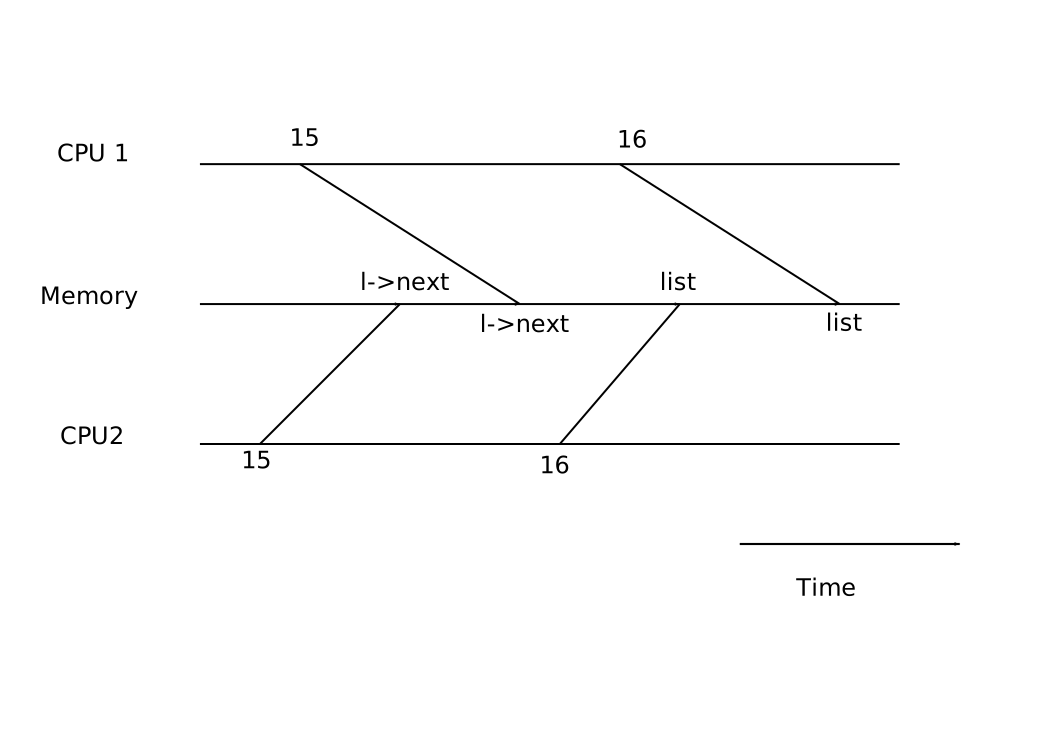
The lost update at line 16 is an example of a race condition. A race
condition is a situation in which a memory location is accessed concurrently,
and at least one access is a write. A race is often a sign of a bug, either a
lost update (if the accesses are writes) or a read of an
incompletely-updated data structure. The outcome of a race depends on the exact
timing of the two CPUs involved and how their memory operations are ordered by
the memory system, which can make race-induced errors difficult to reproduce
and debug. For example, adding print statements while debugging insert might
change the timing of the execution enough to make the race disappear.
The usual way to avoid races is to use a lock. Locks ensure mutual exclusion,
so that only one CPU can execute insert at a time; this makes the scenario
above impossible. The correctly locked version of the above code adds just a few
lines (not numbered):
    6  struct list *list = 0;
       struct lock listlock;
    7
    8  void
    9  insert(int data)
   10  {
   11    struct list *l;
   12    l = malloc(sizeof *l);
   13    l->data = data;
   14
         acquire(&listlock);
   15    l->next = list;
   16    list = l;
         release(&listlock);
   17  }
The sequence of instructions between acquire and release is often called a
critical section, and the lock protects list.
When we say that a lock protects data, we really mean that the lock protects
some collection of invariants that apply to the data. Invariants are properties
of data structures that are maintained across operations. Typically, an
operation's correct behavior depends on the invariants being true when the
operation begins. The operation may temporarily violate the invariants but must
reestablish them before finishing. For example, in the linked list case, the
invariant is that list points at the first node in the list and that each
node's next field points at the next node. The implementation of insert
violates this invariant temporarily: in line 15, l points to the next list
element, but list does not point at l yet (reestablished at line 16). The
race condition we examined above happened because a second CPU executed code
that depended on the list invariants while they were (temporarily) violated.
Proper use of a lock ensures that only one CPU at a time can operate on the data
structure in the critical section, so that no CPU will execute a data structure
operation when the data structure's invariants do not hold.
You can think of locks as serializing concurrent critical sections so that they run one at a time, and thus preserve invariants (assuming they are correct in isolation). You can also think of critical sections as being atomic with respect to each other, so that a critical section that obtains the lock later sees only the complete set of changes from earlier critical sections, and never sees partially-completed updates.
Note that it would also be correct to move up acquire to earlier in insert.
For example, it is fine to move the call to acquire up to before line 12. This
may reduce paralellism because then the calls to malloc are also serialized.
The section "Using locks" below provides some guidelines for where to insert
acquire and release invocations.
Code: Locks
Xv6 has two types of locks: spin-locks and sleep-locks. We'll start with
spin-locks. Xv6 represents a spin-lock as a struct spinlock (see
spinlock.h). The important field in the structure is locked, a word that is
zero when the lock is available and non-zero when it is held. Logically, xv6
should acquire a lock by executing code like:
   21  void
   22  acquire(struct spinlock *lk)
   23  {
   24    for(;;) {
   25      if(!lk->locked) {
   26        lk->locked = 1;
   27        break;
   28      }
   29    }
   30  }
Unfortunately, this implementation does not guarantee mutual exclusion on a
multiprocessor. It could happen that two CPUs simultaneously reach line 25, see
that lk->locked is zero, and then both grab the lock by executing line 26. At
this point, two different CPUs hold the lock, which violates the mutual
exclusion property. Rather than helping us avoid race conditions, this
implementation of acquire has its own race condition. The problem here is
that lines 25 and 26 executed as separate actions. In order for the routine
above to be correct, lines 25 and 26 must execute in one atomic (i.e.,
indivisible) step.
To execute those two lines atomically, xv6 relies on a special x86 instruction,
xchg (see x86.h). In one atomic operation, xchg swaps a word in memory
with the contents of a register. The function acquire (see spinlock.c)
repeats this xchg instruction in a loop; each iteration atomically reads
lk->locked and sets it to 1. If the lock is already held, lk->locked will
already be 1, so the xchg returns 1 and the loop continues. If the xchg
returns 0, however, acquire has successfully acquired the lock—locked was 0
and is now 1—so the loop can stop.
Once the lock is acquired, acquire records, for debugging, the CPU and stack
trace that acquired the lock. If a process forgets to release a lock, this
information can help to identify the culprit. These debugging fields are
protected by the lock and must only be edited while holding the lock.
The function release (see spinlock.c) is the opposite of acquire: it
clears the debugging fields and then releases the lock. The function uses an
assembly instruction to clear locked, because clearing this field should be
atomic so that the xchg instruction won't see a subset of the 4 bytes that
hold locked updated. The x86 guarantees that a 32-bit movl updates all 4
bytes atomically. Xv6 cannot use a regular C assignment, because the C language
specification does not specify that a single assignment is atomic.
Xv6's implementation of spin-locks is x86-specific, and xv6 is thus not directly portable to other processors. To allow for portable implementations of spin-locks, the C language supports a library of atomic instructions; a portable operating system would use those instructions.
Code: Using locks
Xv6 uses locks in many places to avoid race conditions. A simple example is in
the IDE driver ide.c. As mentioned in the beginning of the chapter, iderw
has a queue of disk requests and processors may add new requests to the list
concurrently. To protect this list and other invariants in the driver, iderw
acquires the idelock and releases it at the end of the function.
Exercise 1 explores how to trigger the IDE driver race condition that we saw at
the beginning of the chapter by moving the acquire to after the queue
manipulation. It is worthwhile to try the exercise because it will make clear
that it is not that easy to trigger the race, suggesting that it is difficult
to find race-conditions bugs. It is not unlikely that xv6 has some races.
A hard part about using locks is deciding how many locks to use and which data and invariants each lock protects. There are a few basic principles. First, any time a variable can be written by one CPU at the same time that another CPU can read or write it, a lock should be introduced to keep the two operations from overlapping. Second, remember that locks protect invariants: if an invariant involves multiple memory locations, typically all of them need to be protected by a single lock to ensure the invariant is maintained.
The rules above say when locks are necessary but say nothing about when locks
are unnecessary, and it is important for efficiency not to lock too much,
because locks reduce parallelism. If parallelism isn't important, then one
could arrange to have only a single thread and not worry about locks. A simple
kernel can do this on a multiprocessor by having a single lock that must be
acquired on entering the kernel and released on exiting the kernel (though
system calls such as pipe reads or wait would pose a problem). Many
uniprocessor operating systems have been converted to run on multiprocessors
using this approach, sometimes called a ``giant kernel lock,'' but the approach
sacrifices parallelism: only one CPU can execute in the kernel at a time. If the
kernel does any heavy computation, it would be more efficient to use a larger
set of more fine-grained locks, so that the kernel could execute on multiple
CPUs simultaneously.
Ultimately, the choice of lock granularity is an exercise in parallel programming. Xv6 uses a few coarse data-structure specific locks (see locktable). For example, xv6 has a lock that protects the whole process table and its invariants, which are described in Chapter 6. A more fine-grained approach would be to have a lock per entry in the process table so that threads working on different entries in the process table can proceed in parallel. However, it complicates operations that have invariants over the whole process table, since they might have to acquire several locks. Subsequent chapters will discuss how each part of xv6 deals with concurrency, illustrating how to use locks.
| Lock | Description |
|---|---|
| bcache.lock | Protects allocation of block buffer cache entries |
| cons.lock | Serializes access to console hardware, avoids intermixed output |
| ftable.lock | Serializes allocation of a struct file in file table |
| icache.lock | Protects allocation of inode cache entries |
| idelock | Serializes access to disk hardware and disk queue |
| kmem.lock | Serializes allocation of memory |
| log.lock | Serializes operations on the transaction log |
| pipe's p->lock | Serializes operations on each pipe |
| ptable.lock | Serializes context switching, and operations on proc->state and proctable |
| tickslock | Serializes operations on the ticks counter |
| inode's ip->lock | Serializes operations on each inode and its content |
| buf's b->lock | Serializes operations on each block buffer |
Deadlock and lock ordering
If a code path through the kernel must hold several locks at the same time, it is important that all code paths acquire the locks in the same order. If they don't, there is a risk of deadlock. Let's say two code paths in xv6 need locks A and B, but code path 1 acquires locks in the order A then B, and the other path acquires them in the order B then A. This situation can result in a deadlock if two threads execute the code paths concurrently. Suppose thread T1 executes code path 1 and acquires lock A, and thread T2 executes code path 2 and acquires lock B. Next T1 will try to acquire lock B, and T2 will try to acquire lock A. Both acquires will block indefinitely, because in both cases the other thread holds the needed lock, and won't release it until its acquire returns.
To avoid such deadlocks, all code paths must acquire locks in the same order. The need for a global lock acquisition order means that locks are effectively part of each function's specification: callers must invoke functions in a way that causes locks to be acquired in the agreed-on order.
Xv6 has many lock-order chains of length two involving the ptable.lock, due
to the way that sleep works as discussed in Chapter 6. For example,
ideintr holds the ide lock while calling wakeup, which acquires the ptable
lock. The file system code contains xv6's longest lock chains. For example,
creating a file requires simultaneously holding a lock on the directory, a lock
on the new file's inode, a lock on a disk block buffer, idelock, and
ptable.lock. To avoid deadlock, file system code always acquires locks in the
order mentioned in the previous sentence.
Interrupt handlers
Xv6 uses spin-locks in many situations to protect data that is used by both
interrupt handlers and threads. For example, a timer interrupt might increment
ticks at about the same time that a kernel thread reads ticks in
sys_sleep. The lock tickslock serializes the two accesses.
Interrupts can cause concurrency even on a single processor: if interrupts are
enabled, kernel code can be stopped at any moment to run an interrupt handler
instead. Suppose iderw held the idelock and then got interrupted to run
ideintr. ideintr would try to lock idelock, see it was held, and wait for
it to be released. In this situation, idelock will never be released—only
iderw can release it, and iderw will not continue running until ideintr
returns—so the processor, and eventually the whole system, will deadlock.
To avoid this situation, if a spin-lock is used by an interrupt handler, a
processor must never hold that lock with interrupts enabled. Xv6 is more
conservative: when a processor enters a spin-lock critical section, xv6 always
ensures interrupts are disabled on that processor. Interrupts may still occur
on other processors, so an interrupt's acquire can wait for a thread to
release a spin-lock; just not on the same processor.
Xv6 re-enables interrupts when a processor holds no spin-locks; it must do a
little book-keeping to cope with nested critical sections. acquire calls
pushcli and release calls popcli to track the nesting level of locks on
the current processor. When that count reaches zero, popcli restores the
interrupt enable state that existed at the start of the outermost critical
section. The cli and sti functions execute the x86 interrupt disable and
enable instructions, respectively.
It is important that acquire call pushcli before the xchg that might
acquire the lock. If the two were reversed, there would be a few instruction
cycles when the lock was held with interrupts enabled, and an unfortunately
timed interrupt would deadlock the system. Similarly, it is important that
release call popcli only after the xchg that releases the lock.
Instruction and memory ordering
This chapter has assumed that code executes in the order in which the code appears in the program. Many compilers and processors, however, execute code out of order to achieve higher performance. If an instruction takes many cycles to complete, a processor may want to issue the instruction early so that it can overlap with other instructions and avoid processor stalls. For example, a processor may notice that in a serial sequence of instructions A and B are not dependent on each other and start instruction B before A so that it will be completed when the processor completes A. A compiler may perform a similar re-ordering by emitting instruction B before instruction A in the executable file. Concurrency, however, may expose this reordering to software, which can lead to incorrect behavior.
For example, in this code for insert, it would be a disaster if the compiler
or processor caused the effects of line 4 (or 2 or 5) to be visible to other
cores after the effects of line 6:
    1    l = malloc(sizeof *l);
    2    l->data = data;
    3    acquire(&listlock);
    4    l->next = list;
    5    list = l;
    6    release(&listlock);
If the hardware or compiler would re-order, for example, the effects of line 4
to be visible after line 6, then another processor can acquire listlock and
observe that list points to l, but it won't observe that l->next is set to
the remainder of the list and won't be able to read the rest of the list.
To tell the hardware and compiler not to perform such re-orderings, xv6 uses
__sync_synchronize(), in both acquire and release.
__sync_synchronize() is a memory barrier: it tells the compiler and CPU to
not reorder loads or stores across the barrier. Xv6 worries about ordering only
in acquire and release, because concurrent access to data structures other
than the lock structure is performed between acquire and release.
Sleep locks
Sometimes xv6 code needs to hold a lock for a long time. For example, the file system (Chapter 7) keeps a file locked while reading and writing its content on the disk, and these disk operations can take tens of milliseconds. Efficiency demands that the processor be yielded while waiting so that other threads can make progress, and this in turn means that xv6 needs locks that work well when held across context switches. Xv6 provides such locks in the form of sleep-locks.
Xv6 sleep-locks support yielding the processor during their critical sections.
This property poses a design challenge: if thread T1 holds lock L1 and has
yielded the processor, and thread T2 wishes to acquire L1, we have to ensure
that T1 can execute while T2 is waiting so that T1 can release L1. T2 can't use
the spin-lock acquire function here: it spins with interrupts turned off, and
that would prevent T1 from running. To avoid this deadlock, the sleep-lock
acquire routine (called acquiresleep) yields the processor while waiting, and
does not disable interrupts.
acquiresleep uses techniques that will be explained in Chapter 6. At
a high level, a sleep-lock has a locked field that is protected by a spinlock,
and acquiresleep's call to sleep atomically yields the CPU and releases the
spin-lock. The result is that other threads can execute while acquiresleep
waits.
Because sleep-locks leave interrupts enabled, they cannot be used in interrupt
handlers. Because acquiresleep may yield the processor, sleep-locks cannot be
used inside spin-lock critical sections (though spin-locks can be used inside
sleep-lock critical sections).
Xv6 uses spin-locks in most situations, since they have low overhead. It uses sleep-locks only in the file system, where it is convenient to be able to hold locks across lengthy disk operations.
Limitations of locks
Locks often solve concurrency problems cleanly, but there are times when they are awkward. Subsequent chapters will point out such situations in xv6; this section outlines some of the problems that come up.
Sometimes a function uses data which must be guarded by a lock, but the
function is called both from code that already holds the lock and from code that
wouldn't otherwise need the lock. One way to deal with this is to have two
variants of the function, one that acquires the lock, and the other that
expects the caller to already hold the lock; see wakeup1 for an example.
Another approach is for the function to require callers to hold the lock
whether the caller needs it or not, as with sched. Kernel developers need to
be aware of such requirements.
It might seem that one could simplify situations where both caller and callee need a lock by allowing recursive locks, so that if a function holds a lock, any function it calls is allowed to re-acquire the lock. However, the programmer would then need to reason about all combinations of caller and callee, because it will no longer be the case that the data structure's invariants always hold after an acquire. Whether recursive locks are better than xv6's use of conventions about functions that require a lock to be held is not clear. The larger lesson is that (as with global lock ordering to avoid deadlock) lock requirements sometimes can't be private, but intrude themselves on the interfaces of functions and modules.
A situation in which locks are insufficient is when one thread needs to wait
for another thread's update to a data structure, for example when a pipe's
reader waits for some other thread to write the pipe. The waiting thread cannot
hold the lock on the data, since that would prevent the update it is waiting
for. Instead, xv6 provides a separate mechanism that jointly manages the lock
and event wait; see the description of sleep and wakeup in Chapter
6.
Real world
Concurrency primitives and parallel programming are active areas of research, because programming with locks is still challenging. It is best to use locks as the base for higher-level constructs like synchronized queues, although xv6 does not do this. If you program with locks, it is wise to use a tool that attempts to identify race conditions, because it is easy to miss an invariant that requires a lock.
Most operating systems support POSIX threads (Pthreads), which allow a user process to have several threads running concurrently on different processors. Pthreads has support for user-level locks, barriers, etc. Supporting Pthreads requires support from the operating system. For example, it should be the case that if one pthread blocks in a system call, another pthread of the same process should be able to run on that processor. As another example, if a pthread changes its process's address space (e.g., grow or shrink it), the kernel must arrange that other processors that run threads of the same process update their hardware page tables to reflect the change in the address space. On the x86, this involves shooting down the Translation Look-aside Buffer (TLB) of other processors using inter-processor interrupts (IPIs).
It is possible to implement locks without atomic instructions, but it is expensive, and most operating systems use atomic instructions.
Locks can be expensive if many processors try to acquire the same lock at the same time. If one processor has a lock cached in its local cache, and another processor must acquire the lock, then the atomic instruction to update the cache line that holds the lock must move the line from the one processor's cache to the other processor's cache, and perhaps invalidate any other copies of the cache line. Fetching a cache line from another processor's cache can be orders of magnitude more expensive than fetching a line from a local cache.
To avoid the expenses associated with locks, many operating systems use lock-free data structures and algorithms. For example, it is possible to implement a linked list like the one in the beginning of the chapter that requires no locks during list searches, and one atomic instruction to insert an item in a list. Lock-free programming is more complicated, however, than programming locks; for example, one must worry about instruction and memory reordering. Programming with locks is already hard, so xv6 avoids the additional complexity of lock-free programming.
Exercises
- Move the
acquireiniderwto beforesleep. Is there a race? Why don't you observe it when booting xv6 and runstressfs? Increase critical section with a dummy loop; what do you see now? explain. - Remove the
xchginacquire. Explain what happens when you run xv6? - Write a parallel program using POSIX threads, which is supported on most operating systems. For example, implement a parallel hash table and measure if the number of puts/gets scales with increasing number of cores.
- Implement a subset of Pthreads in xv6. That is, implement a user-level thread library so that a user process can have more than 1 thread and arrange that these threads can run in parallel on different processors. Come up with a design that correctly handles a thread making a blocking system call and changing its shared address space.
Scheduling
Any operating system is likely to run with more processes than the computer has processors, so a plan is needed to time-share the processors among the processes. Ideally the sharing would be transparent to user processes. A common approach is to provide each process with the illusion that it has its own virtual processor by multiplexing the processes onto the hardware processors. This chapter explains how xv6 achieves this multiplexing.
Multiplexing
Xv6 multiplexes by switching each processor from one process to another in two
situations. First, xv6's sleep and wakeup mechanism switches when a process
waits for device or pipe I/O to complete, or waits for a child to exit, or
waits in the sleep system call. Second, xv6 periodically forces a switch when
a process is executing user instructions. This multiplexing creates the
illusion that each process has its own CPU, just as xv6 uses the memory
allocator and hardware page tables to create the illusion that each process has
its own memory.
Implementing multiplexing poses a few challenges. First, how to switch from one process to another? Although the idea of context switching is simple, the implementation is some of the most opaque code in xv6. Second, how to switch transparently to user processes? Xv6 uses the standard technique of driving context switches with timer interrupts. Third, many CPUs may be switching among processes concurrently, and a locking plan is necessary to avoid races. Fourth, a process's memory and other resources must be freed when the process exits, but it cannot do all of this itself because (for example) it can't free its own kernel stack while still using it. Finally, each core of a multi-core machine must remember which process it is executing so that system calls affect the correct process's kernel state. Xv6 tries to solve these problems as simply as possible, but nevertheless the resulting code is tricky.
xv6 must provide ways for processes to coordinate among themselves. For example, a parent process may need to wait for one of its children to exit, or a process reading a pipe may need to wait for some other process to write the pipe. Rather than make the waiting process waste CPU by repeatedly checking whether the desired event has happened, xv6 allows a process to give up the CPU and sleep waiting for an event, and allows another process to wake the first process up. Care is needed to avoid races that result in the loss of event notifications. As an example of these problems and their solution, this chapter examines the implementation of pipes.
Code: Context switching
switch outlines the steps involved
in switching from one user process to another: a user-kernel transition (system
call or interrupt) to the old process's kernel thread, a context switch to the
current CPU's scheduler thread, a context switch to a new process's kernel
thread, and a trap return to the user-level process. The xv6 scheduler has its
own thread (saved registers and stack) because it is sometimes not safe for it
execute on any process's kernel stack; we'll see an example in exit. In this
section we'll examine the mechanics of switching between a kernel thread and a
scheduler thread.
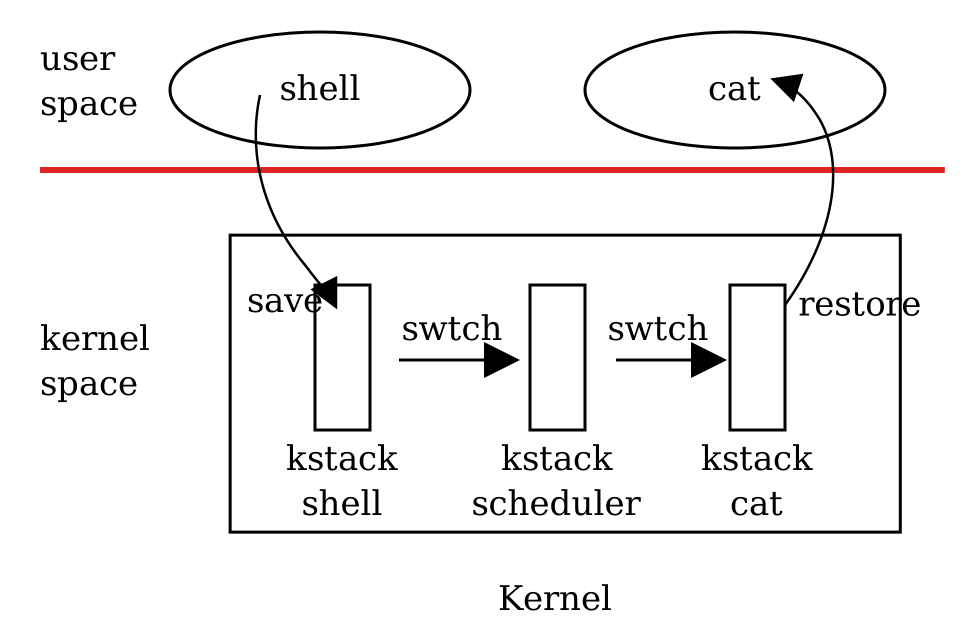
Switching from one thread to another involves saving the old thread's CPU
registers, and restoring the previously-saved registers of the new thread; the
fact that rsp and rip are saved and restored means that the CPU will switch
stacks and switch what code it is executing.
The function swtch performs the saves and restores for a thread switch.
swtch doesn't directly know about threads; it just saves and restores register
sets, called contexts. When it is time for a process to give up the CPU, the
process's kernel thread calls swtch to save its own context and return to the
scheduler context. Each context is represented by a struct context*, a pointer
to a structure stored on the kernel stack involved. swtch takes two
arguments: struct context **old and struct context *new. It pushes the
current registers onto the stack and saves the stack pointer in *old. Then
swtch copies new to rsp, pops previously saved registers, and returns.
Let's follow a user process through swtch into the scheduler. We saw in
Chapter 4, Interrupts, and Drivers that one possibility at the end of each
interrupt is that trap calls yield. yield in turn calls sched, which
calls swtch to save the current context in proc->context and switch to the
scheduler context previously saved in cpu->scheduler.
swtch starts by copying its arguments from the stack to the caller-saved
registers rax and rdx; swtch must do this before it changes the stack
pointer and can no longer access the arguments via rsp. Then swtch pushes
the register state, creating a context structure on the current stack. Only the
callee-saved registers need to be saved; the convention on the x86 is that
these are rbp, rbx, rsi, rdi, and rsp. swtch pushes the first four
explicitly; it saves the last implicitly as the struct context* written to
*old. There is one more important register: the program counter rip. It has
already been saved on the stack by the call instruction that invoked swtch.
Having saved the old context, swtch is ready to restore the new one. It moves
the pointer to the new context into the stack pointer. The new stack has the
same form as the old one that swtch just left—the new stack was the old one
in a previous call to swtch—so swtch can invert the sequence to restore the
new context. It pops the values for rdi, rsi, rbx, and rbp and then
returns. Because swtch has changed the stack pointer, the values restored and
the instruction address returned to are the ones from the new context.
In our example, sched called swtch to switch to cpu->scheduler, the
per-CPU scheduler context. That context had been saved by scheduler's call to
swtch. When the swtch we have been tracing returns, it returns not to
sched but to scheduler, and its stack pointer points at the current CPU's
scheduler stack.
Code: Scheduling
The last section looked at the low-level details of swtch; now let's take
swtch as a given and examine switching from a process through the scheduler
to another process. A process that wants to give up the CPU must acquire the
process table lock ptable.lock, release any other locks it is holding, update
its own state (proc->state), and then call sched. yield follows this
convention, as do sleep and exit, which we will examine later. sched
double-checks those conditions and then an implication of those conditions:
since a lock is held, the CPU should be running with interrupts disabled.
Finally, sched calls swtch to save the current context in proc->context
and switch to the scheduler context in cpu->scheduler. swtch returns on the
scheduler's stack as though scheduler's swtch had returned. The scheduler
continues the for loop, finds a process to run, switches to it, and the cycle
repeats.
We just saw that xv6 holds ptable.lock across calls to swtch: the caller of
swtch must already hold the lock, and control of the lock passes to the
switched-to code. This convention is unusual with locks; usually the thread
that acquires a lock is also responsible for releasing the lock, which makes it
easier to reason about correctness. For context switching it is necessary to
break this convention because ptable.lock protects invariants on the
process's state and context fields that are not true while executing in
swtch. One example of a problem that could arise if ptable.lock were not
held during swtch: a different CPU might decide to run the process after
yield had set its state to RUNNABLE, but before swtch caused it to stop
using its own kernel stack. The result would be two CPUs running on the same
stack, which cannot be right.
A kernel thread always gives up its processor in sched and always switches to
the same location in the scheduler, which (almost) always switches to some
kernel thread that previously called sched. Thus, if one were to print out
the line numbers where xv6 switches threads, one would observe the following
simple pattern: the swtch in sched, the swtch in scheduler, and so on. The
procedures in which this stylized switching between two threads happens are
sometimes referred to as coroutines; in this example, sched and
scheduler are co-routines of each other.
There is one case when the scheduler's call to swtch does not end up in
sched. We saw this case in Chapter 3: when a new process is first
scheduled, it begins at forkret. forkret exists to release the
ptable.lock; otherwise, the new process could start at trapret.
scheduler runs a simple loop: find a process to run, run it until it yields,
repeat. scheduler holds ptable.lock for most of its actions, but releases
the lock (and explicitly enables interrupts) once in each iteration of its
outer loop. This is important for the special case in which this CPU is idle
(can find no RUNNABLE process). If an idling scheduler looped with the lock
continuously held, no other CPU that was running a process could ever perform a
context switch or any process-related system call, and in particular could
never mark a process as RUNNABLE so as to break the idling CPU out of its
scheduling loop. The reason to enable interrupts periodically on an idling CPU
is that there might be no RUNNABLE process because processes (e.g., the shell)
are waiting for I/O; if the scheduler left interrupts disabled all the time,
the I/O would never arrive.
The scheduler loops over the process table looking for a runnable process, one
that has p->state == RUNNABLE. Once it finds a process, it sets the per-CPU
current process variable proc, switches to the process's page table with
switchuvm, marks the process as RUNNING, and then calls swtch to start
running it.
One way to think about the structure of the scheduling code is that it arranges
to enforce a set of invariants about each process, and holds ptable.lock
whenever those invariants are not true. One invariant is that if a process is
RUNNING, a timer interrupt's yield must be able to switch away from the
process; this means that the CPU registers must hold the process's register
values (i.e. they aren't actually in a context), cr3 must refer to the
process's pagetable, rsp must refer to the process's kernel stack so that
swtch can push registers correctly, and proc must refer to the process's
proc[] slot. Another invariant is that if a process is RUNNABLE, an idle
CPU's scheduler must be able to run it; this means that p->context must hold
the process's kernel thread variables, that no CPU is executing on the
process's kernel stack, that no CPU's cr3 refers to the process's page table,
and that no CPU's proc refers to the process.
Maintaining the above invariants is the reason why xv6 acquires ptable.lock
in one thread (often in yield) and releases the lock in a different thread
(the scheduler thread or another next kernel thread). Once the code has started
to modify a running process's state to make it RUNNABLE, it must hold the lock
until it has finished restoring the invariants: the earliest correct release
point is after scheduler stops using the process's page table and clears
proc. Similarly, once scheduler starts to convert a runnable process to
RUNNING, the lock cannot be released until the kernel thread is completely
running (after the swtch, e.g. in yield).
ptable.lock protects other things as well: allocation of process IDs and free
process table slots, the interplay between exit and wait, the machinery to
avoid lost wakeups (see next section), and probably other things too. It might
be worth thinking about whether the different functions of ptable.lock could
be split up, certainly for clarity and perhaps for performance.
Code: mycpu and myproc
xv6 maintains a struct cpu for each processor, which records the process
currently running on the processor (if any), the processor's unique hardware
identifier (apicid), and some other information. The function mycpu returns
the current processor's struct cpu. mycpu does this by reading the
processor identifier from the local APIC hardware and looking through the array
of struct cpu for an entry with that identifier. The return value of mycpu
is fragile: if the timer were to interrupt and cause the thread to be moved to
a different processor, the return value would no longer be correct. To avoid
this problem, xv6 requires that callers of mycpu disable interrupts, and only
enable them after they finish using the returned struct cpu.
The function myproc returns the struct proc pointer for the process that is
running on the current processor. myproc disables interrupts, invokes
mycpu, fetches the current process pointer (c->proc) out of the
struct cpu, and then enables interrupts. If there is no process running,
because the caller is executing in scheduler, myproc returns zero. The
return value of myproc is safe to use even if interrupts are enabled: if a
timer interrupt moves the calling process to a different processor, its
struct proc pointer will stay the same.
Sleep and wakeup
Scheduling and locks help conceal the existence of one process from another, but so far we have no abstractions that help processes intentionally interact. Sleep and wakeup fill that void, allowing one process to sleep waiting for an event and another process to wake it up once the event has happened. Sleep and wakeup are often called sequence coordination or conditional synchronization mechanisms, and there are many other similar mechanisms in the operating systems literature.
To illustrate what we mean, let's consider a simple producer/consumer queue. This queue is similar to the one that feeds commands from processes to the IDE driver (see Chapter 4: Traps, Interrupts, and Drivers), but abstracts away all IDE-specific code. The queue allows one process to send a nonzero pointer to another process. If there were only one sender and one receiver, and they executed on different CPUs, and the compiler didn't optimize too agressively, this implementation would be correct:
  100  struct q {
  101    void *ptr;
  102  };
  103
  104  void*
  105  send(struct q *q, void *p)
  106  {
  107    while(q->ptr != 0)
  108      ;
  109    q->ptr = p;
  110  }
  111
  112  void*
  113  recv(struct q *q)
  114  {
  115    void *p;
  116
  117    while((p = q->ptr) == 0)
  118      ;
  119    q->ptr = 0;
  120    return p;
  121  }
send loops until the queue is empty (ptr == 0) and then puts the pointer
p in the queue. recv loops until the queue is non-empty and takes the
pointer out. When run in different processes, send and recv both modify
q->ptr, but send only writes the pointer when it is zero and recv only
writes the pointer when it is nonzero, so no updates are lost.
The implementation above is expensive. If the sender sends rarely, the
receiver will spend most of its time spinning in the while loop hoping for a
pointer. The receiver's CPU could find more productive work than busy
waiting by repeatedly polling q->ptr. Avoiding busy waiting requires a way
for the receiver to yield the CPU and resume only when send delivers a
pointer.
Let's imagine a pair of calls, sleep and wakeup, that work as follows.
sleep(chan) sleeps on the arbitrary value chan, called the wait channel.
sleep puts the calling process to sleep, releasing the CPU for other work.
wakeup(chan) wakes all processes sleeping on chan (if any), causing their
sleep calls to return. If no processes are waiting on chan, wakeup does
nothing. We can change the queue implementation to use sleep and wakeup:
  201  void*
  202  send(struct q *q, void *p)
  203  {
  204    while(q->ptr != 0)
  205      ;
  206    q->ptr = p;
  207    wakeup(q);  /* wake recv */
  208  }
  209
  210  void*
  211  recv(struct q *q)
  212  {
  213    void *p;
  214
  215    while((p = q->ptr) == 0)
  216      sleep(q);
  217    q->ptr = 0;
  218    return p;
  219  }
recv now gives up the CPU instead of spinning, which is nice. However, it
turns out not to be straightforward to design sleep and wakeup with this
interface without suffering from what is known as the ``lost wake-up'' problem
(see deadlock). Suppose that
recv finds that q->ptr == 0 on line 215. While recv is between lines 215
and 216, send runs on another CPU: it changes q->ptr to be nonzero and
calls wakeup, which finds no processes sleeping and thus does nothing. Now
recv continues executing at line 216: it calls sleep and goes to sleep. This
causes a problem: recv is asleep waiting for a pointer that has already
arrived. The next send will wait for recv to consume the pointer in the
queue, at which point the system will be deadlocked.
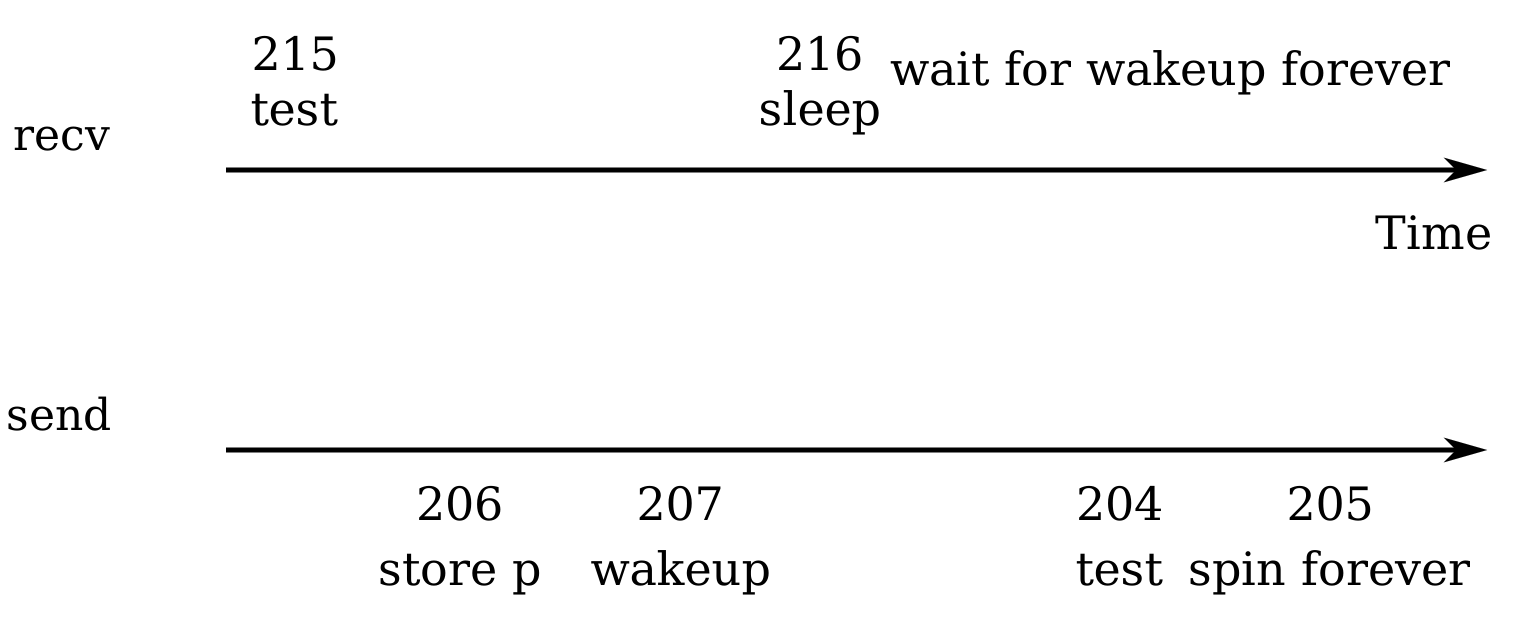
The root of this problem is that the invariant that recv only sleeps when
q->ptr == 0 is violated by send running at just the wrong moment. One
incorrect way of protecting the invariant would be to modify the code for
recv as follows:
  300  struct q {
  301    struct spinlock lock;
  302    void *ptr;
  303  };
  304
  305  void*
  306  send(struct q *q, void *p)
  307  {
  308    acquire(&q->lock);
  309    while(q->ptr != 0)
  310      ;
  311    q->ptr = p;
  312    wakeup(q);
  313    release(&q->lock);
  314  }
  315
  316  void*
  317  recv(struct q *q)
  318  {
  319    void *p;
  320
  321    acquire(&q->lock);
  322    while((p = q->ptr) == 0)
  323      sleep(q);
  324    q->ptr = 0;
  325    release(&q->lock);
  326    return p;
  327  }
One might hope that this version of recv would avoid the lost wakeup because
the lock prevents send from executing between lines 322 and 323. It does
that, but it also deadlocks: recv holds the lock while it sleeps, so the
sender will block forever waiting for the lock.
We'll fix the preceding scheme by changing sleep's interface: the caller must
pass the lock to sleep so it can release the lock after the calling process is
marked as asleep and waiting on the sleep channel. The lock will force a
concurrent send to wait until the receiver has finished putting itself to
sleep, so that the wakeup will find the sleeping receiver and wake it up.
Once the receiver is awake again sleep reacquires the lock before returning.
Our new correct scheme is useable as follows:
  400  struct q {
  401    struct spinlock lock;
  402    void *ptr;
  403  };
  404
  405  void*
  406  send(struct q *q, void *p)
  407  {
  408    acquire(&q->lock);
  409    while(q->ptr != 0)
  410      ;
  411    q->ptr = p;
  412    wakeup(q);
  413    release(&q->lock);
  414  }
  415
  416  void*
  417  recv(struct q *q)
  418  {
  419    void *p;
  420
  421    acquire(&q->lock);
  422    while((p = q->ptr) == 0)
  423      sleep(q, &q->lock);
  424    q->ptr = 0;
  425    release(&q->lock);
  426    return p;
  427  }
The fact that recv holds q->lock prevents send from trying to wake it up
between recv's check of q->ptr and its call to sleep. We need sleep to
atomically release q->lock and put the receiving process to sleep.
A complete sender/receiver implementation would also sleep in send when
waiting for a receiver to consume the value from a previous send.
Code: Sleep and wakeup
Let's look at the implementation of sleep and wakeup in proc.c. The basic
idea is to have sleep mark the current process as SLEEPING and then call
sched to release the processor; wakeup looks for a process sleeping on the
given wait channel and marks it as RUNNABLE. Callers of sleep and wakeup
can use any mutually convenient number as the channel. Xv6 often uses the
address of a kernel data structure involved in the waiting.
sleep begins with a few sanity checks: there must be a current process and
sleep must have been passed a lock. Then sleep acquires ptable.lock. Now
the process going to sleep holds both ptable.lock and lk. Holding lk was
necessary in the caller (in the example, recv): it ensured that no other
process (in the example, one running send) could start a call to
wakeup(chan). Now that sleep holds ptable.lock, it is safe to release
lk: some other process may start a call to wakeup(chan), but wakeup will
not run until it can acquire ptable.lock, so it must wait until sleep has
finished putting the process to sleep, keeping the wakeup from missing the
sleep.
There is a minor complication: if lk is equal to &ptable.lock, then sleep
would deadlock trying to acquire it as &ptable.lock and then release it as
lk. In this case, sleep considers the acquire and release to cancel each
other out and skips them entirely. For example, wait calls sleep with
&ptable.lock.
Now that sleep holds ptable.lock and no others, it can put the process to
sleep by recording the sleep channel, changing the process state, and calling
sched.
At some point later, a process will call wakeup(chan). wakeup acquires
ptable.lock and calls wakeup1, which does the real work. It is important
that wakeup hold the ptable.lock both because it is manipulating process
states and because, as we just saw, ptable.lock makes sure that sleep and
wakeup do not miss each other. wakeup1 is a separate function because
sometimes the scheduler needs to execute a wakeup when it already holds the
ptable.lock; we will see an example of this later. wakeup1 loops over the
process table. When it finds a process in state SLEEPING with a matching
chan, it changes that process's state to RUNNABLE. The next time the
scheduler runs, it will see that the process is ready to be run.
xv6 code always calls wakeup while holding the lock that guards the sleep
condition; in the example above that lock is q->lock. Strictly speaking it is
sufficient if wakeup always follows the acquire (that is, one could call
wakeup after the release). Why do the locking rules for sleep and wakeup
ensure a sleeping process won't miss a wakeup it needs? The sleeping process
holds either the lock on the condition or the ptable.lock or both from a
point before it checks the condition to a point after it is marked as sleeping.
If a concurrent thread causes the condition to be true, that thread must either
hold the lock on the condition before the sleeping thread acquired it, or after
the sleeping thread released it in sleep. If before, the sleeping thread must
have seen the new condition value, and decided to sleep anyway, so it doesn't
matter if it misses the wakeup. If after, then the earliest the waker could
acquire the lock on the condition is after sleep acquires ptable.lock, so
that wakeup's acquisition of ptable.lock must wait until sleep has
completely finished putting the sleeper to sleep. Then wakeup will see the
sleeping process and wake it up (unless something else wakes it up first).
It is sometimes the case that multiple processes are sleeping on the same
channel; for example, more than one process reading from a pipe. A single call
to wakeup will wake them all up. One of them will run first and acquire the
lock that sleep was called with, and (in the case of pipes) read whatever data
is waiting in the pipe. The other processes will find that, despite being woken
up, there is no data to be read. From their point of view the wakeup was
``spurious,'' and they must sleep again. For this reason sleep is always called
inside a loop that checks the condition.
No harm is done if two uses of sleep/wakeup accidentally choose the same channel: they will see spurious wakeups, but looping as described above will tolerate this problem. Much of the charm of sleep/wakeup is that it is both lightweight (no need to create special data structures to act as sleep channels) and provides a layer of indirection (callers need not know which specific process they are interacting with).
Code: Pipes
The simple queue we used earlier in this chapter was a toy, but xv6 contains
two real queues that use sleep and wakeup to synchronize readers and
writers. One is in the IDE driver: a process adds a disk request to a queue and
then calls sleep. The IDE interrupt handler uses wakeup to alert the process
that its request has completed.
A more complex example is the implementation of pipes. We saw the interface for
pipes in Chapter 1: bytes written to one end of a pipe
are copied in an in-kernel buffer and then can be read out of the other end of
the pipe. Future chapters will examine the file descriptor support surrounding
pipes, but let's look now at the implementations of pipewrite and piperead.
Each pipe is represented by a struct pipe, which contains a lock and a
data buffer. The fields nread and nwrite count the number of bytes read
from and written to the buffer. The buffer wraps around: the next byte written
after buf[PIPESIZE-1] is buf[0]. The counts do not wrap. This convention
lets the implementation distinguish a full buffer (nwrite == nread+PIPESIZE)
from an empty buffer (nwrite == nread), but it means that indexing into the
buffer must use buf[nread % PIPESIZE] instead of just buf[nread] (and
similarly for nwrite). Let's suppose that calls to piperead and pipewrite
happen simultaneously on two different CPUs.
pipewrite begins by acquiring the pipe's lock, which protects the counts, the
data, and their associated invariants. piperead then tries to acquire the
lock too, but cannot. It spins in acquire waiting for the lock. While
piperead waits, pipewrite loops over the bytes being written—addr[0],
addr[1], ..., addr[n-1]—adding each to the pipe in turn. During this loop,
it could happen that the buffer fills. In this case, pipewrite calls wakeup
to alert any sleeping readers to the fact that there is data waiting in the
buffer and then sleeps on &p->nwrite to wait for a reader to take some bytes
out of the buffer. sleep releases p->lock as part of putting pipewrite's
process to sleep.
Now that p->lock is available, piperead manages to acquire it and enters its
critical section: it finds that p->nread != p->nwrite (pipewrite went to
sleep because p->nwrite == p->nread+PIPESIZE) so it falls through to the for
loop, copies data out of the pipe, and increments nread by the number of
bytes copied. That many bytes are now available for writing, so piperead
calls wakeup to wake any sleeping writers before it returns to its caller.
wakeup finds a process sleeping on &p->nwrite, the process that was running
pipewrite but stopped when the buffer filled. It marks that process as
RUNNABLE.
The pipe code uses separate sleep channels for reader and writer (p->nread
and p->nwrite); this might make the system more efficient in the unlikely
event that there are lots of readers and writers waiting for the same pipe. The
pipe code sleeps inside a loop checking the sleep condition; if there are
multiple readers or writers, all but the first process to wake up will see the
condition is still false and sleep again.
Code: Wait, exit, and kill
sleep and wakeup can be used for many kinds of waiting. An interesting
example, seen in Chapter 1, is the wait system call
that a parent process uses to wait for a child to exit. When a child exits, it
does not die immediately. Instead, it switches to the ZOMBIE process state
until the parent calls wait to learn of the exit. The parent is then
responsible for freeing the memory associated with the process and preparing
the struct proc for reuse. If the parent exits before the child, the init
process adopts the child and waits for it, so that every child has a parent to
clean up after it.
An implementation challenge is the possibility of races between parent and
child wait and exit, as well as exit and exit. wait begins by
acquiring ptable.lock. Then it scans the process table looking for children.
If wait finds that the current process has children but that none have exited,
it calls sleep to wait for one of them to exit and scans again. Here, the
lock being released in sleep is ptable.lock, the special case we saw above.
exit acquires ptable.lock and then wakes up any process sleeping on a wait
channel equal to the current process's parent proc; if there is such a
process, it will be the parent in wait. This may look premature, since exit
has not marked the current process as a ZOMBIE yet, but it is safe: although
wakeup may cause the parent to run, the loop in wait cannot run until exit
releases ptable.lock by calling sched to enter the scheduler, so wait
can't look at the exiting process until after exit has set its state to
ZOMBIE. Before exit yields the processor, it reparents all of the exiting
process's children, passing them to the initproc. Finally, exit calls
sched to relinquish the CPU.
If the parent process was sleeping in wait, the scheduler will eventually run
it. The call to sleep returns holding ptable.lock; wait rescans the
process table and finds the exited child with state == ZOMBIE. It records the
child's pid and then cleans up the struct proc, freeing the memory
associated with the process.
The child process could have done most of the cleanup during exit, but it is
important that the parent process be the one to free p->kstack and p->pgdir:
when the child runs exit, its stack sits in the memory allocated as
p->kstack and it uses its own pagetable. They can only be freed after the
child process has finished running for the last time by calling swtch (via
sched). This is one reason that the scheduler procedure runs on its own stack
rather than on the stack of the thread that called sched.
While exit allows a process to terminate itself, kill lets one process
request that another be terminated. It would be too complex for kill to
directly destroy the victim process, since the victim might be executing on
another CPU or sleeping while midway through updating kernel data structures.
To address these challenges, kill does very little: it just sets the victim's
p->killed and, if it is sleeping, wakes it up. Eventually the victim will
enter or leave the kernel, at which point code in trap will call exit if
p->killed is set. If the victim is running in user space, it will soon enter
the kernel by making a system call or because the timer (or some other device)
interrupts.
If the victim process is in sleep, the call to wakeup will cause the victim
process to return from sleep. This is potentially dangerous because the
condition being waiting for may not be true. However, xv6 calls to sleep are
always wrapped in a while loop that re-tests the condition after sleep
returns. Some calls to sleep also test p->killed in the loop, and abandon
the current activity if it is set. This is only done when such abandonment
would be correct. For example, the pipe read and write code returns if the
killed flag is set; eventually the code will return back to trap, which will
again check the flag and exit.
Some xv6 sleep loops do not check p->killed because the code is in the
middle of a multi-step system call that should be atomic. The IDE driver is an
example: it does not check p->killed because a disk operation may be one of a
set of writes that are all needed in order for the file system to be left in a
correct state. To avoid the complication of cleaning up after a partial
operation, xv6 delays the killing of a process that is in the IDE driver until
some point later when it is easy to kill the process (e.g., when the complete
file system operation has completed and the process is about to return to user
space).
Real world
The xv6 scheduler implements a simple scheduling policy, which runs each process in turn. This policy is called round robin. Real operating systems implement more sophisticated policies that, for example, allow processes to have priorities. The idea is that a runnable high-priority process will be preferred by the scheduler over a runnable low-priority process. These policies can become complex quickly because there are often competing goals: for example, the operating might also want to guarantee fairness and high throughput. In addition, complex policies may lead to unintended interactions such as priority inversion and convoys. Priority inversion can happen when a low-priority and high-priority process share a lock, which when acquired by the low-priority process can prevent the high-priority process from making progress. A long convoy can form when many high-priority processes are waiting for a low-priority process that acquires a shared lock; once a convoy has formed it can persist for long time. To avoid these kinds of problems additional mechanisms are necessary in sophisticated schedulers.
sleep and wakeup are a simple and effective synchronization method, but
there are many others. The first challenge in all of them is to avoid the
``lost wakeups'' problem we saw at the beginning of the chapter. The original
Unix kernel's sleep simply disabled interrupts, which sufficed because Unix
ran on a single-CPU system. Because xv6 runs on multiprocessors, it adds an
explicit lock to sleep. FreeBSD's msleep takes the same approach. Plan 9's
sleep uses a callback function that runs with the scheduling lock held just
before going to sleep; the function serves as a last minute check of the sleep
condition, to avoid lost wakeups. The Linux kernel's sleep uses an explicit
process queue instead of a wait channel; the queue has its own internal lock.
Scanning the entire process list in wakeup for processes with a matching
chan is inefficient. A better solution is to replace the chan in both
sleep and wakeup with a data structure that holds a list of processes
sleeping on that structure. Plan 9's sleep and wakeup call that structure a
rendezvous point or Rendez. Many thread libraries refer to the same structure
as a condition variable; in that context, the operations sleep and wakeup
are called wait and signal. All of these mechanisms share the same flavor:
the sleep condition is protected by some kind of lock dropped atomically during
sleep.
The implementation of wakeup wakes up all processes that are waiting on a
particular channel, and it might be the case that many processes are waiting
for that particular channel. The operating system will schedule all these
processes and they will race to check the sleep condition. Processes that
behave in this way are sometimes called a thundering herd, and it is best
avoided. Most condition variables have two primitives for wakeup: signal,
which wakes up one process, and broadcast, which wakes up all processes
waiting.
Semaphores are another common coordination mechanism. A semaphore is an integer value with two operations, increment and decrement (or up and down). It is aways possible to increment a semaphore, but the semaphore value is not allowed to drop below zero: a decrement of a zero semaphore sleeps until another process increments the semaphore, and then those two operations cancel out. The integer value typically corresponds to a real count, such as the number of bytes available in a pipe buffer or the number of zombie children that a process has. Using an explicit count as part of the abstraction avoids the ``lost wakeup'' problem: there is an explicit count of the number of wakeups that have occurred. The count also avoids the spurious wakeup and thundering herd problems.
Terminating processes and cleaning them up introduces much complexity in xv6.
In most operating systems it is even more complex, because, for example, the
victim process may be deep inside the kernel sleeping, and unwinding its stack
requires much careful programming. Many operating systems unwind the stack
using explicit mechanisms for exception handling, such as longjmp.
Furthermore, there are other events that can cause a sleeping process to be
woken up, even though the event it is waiting for has not happened yet. For
example, when a Unix process is sleeping, another process may send a signal to
it. In this case, the process will return from the interrupted system call with
the value -1 and with the error code set to EINTR. The application can check
for these values and decide what to do. Xv6 doesn't support signals and this
complexity doesn't arise.
Xv6's support for kill is not entirely satisfactory: there are sleep loops
which probably should check for p->killed. A related problem is that, even
for sleep loops that check p->killed, there is a race between sleep and
kill; the latter may set p->killed and try to wake up the victim just after
the victim's loop checks p->killed but before it calls sleep. If this
problem occurs, the victim won't notice the p->killed until the condition it
is waiting for occurs. This may be quite a bit later (e.g., when the IDE driver
returns a disk block that the victim is waiting for) or never (e.g., if the
victim is waiting from input from the console, but the user doesn't type any
input).
Exercises
- Sleep has to check
lk != &ptable.lockto avoid a deadlock. Suppose the special case were eliminated by replacing
withif(lk != &ptable.lock){ acquire(&ptable.lock); release(lk); }
Doing this would breakrelease(lk); acquire(&ptable.lock);sleep. How? - Most process cleanup could be done by either
exitorwait, but we saw above thatexitmust not freep->stack. It turns out thatexitmust be the one to close the open files. Why? The answer involves pipes. - Implement semaphores in xv6. You can use mutexes but do not use sleep and wakeup. Replace the uses of sleep and wakeup in xv6 with semaphores. Judge the result.
- Fix the race mentioned above between
killandsleep, so that akillthat occurs after the victim's sleep loop checksp->killedbut before it callssleepresults in the victim abandoning the current system call. - Design a plan so that every sleep loop checks
p->killedso that, for example, a process that is in the IDE driver can return quickly from the while loop if another kills that process. - Design a plan that uses only one context switch when switching from one user process to another. This plan involves running the scheduler procedure on the kernel stack of the user process, instead of the dedicated scheduler stack. The main challenge is to clean up a user process correctly. Measure the performance benefit of avoiding one context switch.
- Modify xv6 to turn off a processor when it is idle and just spinning in the
loop in
scheduler. (Hint: look at the x86HLTinstruction.) - The lock
p->lockprotects many invariants, and when looking at a particular piece of xv6 code that is protected byp->lock, it can be difficult to figure out which invariant is being enforced. Design a plan that is more clean by perhaps splittingp->lockin several locks.
File system
The purpose of a file system is to organize and store data. File systems typically support sharing of data among users and applications, as well as persistence so that data is still available after a reboot.
The xv6 file system provides Unix-like files, directories, and pathnames (see Chapter 1), and stores its data on an IDE disk for persistence (see Chapter 4). The file system addresses several challenges:
- The file system needs on-disk data structures to represent the tree of named directories and files, to record the identities of the blocks that hold each file's content, and to record which areas of the disk are free.
- The file system must support crash recovery. That is, if a crash (e.g., power failure) occurs, the file system must still work correctly after a restart. The risk is that a crash might interrupt a sequence of updates and leave inconsistent on-disk data structures (e.g., a block that is both used in a file and marked free).
- Different processes may operate on the file system at the same time, so the file system code must coordinate to maintain invariants.
- Accessing a disk is orders of magnitude slower than accessing memory, so the file system must maintain an in-memory cache of popular blocks.
The rest of this chapter explains how xv6 addresses these challenges.
Overview
The xv6 file system implementation is
organized in seven layers, shown in fslayer.
The disk layer reads and writes blocks on an IDE hard drive.
The buffer cache layer caches disk blocks and synchronizes access to them,
making sure that only one kernel process at a time can modify the
data stored in any particular block. The logging layer allows higher
layers to wrap updates to several blocks in a
transaction,
and ensures that the blocks are updated atomically in the
face of crashes (i.e., all of them are updated or none).
The inode layer provides individual files, each represented as an
inode
with a unique i-number
and some blocks holding the file's data. The directory
layer implements each directory as a special kind of
inode whose content is a sequence of directory entries, each of which contains a
file's name and i-number.
The pathname layer provides
hierarchical path names like
/usr/rtm/xv6/fs.c,
and resolves them with recursive lookup.
The file descriptor layer abstracts many Unix resources (e.g., pipes, devices,
files, etc.) using the file system interface, simplifying the lives of
application programmers.
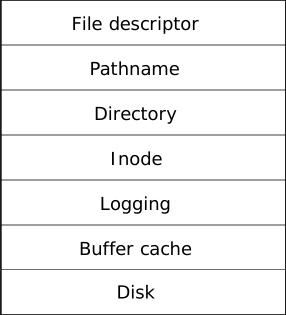
The file system must have a plan for where it stores inodes and
content blocks on the disk.
To do so, xv6 divides the disk into several
sections, as shown in fslayout.
The file system does not use
block 0 (it holds the boot sector). Block 1 is called the
superblock;
it contains metadata about the file system (the file system size in blocks, the
number of data blocks, the number of inodes, and the number of blocks in the
log). Blocks starting at 2 hold the log. After the log are the inodes, with multiple inodes per block. After
those come bitmap blocks tracking which data blocks are in use.
The remaining blocks are data blocks; each is either marked
free in the bitmap block, or holds content for a file or directory.
The superblock is filled in by a separate program, called
mkfs,
which builds an initial file system.
The rest of this chapter discusses each layer, starting with the buffer cache. Look out for situations where well-chosen abstractions at lower layers ease the design of higher ones.
Buffer cache layer
The buffer cache has two jobs: (1) synchronize access to disk blocks to ensure
that only one copy of a block is in memory and that only one kernel thread at a time
uses that copy; (2) cache popular blocks so that they don't need to be re-read from
the slow disk. The code is in
bio.c.
The main interface exported by the buffer cache consists of
bread
and
bwrite;
the former obtains a
buf
containing a copy of a block which can be read or modified in memory, and the
latter writes a modified buffer to the appropriate block on the disk.
A kernel thread must release a buffer by calling
brelse
when it is done with it.
The buffer cache uses a per-buffer sleep-lock to ensure
that only one thread at a time uses each buffer
(and thus each disk block);
bread
returns a locked buffer, and
brelse
releases the lock.
Let's return to the buffer cache. The buffer cache has a fixed number of buffers to hold disk blocks, which means that if the file system asks for a block that is not already in the cache, the buffer cache must recycle a buffer currently holding some other block. The buffer cache recycles the least recently used buffer for the new block. The assumption is that the least recently used buffer is the one least likely to be used again soon.

Code: Buffer cache
The buffer cache is a doubly-linked list of buffers.
The function
binit,
called by
main
initializes the list with the
NBUF
buffers in the static array
buf
All other access to the buffer cache refer to the linked list via
bcache.head,
not the
buf
array.
A buffer has two state bits associated with it.
B_VALID
indicates that the buffer contains a copy of the block.
B_DIRTY
indicates that the buffer content has been modified and needs
to be written to the disk.
Bread
calls
bget
to get a buffer for the given sector
If the buffer needs to be read from disk,
bread
calls
iderw
to do that before returning the buffer.
Bget
scans the buffer list for a buffer with the given device and sector numbers
If there is such a buffer,
bget
acquires the sleep-lock for the buffer.
bget
then returns the locked buffer.
If there is no cached buffer for the given sector,
bget
must make one, possibly reusing a buffer that held
a different sector.
It scans the buffer list a second time, looking for a buffer
that is not locked and not dirty:
any such buffer can be used.
Bget
edits the buffer metadata to record the new device and sector number
and acquires its sleep-lock.
Note that the assignment to
flags
clears
B_VALID,
thus ensuring that
bread
will read the block data from disk
rather than incorrectly using the buffer's previous contents.
It is important that there is at most one cached buffer per
disk sector, to ensure that readers see writes, and because the
file system uses locks on buffers for synchronization.
bget
ensures this invariant by holding the
bache.lock
continuously from the first loop's check of whether the
block is cached through the second loop's declaration that
the block is now cached (by setting
dev,
blockno,
and
refcnt).
This causes the check for a block's presence and (if not
present) the designation of a buffer to hold the block to
be atomic.
It is safe for
bget
to acquire the buffer's sleep-lock outside of the
bcache.lock
critical section,
since the non-zero
b->refcnt
prevents the buffer from being re-used for a different disk block.
The sleep-lock protects reads
and writes of the block's buffered content, while the
bcache.lock
protects information about which blocks are cached.
If all the buffers are busy, then too many processes are
simultaneously executing file system calls;
bget
panics.
A more graceful response might be to sleep until a buffer became free,
though there would then be a possibility of deadlock.
Once
bread
has read the disk (if needed) and returned the
buffer to its caller, the caller has
exclusive use of the buffer and can read or write the data bytes.
If the caller does modify the buffer, it must call
bwrite
to write the changed data to disk before releasing the buffer.
Bwrite
calls
iderw
to talk to the disk hardware, after setting
B_DIRTY
to indicate that
iderw
should write (rather than read).
When the caller is done with a buffer,
it must call
brelse
to release it.
(The name
brelse,
a shortening of
b-release,
is cryptic but worth learning:
it originated in Unix and is used in BSD, Linux, and Solaris too.)
Brelse
releases the sleep-lock and
moves the buffer
to the front of the linked list
Moving the buffer causes the
list to be ordered by how recently the buffers were used (meaning released):
the first buffer in the list is the most recently used,
and the last is the least recently used.
The two loops in
bget
take advantage of this:
the scan for an existing buffer must process the entire list
in the worst case, but checking the most recently used buffers
first (starting at
bcache.head
and following
next
pointers) will reduce scan time when there is good locality of reference.
The scan to pick a buffer to reuse picks the least recently used
buffer by scanning backward
(following
prev
pointers).
Logging layer
One of the most interesting problems in file system design is crash recovery. The problem arises because many file system operations involve multiple writes to the disk, and a crash after a subset of the writes may leave the on-disk file system in an inconsistent state. For example, suppose a crash occurs during file truncation (setting the length of a file to zero and freeing its content blocks). Depending on the order of the disk writes, the crash may either leave an inode with a reference to a content block that is marked free, or it may leave an allocated but unreferenced content block.
The latter is relatively benign, but an inode that refers to a freed block is likely to cause serious problems after a reboot. After reboot, the kernel might allocate that block to another file, and now we have two different files pointing unintentionally to the same block. If xv6 supported multiple users, this situation could be a security problem, since the old file's owner would be able to read and write blocks in the new file, owned by a different user.
Xv6 solves the problem of crashes during file system operations with a simple form of logging. An xv6 system call does not directly write the on-disk file system data structures. Instead, it places a description of all the disk writes it wishes to make in a log on the disk. Once the system call has logged all of its writes, it writes a special commit record to the disk indicating that the log contains a complete operation. At that point the system call copies the writes to the on-disk file system data structures. After those writes have completed, the system call erases the log on disk.
If the system should crash and reboot, the file system code recovers from the crash as follows, before running any processes. If the log is marked as containing a complete operation, then the recovery code copies the writes to where they belong in the on-disk file system. If the log is not marked as containing a complete operation, the recovery code ignores the log. The recovery code finishes by erasing the log.
Why does xv6's log solve the problem of crashes during file system operations? If the crash occurs before the operation commits, then the log on disk will not be marked as complete, the recovery code will ignore it, and the state of the disk will be as if the operation had not even started. If the crash occurs after the operation commits, then recovery will replay all of the operation's writes, perhaps repeating them if the operation had started to write them to the on-disk data structure. In either case, the log makes operations atomic with respect to crashes: after recovery, either all of the operation's writes appear on the disk, or none of them appear.
Log design
The log resides at a known fixed location, specified in the superblock. It consists of a header block followed by a sequence of updated block copies (``logged blocks''). The header block contains an array of sector numbers, one for each of the logged blocks, and the count of log blocks. The count in the header block on disk is either zero, indicating that there is no transaction in the log, or non-zero, indicating that the log contains a complete committed transaction with the indicated number of logged blocks. Xv6 writes the header block when a transaction commits, but not before, and sets the count to zero after copying the logged blocks to the file system. Thus a crash midway through a transaction will result in a count of zero in the log's header block; a crash after a commit will result in a non-zero count.
Each system call's code indicates the start and end of the sequence of writes that must be atomic with respect to crashes. To allow concurrent execution of file system operations by different processes, the logging system can accumulate the writes of multiple system calls into one transaction. Thus a single commit may involve the writes of multiple complete system calls. To avoid splitting a system call across transactions, the logging system only commits when no file system system calls are underway.
The idea of committing several transactions together is known as group commit. Group commit reduces the number of disk operations because it amortizes the fixed cost of a commit over multiple operations. Group commit also hands the disk system more concurrent writes at the same time, perhaps allowing the disk to write them all during a single disk rotation. Xv6's IDE driver doesn't support this kind of batching, but xv6's file system design allows for it.
Xv6 dedicates a fixed amount of space on the disk to hold the log.
The total number of blocks written by the system calls in a
transaction must fit in that space.
This has two consequences.
No single system call
can be allowed to write more distinct blocks than there is space
in the log. This is not a problem for most system calls, but two
of them can potentially write many blocks:
write
and
unlink.
A large file write may write many data blocks and many bitmap blocks
as well as an inode block; unlinking a large file might write many
bitmap blocks and an inode.
Xv6's write system call breaks up large writes into multiple smaller
writes that fit in the log,
and
unlink
doesn't cause problems because in practice the xv6 file system uses
only one bitmap block.
The other consequence of limited log space
is that the logging system cannot allow a system call to start
unless it is certain that the system call's writes will
fit in the space remaining in the log.
Code: logging
A typical use of the log in a system call looks like this:
  begin_op();
  ...
  bp = bread(...);
  bp->data[...] = ...;
  log_write(bp);
  ...
  end_op();
begin_op
waits until
the logging system is not currently committing, and until
there is enough unreserved log space to hold
the writes from this call.
log.outstanding
counts the number of system calls that have reserved log
space; the total reserved space is
log.outstanding
times
MAXOPBLOCKS.
Incrementing
log.outstanding
both reserves space and prevents a commit
from occuring during this system call.
The code conservatively assumes that each system call might write up to
MAXOPBLOCKS
distinct blocks.
log_write
acts as a proxy for
bwrite.
It records the block's sector number in memory,
reserving it a slot in the log on disk,
and marks the buffer
B_DIRTY
to prevent the block cache from evicting it.
The block must stay in the cache until committed:
until then, the cached copy is the only record
of the modification; it cannot be written to
its place on disk until after commit;
and other reads in the same transaction must
see the modifications.
log_write
notices when a block is written multiple times during a single
transaction, and allocates that block the same slot in the log.
This optimization is often called
absorption.
It is common that, for example, the disk block containing inodes
of several files is written several times within a transaction. By absorbing
several disk writes into one, the file system can save log space and
can achieve better performance because only one copy of the disk block must be
written to disk.
end_op
first decrements the count of outstanding system calls.
If the count is now zero, it commits the current
transaction by calling
commit().
There are four stages in this process.
write_log()
copies each block modified in the transaction from the buffer
cache to its slot in the log on disk.
write_head()
writes the header block to disk: this is the
commit point, and a crash after the write will
result in recovery replaying the transaction's writes from the log.
install_trans
reads each block from the log and writes it to the proper
place in the file system.
Finally
end_op
writes the log header with a count of zero;
this has to happen before the next transaction starts writing
logged blocks, so that a crash doesn't result in recovery
using one transaction's header with the subsequent transaction's
logged blocks.
recover_from_log
is called from
initlog
which is called during boot before the first user process runs.
It reads the log header, and mimics the actions of
end_op
if the header indicates that the log contains a committed transaction.
An example use of the log occurs in
filewrite
The transaction looks like this:
      begin_op();
      ilock(f->ip);
      r = writei(f->ip, ...);
      iunlock(f->ip);
      end_op();
This code is wrapped in a loop that breaks up large writes into individual
transactions of just a few sectors at a time, to avoid overflowing
the log. The call to
writei
writes many blocks as part of this
transaction: the file's inode, one or more bitmap blocks, and some data
blocks.
Code: Block allocator
File and directory content is stored in disk blocks,
which must be allocated from a free pool.
xv6's block allocator
maintains a free bitmap on disk, with one bit per block.
A zero bit indicates that the corresponding block is free;
a one bit indicates that it is in use.
The program
mkfs
sets the bits corresponding to the boot sector, superblock, log blocks, inode
blocks, and bitmap blocks.
The block allocator provides two functions:
balloc
allocates a new disk block, and
bfree
frees a block.
Balloc
The loop in
balloc
at
considers every block, starting at block 0 up to
sb.size,
the number of blocks in the file system.
It looks for a block whose bitmap bit is zero,
indicating that it is free.
If
balloc
finds such a block, it updates the bitmap
and returns the block.
For efficiency, the loop is split into two
pieces.
The outer loop reads each block of bitmap bits.
The inner loop checks all
BPB
bits in a single bitmap block.
The race that might occur if two processes try to allocate
a block at the same time is prevented by the fact that
the buffer cache only lets one process use any one bitmap block at a time.
Bfree
finds the right bitmap block and clears the right bit.
Again the exclusive use implied by
bread
and
brelse
avoids the need for explicit locking.
As with much of the code described in the remainder of this chapter,
balloc
and
bfree
must be called inside a transaction.
Inode layer
The term inode can have one of two related meanings. It might refer to the on-disk data structure containing a file's size and list of data block numbers. Or ``inode'' might refer to an in-memory inode, which contains a copy of the on-disk inode as well as extra information needed within the kernel.
The on-disk inodes are packed into a contiguous area of disk called the inode blocks. Every inode is the same size, so it is easy, given a number n, to find the nth inode on the disk. In fact, this number n, called the inode number or i-number, is how inodes are identified in the implementation.
The on-disk inode is defined by a
struct dinode
The
type
field distinguishes between files, directories, and special
files (devices).
A type of zero indicates that an on-disk inode is free.
The
nlink
field counts the number of directory entries that
refer to this inode, in order to recognize when the
on-disk inode and its data blocks should be freed.
The
size
field records the number of bytes of content in the file.
The
addrs
array records the block numbers of the disk blocks holding
the file's content.
The kernel keeps the set of active inodes in memory; struct inode is the
in-memory copy of a struct dinode on disk.
The kernel stores an inode in memory only if there are
C pointers referring to that inode. The
ref
field counts the number of C pointers referring to the
in-memory inode, and the kernel discards the inode from
memory if the reference count drops to zero.
The
iget
and
iput
functions acquire and release pointers to an inode,
modifying the reference count.
Pointers to an inode can come from file descriptors,
current working directories, and transient kernel code
such as
exec.
There are four lock or lock-like mechanisms in xv6's
inode code.
icache.lock
protects the invariant that an inode is present in the cache
at most once, and the invariant that a cached inode's
ref
field counts the number of in-memory pointers to the cached inode.
Each in-memory inode has a
lock
field containing a
sleep-lock, which ensures exclusive access to the
inode's fields (such as file length) as well as to the
inode's file or directory content blocks.
An inode's
ref,
if it is greater than zero, causes the system to maintain
the inode in the cache, and not re-use the cache entry for
a different inode.
Finally, each inode contains a
nlink
field (on disk and copied in memory if it is cached) that
counts the number of directory entries that refer to a file;
xv6 won't free an inode if its link count is greater than zero.
A struct inode pointer returned by iget() is guaranteed to be valid until
the corresponding call to iput();
the inode won't be deleted, and the memory referred to
by the pointer won't be re-used for a different inode.
iget()
provides non-exclusive access to an inode, so that
there can be many pointers to the same inode.
Many parts of the file system code depend on this behavior of
iget(),
both to hold long-term references to inodes (as open files
and current directories) and to prevent races while avoiding
deadlock in code that manipulates multiple inodes (such as
pathname lookup).
The struct inode that iget returns may not have any useful content.
In order to ensure it holds a copy of the on-disk
inode, code must call
ilock.
This locks the inode (so that no other process can
ilock
it) and reads the inode from the disk,
if it has not already been read.
iunlock
releases the lock on the inode.
Separating acquisition of inode pointers from locking
helps avoid deadlock in some situations, for example during
directory lookup.
Multiple processes can hold a C pointer to an inode
returned by
iget,
but only one process can lock the inode at a time.
The inode cache only caches inodes to which kernel code
or data structures hold C pointers.
Its main job is really synchronizing access by multiple processes;
caching is secondary.
If an inode is used frequently, the buffer cache will probably
keep it in memory if it isn't kept by the inode cache.
The inode cache is write-through, which means that code that
modifies a cached inode must immediately write it to disk with
iupdate.
Code: Inodes
To allocate a new inode (for example, when creating a file),
xv6 calls
ialloc
Ialloc
is similar to
balloc:
it loops over the inode structures on the disk, one block at a time,
looking for one that is marked free.
When it finds one, it claims it by writing the new
type
to the disk and then returns an entry from the inode cache
with the tail call to
iget
The correct operation of
ialloc
depends on the fact that only one process at a time
can be holding a reference to
bp:
ialloc
can be sure that some other process does not
simultaneously see that the inode is available
and try to claim it.
Iget
looks through the inode cache for an active entry
ip->ref (
>
0)
with the desired device and inode number.
If it finds one, it returns a new reference to that inode.
As
iget
scans, it records the position of the first empty slot
which it uses if it needs to allocate a cache entry.
Code must lock the inode using
ilock
before reading or writing its metadata or content.
Ilock
uses a sleep-lock for this purpose.
Once
ilock
has exclusive access to the inode, it reads the inode
from disk (more likely, the buffer cache) if needed.
The function
iunlock
releases the sleep-lock,
which may cause any processes sleeping
to be woken up.
Iput
releases a C pointer to an inode
by decrementing the reference count
If this is the last reference, the inode's
slot in the inode cache is now free and can be re-used
for a different inode.
If
iput
sees that there are no C pointer references to an inode
and that the inode has no links to it (occurs in no
directory), then the inode and its data blocks must
be freed.
Iput
calls
itrunc
to truncate the file to zero bytes, freeing the data blocks;
sets the inode type to 0 (unallocated);
and writes the inode to disk
The locking protocol in
iput
in the case in which it frees the inode deserves a closer look.
One danger is that a concurrent thread might be waiting in
ilock
to use this inode (e.g. to read a file or list a directory),
and won't be prepared to find the inode is not longer
allocated. This can't happen because there is no way for
a system call to get a pointer to a cached inode if it has
no links to it and
ip->ref
is one. That one reference is the reference owned by the
thread calling
iput.
It's true that
iput
checks that the reference count is one outside of its
icache.lock
critical section, but at that point the link
count is known to be zero, so no thread will try
to acquire a new reference.
The other main danger is that a concurrent call to
ialloc
might choose the same inode that
iput
is freeing.
This can only happen after the
iupdate
writes the disk so that the inode has type zero.
This race is benign; the allocating thread will politely wait
to acquire the inode's sleep-lock before reading or writing
the inode, at which point
iput
is done with it.
iput()
can write to the disk. This means that any system call that uses the file
system may write the disk, because the system call may be the last one having a
reference to the file. Even calls like
read()
that appear to be read-only, may end up calling
iput().
This, in turn, means that even read-only system calls
must be wrapped in transactions if they use the file system.
There is a challenging interaction between
iput()
and crashes.
iput() doesn't truncate a file immediately when the link count for the file
drops to zero, because some process might still hold a reference to the inode in
memory: a process might still be reading and writing to the file, because it
successfully opened it. But, if a crash happens before the last process closes
the file descriptor for the file, then the file will be marked allocated on disk
but no directory entry points to it.
File systems handle this case in one of two ways. The simple solution is that on recovery, after reboot, the file system scans the whole file system for files that are marked allocated, but have no directory entry pointing to them. If any such file exists, then it can free those files.
The second solution doesn't require scanning the file system. In this solution, the file system records on disk (e.g., in the super block) the inode inumber of a file whose link count drops to zero but whose reference count isn't zero. If the file system removes the file when its reference counts reaches 0, then it updates the on-disk list by removing that inode from the list. On recovery, the file system frees any file in the list.
Xv6 implements neither solution, which means that inodes may be marked allocated on disk, even though they are not in use anymore. This means that over time xv6 runs the risk that it may run out of disk space.
Code: Inode content

The on-disk inode structure,
struct dinode,
contains a size and an array of block numbers (see inode).
The inode data is found in the blocks listed in the dinode's addrs array.
The first
NDIRECT
blocks of data are listed in the first
NDIRECT
entries in the array; these blocks are called
direct blocks.
The next
NINDIRECT
blocks of data are listed not in the inode
but in a data block called the
indirect block.
The last entry in the
addrs
array gives the address of the indirect block.
Thus the first 6 kB (NDIRECT * BSIZE) bytes of a file can be loaded from
blocks listed in the inode, while the next 64 kB (NINDIRECT * BSIZE) bytes can
only be loaded after consulting the indirect block.
This is a good on-disk representation but a
complex one for clients.
The function
bmap
manages the representation so that higher-level routines such as
readi
and
writei,
which we will see shortly.
Bmap
returns the disk block number of the
bnth
data block for the inode
ip.
If
ip
does not have such a block yet,
bmap
allocates one.
The function
bmap
begins by picking off the easy case: the first
NDIRECT
blocks are listed in the inode itself
The next
NINDIRECT
blocks are listed in the indirect block at
ip->addrs[NDIRECT].
Bmap
reads the indirect block
and then reads a block number from the right
position within the block
If the block number exceeds
NDIRECT+NINDIRECT,
bmap
panics;
writei
contains the check that prevents this from happening
Bmap
allocates blocks as needed.
An
ip->addrs[]
or indirect
entry of zero indicates that no block is allocated.
As
bmap
encounters zeros, it replaces them with the numbers of fresh blocks,
allocated on demand.
itrunc
frees a file's blocks, resetting the inode's size to zero.
Itrunc
starts by freeing the direct blocks
then the ones listed in the indirect block
and finally the indirect block itself
Bmap
makes it easy for
readi
and
writei
to get at an inode's data.
Readi
starts by
making sure that the offset and count are not
beyond the end of the file.
Reads that start beyond the end of the file return an error
while reads that start at or cross the end of the file
return fewer bytes than requested
The main loop processes each block of the file,
copying data from the buffer into
dst
writei
is identical to
readi,
with three exceptions:
writes that start at or cross the end of the file
grow the file, up to the maximum file size
the loop copies data into the buffers instead of out
and if the write has extended the file,
writei
must update its size
Both
readi
and
writei
begin by checking for
ip->type
==
T_DEV.
This case handles special devices whose data does not
live in the file system; we will return to this case in the file descriptor layer.
The function
stati
copies inode metadata into the
stat
structure, which is exposed to user programs
via the
stat
system call.
Code: directory layer
A directory is implemented internally much like a file.
Its inode has type
T_DIR
and its data is a sequence of directory entries.
Each entry is a
struct dirent
which contains a name and an inode number.
The name is at most
DIRSIZ
(14) characters;
if shorter, it is terminated by a NUL (0) byte.
Directory entries with inode number zero are free.
The function
dirlookup
searches a directory for an entry with the given name.
If it finds one, it returns a pointer to the corresponding inode, unlocked,
and sets
*poff
to the byte offset of the entry within the directory,
in case the caller wishes to edit it.
If
dirlookup
finds an entry with the right name,
it updates
*poff,
releases the block, and returns an unlocked inode
obtained via
iget.
Dirlookup
is the reason that
iget
returns unlocked inodes.
The caller has locked
dp,
so if the lookup was for
".",
an alias for the current directory,
attempting to lock the inode before
returning would try to re-lock
dp
and deadlock.
(There are more complicated deadlock scenarios involving
multiple processes and
"..",
an alias for the parent directory;
"."
is not the only problem.)
The caller can unlock
dp
and then lock
ip,
ensuring that it only holds one lock at a time.
The function
dirlink
writes a new directory entry with the given name and inode number into the
directory
dp.
If the name already exists,
dirlink
returns an error
The main loop reads directory entries looking for an unallocated entry.
When it finds one, it stops the loop early
with
off
set to the offset of the available entry.
Otherwise, the loop ends with
off
set to
dp->size.
Either way,
dirlink
then adds a new entry to the directory
by writing at offset
off
Code: Path names
Path name lookup involves a succession of calls to
dirlookup,
one for each path component.
Namei
evaluates
path
and returns the corresponding
inode.
The function
nameiparent
is a variant: it stops before the last element, returning the
inode of the parent directory and copying the final element into
name.
Both call the generalized function
namex
to do the real work.
Namex
starts by deciding where the path evaluation begins.
If the path begins with a slash, evaluation begins at the root;
otherwise, the current directory
Then it uses
skipelem
to consider each element of the path in turn
Each iteration of the loop must look up
name
in the current inode
ip.
The iteration begins by locking
ip
and checking that it is a directory.
If not, the lookup fails
(Locking
ip
is necessary not because
ip->type
can change underfoot--it can't--but because
until
ilock
runs,
ip->type
is not guaranteed to have been loaded from disk.)
If the call is
nameiparent
and this is the last path element, the loop stops early,
as per the definition of
nameiparent;
the final path element has already been copied
into
name,
so
namex
need only
return the unlocked
ip
Finally, the loop looks for the path element using
dirlookup
and prepares for the next iteration by setting
"ip = next"
When the loop runs out of path elements, it returns
ip.
The procedure
namex
may take a long time to complete: it could involve several disk operations to
read inodes and directory blocks for the directories traversed in the pathname
(if they are not in the buffer cache). Xv6 is carefully designed so that if an
invocation of
namex
by one kernel thread is blocked on a disk I/O, another kernel thread looking up
a different pathname can proceed concurrently.
namex
locks each directory in the path separately so that lookups in different
directories can proceed in parallel.
This concurrency introduces some challenges. For example, while one kernel thread is looking up a pathname another kernel thread may be changing the directory tree by unlinking a directory. A potential risk is that a lookup may be searching a directory that has been deleted by another kernel thread and its blocks have been re-used for another directory or file.
Xv6 avoids such races. For example, when executing
dirlookup
in
namex,
the lookup thread holds the lock on the directory and
dirlookup
returns an inode that was obtained using
iget.
iget
increases the reference count of the inode. Only after receiving the
inode from
dirlookup
does
namex
release the lock on the directory. Now another thread may unlink the inode from
the directory but xv6 will not delete the inode yet, because the reference count
of the inode is still larger than zero.
Another risk is deadlock. For example,
next
points to the same inode as
ip
when looking up ".".
Locking
next
before releasing the lock on
ip
would result in a deadlock.
To avoid this deadlock,
namex
unlocks the directory before obtaining a lock on
next.
Here again we see why the separation between
iget
and
ilock
is important.
File descriptor layer
A cool aspect of the Unix interface is that most resources in Unix are represented as files, including devices such as the console, pipes, and of course, real files. The file descriptor layer is the layer that achieves this uniformity.
Xv6 gives each process its own table of open files, or
file descriptors, as we saw in
Chapter 1.
Each open file is represented by a
struct file
which is a wrapper around either an inode or a pipe,
plus an i/o offset.
Each call to
open
creates a new open file (a new
struct file):
if multiple processes open the same file independently,
the different instances will have different i/o offsets.
On the other hand, a single open file
(the same
struct file)
can appear
multiple times in one process's file table
and also in the file tables of multiple processes.
This would happen if one process used
open
to open the file and then created aliases using
dup
or shared it with a child using
fork.
A reference count tracks the number of references to
a particular open file.
A file can be open for reading or writing or both.
The
readable
and
writable
fields track this.
All the open files in the system are kept in a global file table,
the
ftable.
The file table has a function to allocate a file (filealloc()), create a
duplicate reference (filedup()), release a reference (fileclose()), and read
and write data (fileread() and filewrite()).
The first three follow the now-familiar form.
Filealloc scans the file table for an unreferenced file (f->ref == 0) and
returns a new reference;
filedup
increments the reference count;
and
fileclose
decrements it.
When a file's reference count reaches zero,
fileclose
releases the underlying pipe or inode,
according to the type.
The functions
filestat,
fileread,
and
filewrite
implement the
stat,
read,
and
write
operations on files.
Filestat
is only allowed on inodes and calls
stati.
Fileread
and
filewrite
check that the operation is allowed by
the open mode and then
pass the call through to either
the pipe or inode implementation.
If the file represents an inode,
fileread
and
filewrite
use the i/o offset as the offset for the operation
and then advance it
Pipes have no concept of offset.
Recall that the inode functions require the caller
to handle locking
The inode locking has the convenient side effect that the
read and write offsets are updated atomically, so that
multiple writing to the same file simultaneously
cannot overwrite each other's data, though their writes may end up interlaced.
Code: System calls
With the functions that the lower layers provide the implementation of most system calls is trivial (see .file sysfile.c ). There are a few calls that deserve a closer look.
The functions
sys_link
and
sys_unlink
edit directories, creating or removing references to inodes.
They are another good example of the power of using
transactions.
Sys_link
begins by fetching its arguments, two strings
old
and
new
Assuming
old
exists and is not a directory
sys_link
increments its
ip->nlink
count.
Then
sys_link
calls
nameiparent
to find the parent directory and final path element of
new
and creates a new directory entry pointing at
old's
inode
The new parent directory must exist and
be on the same device as the existing inode:
inode numbers only have a unique meaning on a single disk.
If an error like this occurs,
sys_link
must go back and decrement
ip->nlink.
Transactions simplify the implementation because it requires updating multiple
disk blocks, but we don't have to worry about the order in which we do
them. They either will all succeed or none.
For example, without transactions, updating
ip->nlink
before creating a link, would put the file system temporarily in an unsafe
state, and a crash in between could result in havoc.
With transactions we don't have to worry about this.
Sys_link
creates a new name for an existing inode.
The function
create
creates a new name for a new inode.
It is a generalization of the three file creation
system calls:
open
with the
O_CREATE
flag makes a new ordinary file,
mkdir
makes a new directory,
and
mkdev
makes a new device file.
Like
sys_link,
create
starts by caling
nameiparent
to get the inode of the parent directory.
It then calls
dirlookup
to check whether the name already exists
If the name does exist,
create's
behavior depends on which system call it is being used for:
open
has different semantics from
mkdir
and
mkdev.
If
create
is being used on behalf of
open
(type == T_FILE) and the name that exists is itself a regular file, then
open treats that as a success, so create does too. Otherwise, it is an
error.
If the name does not already exist,
create
now allocates a new inode with
ialloc
If the new inode is a directory,
create
initializes it with
.
and
..
entries.
Finally, now that the data is initialized properly,
create
can link it into the parent directory
Create,
like
sys_link,
holds two inode locks simultaneously:
ip
and
dp.
There is no possibility of deadlock because
the inode
ip
is freshly allocated: no other process in the system
will hold
ip's
lock and then try to lock
dp.
Using
create,
it is easy to implement
sys_open,
sys_mkdir,
and
sys_mknod.
Sys_open
is the most complex, because creating a new file is only
a small part of what it can do.
If
open
is passed the
O_CREATE
flag, it calls
create
Otherwise, it calls
namei
Create
returns a locked inode, but
namei
does not, so
sys_open
must lock the inode itself.
This provides a convenient place to check that directories
are only opened for reading, not writing.
Assuming the inode was obtained one way or the other,
sys_open
allocates a file and a file descriptor
and then fills in the file
Note that no other process can access the partially initialized file since it is only
in the current process's table.
Chapter 6 examined the implementation of pipes
before we even had a file system.
The function
sys_pipe
connects that implementation to the file system
by providing a way to create a pipe pair.
Its argument is a pointer to space for two integers,
where it will record the two new file descriptors.
Then it allocates the pipe and installs the file descriptors.
Real world
The buffer cache in a real-world operating system is significantly more complex than xv6's, but it serves the same two purposes: caching and synchronizing access to the disk. Xv6's buffer cache, like V6's, uses a simple least recently used (LRU) eviction policy; there are many more complex policies that can be implemented, each good for some workloads and not as good for others. A more efficient LRU cache would eliminate the linked list, instead using a hash table for lookups and a heap for LRU evictions. Modern buffer caches are typically integrated with the virtual memory system to support memory-mapped files.
Xv6's logging system is inefficient. A commit cannot occur concurrently with file system system calls. The system logs entire blocks, even if only a few bytes in a block are changed. It performs synchronous log writes, a block at a time, each of which is likely to require an entire disk rotation time. Real logging systems address all of these problems.
Logging is not the only way to provide crash recovery. Early file systems
used a scavenger during reboot (for example, the UNIX
fsck
program) to examine every file and directory and the block and inode
free lists, looking for and resolving inconsistencies. Scavenging can take
hours for large file systems, and there are situations where it is not
possible to resolve inconsistencies in a way that causes the original
system calls to be atomic. Recovery
from a log is much faster and causes system calls to be atomic
in the face of crashes.
Xv6 uses the same basic on-disk layout of inodes and directories as early UNIX; this scheme has been remarkably persistent over the years. BSD's UFS/FFS and Linux's ext2/ext3 use essentially the same data structures. The most inefficient part of the file system layout is the directory, which requires a linear scan over all the disk blocks during each lookup. This is reasonable when directories are only a few disk blocks, but is expensive for directories holding many files. Microsoft Windows's NTFS, Mac OS X's HFS, and Solaris's ZFS, just to name a few, implement a directory as an on-disk balanced tree of blocks. This is complicated but guarantees logarithmic-time directory lookups.
Xv6 is naive about disk failures: if a disk operation fails, xv6 panics. Whether this is reasonable depends on the hardware: if an operating systems sits atop special hardware that uses redundancy to mask disk failures, perhaps the operating system sees failures so infrequently that panicking is okay. On the other hand, operating systems using plain disks should expect failures and handle them more gracefully, so that the loss of a block in one file doesn't affect the use of the rest of the file system.
Xv6 requires that the file system fit on one disk device and not change in size. As large databases and multimedia files drive storage requirements ever higher, operating systems are developing ways to eliminate the ``one disk per file system'' bottleneck. The basic approach is to combine many disks into a single logical disk. Hardware solutions such as RAID are still the most popular, but the current trend is moving toward implementing as much of this logic in software as possible. These software implementations typically allow rich functionality like growing or shrinking the logical device by adding or removing disks on the fly. Of course, a storage layer that can grow or shrink on the fly requires a file system that can do the same: the fixed-size array of inode blocks used by xv6 would not work well in such environments. Separating disk management from the file system may be the cleanest design, but the complex interface between the two has led some systems, like Sun's ZFS, to combine them.
Xv6's file system lacks many other features of modern file systems; for example, it lacks support for snapshots and incremental backup.
Modern Unix systems allow many kinds of resources to be
accessed with the same system calls as on-disk storage:
named pipes, network connections,
remotely-accessed network file systems, and monitoring and control
interfaces such as
/proc.
Instead of xv6's
if
statements in
fileread
and
filewrite,
these systems typically give each open file a table of function pointers,
one per operation,
and call the function pointer to invoke that inode's
implementation of the call.
Network file systems and user-level file systems
provide functions that turn those calls into network RPCs
and wait for the response before returning.
Exercises
-
Why panic in
balloc? Can xv6 recover? -
Why panic in
ialloc? Can xv6 recover? -
Why doesn't
fileallocpanic when it runs out of files? Why is this more common and therefore worth handling? -
Suppose the file corresponding to
ipgets unlinked by another process betweensys_link's calls toiunlock(ip)anddirlink. Will the link be created correctly? Why or why not? -
createmakes four function calls (one toiallocand three todirlink) that it requires to succeed. If any doesn't,createcallspanic. Why is this acceptable? Why can't any of those four calls fail? -
sys_chdircallsiunlock(ip)beforeiput(cp->cwd), which might try to lockcp->cwd, yet postponingiunlock(ip)until after theiputwould not cause deadlocks. Why not? -
Implement the
lseeksystem call. Supportinglseekwill also require that you modifyfilewriteto fill holes in the file with zero iflseeksetsoffbeyondf->ip->size. -
Add
O_TRUNCandO_APPENDtoopen, so that>and>>operators work in the shell. -
Modify the file system to support symbolic links.
Summary
This text walked through operating systems by reading xv6 line by line. Some code snippets capture core ideas — context switching, the user/kernel boundary, locks — are essential. Others simply illustrate one way to implement an idea, and could be replaced with better scheduling algorithms, improved on-disk structures, or more concurrent logging.
The examples all used the Unix system call interface, but the principles extend beyond Unix to the design of other operating systems.
Acknowledgements
This book began as the MIT 6.828/6.1810 operating systems text written by Profs. Frans Kaashoek and Robert Morris. We have adapted it at UIC, extending xv6 to the x86-64 architecture while keeping the spirit of the original work.
The text is meant to be read alongside the xv6 source. This approach follows John Lions's classic Commentary on UNIX 6th Edition and mirrors the structure of the original xv6, a re-implementation of Unix V6 in ANSI C for modern multiprocessors.
We thank the MIT faculty, TAs, and students of 6.828/6.1810, and especially Austin Clements and Nickolai Zeldovich, for their many contributions. We're also grateful to the wider community for reporting bugs and suggesting improvements: Abutalib Aghayev, Sebastian Boehm, Anton Burtsev, Raphael Carvalho, Rasit Eskicioglu, Color Fuzzy, Giuseppe, Tao Guo, Robert Hilderman, Wolfgang Keller, Austin Liew, Pavan Maddamsetti, Jacek Masiulaniec, Michael McConville, miguelgvieira, Mark Morrissey, Harry Pan, Askar Safin, Salman Shah, Ruslan Savchenko, Pawel Szczurko, Warren Toomey, tyfkda, and Zou Chang Wei.
Utils and System Calls
First, pull the latest code from the xv6 repo and switch to the hw1 branch.
git pull origin
git checkout hw1
Note: If you haven't cloned the repository yet, do so with:
git clone https://github.com/sysec-uic/xv6-public.git
git checkout hw1
Step 1: Write a time Program for xv6 (2 pt)
Create a new program called time that measures cycles used by a command. Example:
$ time echo Hello
Hello
echo took 76374348 cycles to run.
- Use
fork(),exec(), andwait(). - Use the
rdtscpassembly instruction. - Do not trigger any kernel exceptions.
- Read the Makefile for how to add a new user program (see
UPROGS). - No standard C library — study
ULIBin Makefile.
Turn-in:
Upload a screenshot of executing time echo "Hello 461" to Gradescope.
Step 2: Write a pingpong Program for xv6 (2 pt)
Write a user-level program that uses xv6 system calls to ''ping-pong'' a byte between two processes over a pair of pipes [1], one for each direction.
The parent should send a byte to the child; the child should print <pid>: received ping, where <pid> is its process ID, write the byte on the pipe to the parent, and exit; the parent should read the byte from the child, print <pid>: received pong, and exit.
Run the program from the xv6 shell, and it should produce the following output:
$ make qemu-nox
...
init: starting sh
$ pingpong
4: received ping
3: received pong
$
If you encounter a zombie!, please refer to [2]. You should avoid zombies whenever possible!
- [1] https://www.geeksforgeeks.org/c/pipe-system-call/
- [2] https://en.wikipedia.org/wiki/Zombie_process
Turn-in:
Upload a screenshot of executing pingpong to Gradescope.
Step 3: Using gdb (4pt)
In many cases, print statements will be sufficient to debug your kernel, but sometimes it is useful to single-step through code or get a stack back-trace. The GDB debugger can help.
To help you become familiar with gdb, run make qemu-nox-gdb and then fire up gdb in another window (see the gdb material on the guidance page). Once you have two windows open, type in the gdb window:
(gdb) b syscall
Breakpoint 2 at 0xffff800000107ee8: file syscall.c, line 154.
(gdb) c
Continuing.
(gdb) layout src
(gdb) backtrace
The layout command splits the window in two, showing where gdb is in the source code. backtrace prints a stack backtrace.
Answer the following questions on Gradescope
Q3.1 Look at the backtrace output, which function called syscall?
Q3.2 Value of proc->tf->rax
Type n a few times to step past uint64 num = proc->tf->rax;
Once past this statement, type p num, which prints the value of tf->rax.
What is the value of proc->tf->rax and what does that value represent? (Hint: look at initcode.S, the first user program xv6 starts.)
Q3.3 Handle kernel crash
The xv6 kernel code contains consistency checks whose failure causes the kernel to panic; you may find that your kernel modifications cause panics. For example, replace the statement uint64 num = proc->tf->rax; with uint64 num = * (int *)0; at the beginning of syscall, run make qemu-nox, and you will see something similar to:
cpu1: starting
cpu0: starting
[1~unexpected trap 14 from cpu 1 rip ffff800000107f00 (cr2=0x0000000000000000)
proc id: 1
cpu0: panic: trap
 ffff800000100c94
 ffff800000109912
 ffff8000001093fc
 ...
Quit out of qemu.
To track down the source of a kernel page-fault panic, search for the rip value printed for the panic you just saw in the file kernel.asm, which contains the assembly for the compiled kernel.
Write down the assembly instruction the kernel is panicing at. Which register corresponds to the variable num?
Q3.4 Why kernel crash?
To inspect the state of the processor and the kernel at the faulting instruction, fire up gdb, and set a breakpoint at the faulting epc, like this:
(gdb) b *0xffff800000107f00
Breakpoint 2 at 0xffff800000107f00: file syscall.c, line 156.
(gdb) layout asm
(gdb) c
Confirm that the faulting assembly instruction is the same as the one you found above.
Why does the kernel crash?
Step 4: System call tracing (4 pt)
In this assignment, you will add a system call tracing feature that may help you when debugging later labs. You'll create a new trace system call that will control tracing. It should take one argument, an integer "mask", whose bits specify which system calls to trace. For example, to trace the fork system call, a program calls trace(1 << SYS_fork), where SYS_fork is a syscall number from syscall.h.
You have to modify the xv6 kernel to print a line when each system call is about to return, if the system call's number is set in the mask. The line should contain the process ID, the name of the system call, and the return value; you don't need to print the system call arguments. The trace system call should enable tracing for the process that calls it and any children that it subsequently forks, but should not affect other processes.
We provide a trace user-level program that runs another program with tracing enabled (see trace.c). When you're done, you should see output like this:
$ trace 32 grep hello README
3: syscall read -> 1023
3: syscall read -> 966
3: syscall read -> 70
3: syscall read -> 0
$
$ trace 2147483647 grep hello README
4: syscall trace -> 0
4: syscall exec -> 3
4: syscall open -> 3
4: syscall read -> 1023
4: syscall read -> 966
4: syscall read -> 70
4: syscall read -> 0
4: syscall close -> 0
$
$ grep hello README
$
$ trace 2 usertests forkforkfork
usertests starting
test forkforkfork: 407: syscall fork -> 408
408: syscall fork -> 409
409: syscall fork -> 410
410: syscall fork -> 411
409: syscall fork -> 412
410: syscall fork -> 413
409: syscall fork -> 414
411: syscall fork -> 415
...
In the first example above, trace invokes grep tracing just the read system call. The 32 is 1 << SYS_read. In the second example, trace runs grep while tracing all system calls; the 2147483647 has all 31 low bits set. In the third example, the program isn't traced, so no trace output is printed.
In the fourth example, the fork system calls of all the descendants of the forkforkfork test in usertests are being traced. Your solution is correct if your program behaves as shown above (though the process IDs may be different).
Some hints:
- Add
_tracetoUPROGSinMakefile - Run
make qemu-noxand you will see that the compiler cannot compiletrace.c, because the user-space stubs for the trace system call don't exist yet: add a prototype for trace touser.h, a stub tousys.S, and a syscall number tosyscall.h. Once you fix the compilation issues, runtrace 32 grep hello README; it will fail because you haven't implemented the system call in the kernel yet. - Add a
sys_trace()function insysproc.cthat implements the new system call by remembering its argument in a new variable in theprocstructure (seeproc.h). The functions to retrieve system call arguments from user space are insyscall.c, and you can see examples of their use insysproc.c. Add your newsys_traceto the syscalls array insyscall.c. - Modify
fork()(seeproc.c) to copy the trace mask from the parent to the child process. - Modify the
syscall()function insyscall.cto print the trace output. You will need to add an array of syscall names to index into.
Turn-in:
Upload a screenshot of executing trace 2147483647 grep hello README to Gradescope.
Submission
Please follow instructions on Gradescope to submit your solution.
Page Tables
Similar to hw1, pull the latest code from https://github.com/sysec-uic/xv6-public/, and switch to hw2.
git pull origin
git checkout hw2
You can also check what has been added in hw2 using this link: https://github.com/sysec-uic/xv6-public/compare/master...hw2
Step 1: Understand the meaning of PTEs (2 pt)
To help you understand x86_64 page tables, your first task is to explain the page table for a user process.
Run make qemu-nox and run the user program vmprint. The newly added vmprint system call prints out the page-table entries for the first 10 virtual pages of the vmprint process. The output looks as follows:
$ vmprint
[u] Calling vmprint syscall to print the first 10 pages in the
    current process's virtual address space:
[k] First 10 pages of process PID 3 (vmprint) page table:
VA 0000000000000000: PTE 0000000000000000, flags 00000000
VA 0000000000001000: PTE 000000000dfcc027, flags 00000027
VA 0000000000002000: PTE 000000000dfc8003, flags 00000003
VA 0000000000003000: PTE 000000000dfc7067, flags 00000067
VA 0000000000004000: PTE 0000000000000000, flags 00000000
... ...
For the page table entries in the output, explain what they logically contain and what their permission bits are. Write your answer on Gradescope.
Note: Figure 2-1 in the xv6 book might be helpful, although note that the figure shows a page table for x86-32 while our code is on an x86-64 kernel. Note that xv6 doesn't place the virtual pages consecutively in physical memory.
Step 2: Explain what happens if we allocate pages on heap (2 pt)
Inside the xv6 OS, run the command vmprint heap. This command allocates two pages of heap memory using malloc().
Observe how the process’s virtual memory layout changes as a result.
Explain the differences you see in the printed output compared to running vmprint without the heap argument.
Why do these changes occur? Write your answer on Gradescope.
Step 3: Print a page table (4 pt)
To help you visualize x86-64 4-level page tables, and perhaps to aid future debugging, your next task is to write a function that prints the contents of a page table.
We added a system call sys_vmprint(), which takes a parameter mode from the userspace. When the mode is 0, it prints the first 10 virtual pages (Step 1). When the mode is 1, it prints a page table hierarchy. Your task is to print that page table (mode 1) in the format described below.
$ vmprint
[u] Calling vmprint syscall to print the first 10 pages in the
    current process's virtual address space:
[k] First 10 pages of process PID 3 (vmprint) page table:
VA 0000000000000000: PTE 0000000000000000, flags 00000000
VA 0000000000001000: PTE 000000000dfcc027, flags 00000027
... ...

[u] Calling vmprint syscall to print the full page table:
[k] Full page table of process PID 3 (vmprint):
page table pml4 va 0xffff80000dfcd000 (pa 0x0dfcd000)
0x0000000000000000: pte 0x000000000dfcb027 pa 0x0dfcb000
 ..0x0000000000000000: pte 0x000000000dfca027 pa 0x0dfca000
 .. ..0x0000000000000000: pte 0x000000000dfc9027 pa 0x0dfc9000
 .. .. ..0x0000000000001000: pte 0x000000000dfcc027 pa 0x0dfcc000
 .. .. ..0x0000000000002000: pte 0x000000000dfc8003 pa 0x0dfc8000
 .. .. ..0x0000000000003000: pte 0x000000000dfc7067 pa 0x0dfc7000
0xffff800000000000: pte 0x000000000dffe023 pa 0x0dffe000
 ..0xffff800000000000: pte 0x00000000000000e3 pa 0x00000000
 ..0xffff8000c0000000: pte 0x00000000c00000fb pa 0xc0000000
After you finish the implementation, feel free to check your code with vmprint heap.
Submission
Please follow instructions on Gradescope to submit your solution.
Page Table Deduplication and Copy-on-Write (CoW)
In this homework, we implement two advanced virtual memory features in xv6.
First, we introduce a deduplication system, wherein the kernel scans the system for duplicated pages and frees up memory by reusing identical physical memory page frames in several virtual memory locations (Part 1).
This, however, introduces a major problem should a process try to write to one of these shared pages. Thus, the second part of our homework is to handle this problem using a copy-on-write approach: write-protect the shared pages, and make a new writable copy for any process that needs it (Part 2).
Similar to hw1, pull the latest code from https://github.com/sysec-uic/xv6-public/, and switch to hw3.
git pull origin
git checkout hw3
You may want to check what has been modified in hw3 using this link: https://github.com/sysec-uic/xv6-public/compare/master...hw3
Part 1: Page table deduplication (8 pt)
The changes mostly live in kalloc.c. Pay attention to the new functions kretain() and krelease(), as well as a new array of struct frameinfo. Here, kretain() increases the reference count on a page (indicated using the virtual address of the kernel's mapping of the physical frame, a.k.a. P2V(framenumber<<12), just like how kalloc() and kfree() do it. krelease() decreases the count, and if the count reaches zero, it calls kfree() on the page. kalloc() sets the reference count of a freshly allocated page to 1. Finally, all uses of kfree() throughout xv6 were replaced with krelease().
- Attention: whenever you see the term "frame" in xv6, it's about physical pages.
What primarily missing is the implementation of dedup and copy-on-write, for which placeholders exist in vm.c. You only need to edit vm.c to achieve a fully-functional implementation. However, it's okay to edit any other files.
The program dedup_reader allocates a lot of memory and fills it with lots of identical content. This uses up a lot of physical RAM. It then calls the new system call sys_dedup(), which identifies duplicated pages and frees up most of the memory through virtual memory deduplication. The program then reads from the memory to make sure it still works as expected.
A correct solution finishes dedup in less than 1 second without crashing, and shows an increase in the number of free system pages commensurate with the size of the large allocation at the beginning of the program. A sample output:
$ dedup_reader
Freepages at start: 56805
Freepages after malloc: 54359
Freepages after: 56798
The skeleton dedup() function has been provided at the bottom of vm.c. The new system call "sys_dedup()" will come here and print out that message. You only need to implement dedup() to finish this part. Two helper functions (update_checksum() and frames_are_identical() in kalloc.c) are provided for finding the duplicates quickly. Use these functions at your discretion. You can get full points without using them, as long as it works as expected.
If your implementation runs correctly but takes a while to execute, dedup() might be repeatedly performing some expensive computations.
Submission
Please follow instructions on Gradescope to submit your solution.
Part 2: Copy-on-Write (CoW) (8 pt)
The second part of this homework asks you to implement the copy-on-write (CoW) mechanism. You need to build on top of your hw3 (part 1) code, and later push your new code changes (with a new git commit) to the same GitHub remote repository.
The program dedup_writer is similar to dedup_reader, except it then writes to some parts of the memory, checks that other parts of memory are unaffected, calls sys_dedup(), writes some more, and calls sys_dedup() again.
For this to work correctly, you need to write-protect your deduped page table entries so that a page fault is triggered when a write occurs. This is then caught by a new case in the big trap.c switch statement, which leads to the copyonwrite() skeleton function in vm.c. You need to implement copyonwrite() to allow writing on the deduped pages by creating a private copy of that page and mapping it there with write enabled.
A sample output:
$ dedup_writer
Freepages at start: 56804
Freepages after malloc: 54358
Freepages after dedup: 56798
Freepages after writing a little: 56554
Freepages after dedup: 56796
Freepages after writing the rest: 54600
Freepages after dedup: 56797
Submission
Please follow instructions on Gradescope to submit your solution.
Device Drivers for Console and Display
In this homework, we extend the existing console device driver to support colored text and create a brand new device driver for graphics display. Provided are a couple of user-space programs that utilize the new (and as of yet non-existent) functionality to display information on the screen.
Pull the latest code from https://github.com/sysec-uic/xv6-public/, and switch to hw4.
git pull origin
git checkout hw4
Part 1: Implementing a console driver (10pt)
After running "make qemu" (not "make qemu-nox"), you will see two new binaries, prettyprint and imshow, in a running xv6. Try to run them; neither program takes any arguments.
To learn about the difference between the master branch and the hw4 skeleton code, switch to the hw4 branch and run git diff origin/master *.{c,h,S}. The template introduces a couple of new user programs, some VGA support functions, adds the ioctl system call, and makes a small structural change to how device drivers hook into the kernel.
With prettyprint ("pretty-print"), a correct solution would display colorful text. Read prettyprint.c to see how it is intended to work.
Here, ioctl() (read "I/O control") is a classic Unix system call that was added to xv6 for this assignment. The purpose of ioctl() is to support various configuration settings for I/O devices. In the Unix model, I/O devices are represented by device files, notably the console and display, as seen in this assignment.
Hence, your job is to extend the functionality of the existing ioctl() system call to support the expected behavior of the prettyprint program. Remember the color configured by each call to ioctl(), and make sure this color is used to print subsequent characters on the appropriate file descriptor. There is a separate ioctl() mode for changing the "global" color, used when displaying input and cprintf output. Note that other output (say from cprintf, console input, or stderr) should not be affected by any color change to stdout, and vice versa. To help with this, the hw4 template includes changes to init.c, which opens /console a second time for stderr, rather than dup()ing stdout (switch to the hw4 branch, type: git diff origin/master init.c).
Study tip: Try to understand and follow the end-to-end life of a system call, how arguments are processed, how return values make it to the application, and so on. Read the console.c code and ensure you understand what's happening. How do characters make it from a keyboard interrupt to a reading process? For a more interesting example, what happens if the user presses backspace while a program is reading from stdin?
The "driver" of the console is initialized in consoleinit(). Your code for this task mainly goes to console.c, plus some declarations in defs.h.
Below is the expected output.
Hints
In struct file, you will find a new field void* dev_payload. This field may be used by device drivers to store driver-specific information in the struct file. This could be a pointer to a struct holding a lot of information, but in our case, we just need an int value to remember the color stored by ioctl.
Read prettyprint.c, console.c, and other related source code carefully. Don't rush to write code before understanding the expected behavior.
To output colored text, search the "gray on black" comment in cgaputc(). Try to experiment with printing a different color by editing that line of code.
How do you pass the color into that function? You need to change some functions' prototypes and/or add new functions to achieve it.
Debugging
When debugging, a good practice is to set the CPUS in the Makefile to 1.
Just add the interested kernel function names to .gdbinit.tmpl:
...
b consoleinit
b consolewrite
c
If the kernel panic()-ed, it will print out a list of addresses. That is the stack backtrace of the failed execution. Each address is the return address of a function call. You can find the corresponding line in kernel.asm, and the instruction before the address should be a "call" instruction.
New syscall: ioctl()
A new syscall ioctl() is added to the hw4 branch.
- User space:
user.handusys.S - Kernel space:
syscall.candsysfile.c sys_ioctl()->fileioctl()->consoleioctl()-> ?? what should be done here?
Read fileioctl() carefully to see what the three arguments are.
We use printf to print on the screen: (all user-space code)
printf()atprintf.cputc()atprintf.cwrite()-- starts the syscall
At the kernel side:
- After some .S and dispatching code...
sys_write()->filewrite()
cross-reference fails again. function pointers! grep 'devsw' *:
return devsw[f->ip->major].write(f, off, addr, n);
We want to see who set those function pointers:
- grep for "
write =" consoleinit()inconsole.c- This search is easy in xv6 because there is only one place where the "write" function pointer is assigned. It can be extremely painful to search in a big code base, such as the Linux kernel.
Now we know filewrite() effectively calls consolewrite():
consolewrite()->consputc()->cgaputc()-> ...crt[pos++] = (c&0xff) | 0x0700;
How to manipulate text/color in VGA Mode 3: https://wiki.osdev.org/Text_UI
Compare the arguments for consolewrite() and consputc(). Something is missing?
Submission
Please follow instructions on Gradescope to submit your solution.
Part 2: Implementing a VGA display driver
With imshow, a cover image should show up on the screen, change color, and disappear (return to text mode). To receive full points, make sure the original console text remains after the program finishes. (hint: switching video modes automatically clears the corresponding buffer).
While the console supports both read and write, your display only needs to support write (for showing pixels). Look at how the console driver is implemented and figure out how to implement a display driver.
Note that due to the virtual memory mapping, the virtual address 0xA0000 no longer maps to the video buffer (0xA0000 becomes user-space memory). Instead, you can find the buffer at KERNBASE+0xA0000.
Create a file display.c to hold the display driver code, plus "hooks" elsewhere. You'll need to implement driver initialization, writes to the display, and ioctls to change mode and modify palette colors. To change mode and palette colors, use the helper functions provided in vga.h. The Mode 13h is the graphic mode.
Below is the expected output.
Dig a little deeper
After executing imshow and returning to Mode 3, you will notice that prettyprint starts to show wrong colors. This is because the two VGA modes are supposed to use different palette settings. It's the driver's duty to configure the palette settings when switching modes. You need to "fix the bug" by restoring the correct palette settings after switching to the VGA mode 3. You only need to change vga.c to fix the bug. Implement cgaRestorePalette(). You can get clues about how to do this by reading the functions around it.
Hints
The display device file is created for you upon startup, in init.c. For sys_ioctl and sys_write, try to mirror how the console device is implemented.
In addition to your new code in display.c (should be less than 50 lines), you will also need to add/change a few lines in Makefile, main.c, and defs.h.
You DON'T need to call setdefaultVGApalette().
Submission
Please follow instructions on Gradescope to submit your solution.
Bonus Task: Super Simple Mario (s2mario)
Now that you have a working VGA display driver with mode switching and palette support, it's time to put it to use! In this bonus task, you will support a super simple Mario game that runs in xv6's VGA Mode 13h (320×200, 256 colors).
A starter file mario.c is provided in this patch — it contains the game loop, a 16×16 Mario sprite, and rendering logic. However, it won't work yet: the game needs raw keyboard input that the current console driver doesn't support.
What you need to do
The game calls ioctl(0, 3, 1) on stdin to enable raw input mode, and ioctl(0, 4, 0) to perform a non-blocking key fetch each frame. Neither of these is implemented in console.c — you'll find three TODO(hw4-bonus) markers showing exactly where your code needs to go.
- TODO 1 — Raw path buffering (
consoleintr): Wheninput.rawis set, each keypress should be enqueued directly intoinput.bufand readers should be woken up immediately — no line editing, no echo, no waiting for Enter. - TODO 2 — Raw mode toggle (
consoleioctl, param 3): Setinput.rawbased on the value argument. Don't forget to reset the ring buffer indices (input.r,input.w,input.e) so stale characters don't leak between modes. - TODO 3 — Non-blocking key fetch (
consoleioctl, param 4): If the ring buffer has data, pop one character and return it. If the buffer is empty, return −1 instead of blocking. Think carefully about which lock you need to hold.
Hints
Study how the normal (cooked) input path in consoleintr enqueues characters and wakes readers — your raw path is a simplified version of the same logic.
The ring buffer uses modular arithmetic: input.buf[input.r++ % INPUT_BUF]. Make sure input.e - input.r < INPUT_BUF before writing, just like the cooked path does.
The non-blocking fetch in param 4 must acquire input.lock to safely read and advance input.r. Without the lock, you risk racing with consoleintr on another CPU.
To test, run mario at the xv6 shell. Use A/D to move left/right, W to jump, and Q to quit. If raw mode isn't working, the game will hang waiting for input.
Applying the starter patch
If you haven't already, apply the starter patch to get mario.c and the console.c TODOs:
<switch to the hw4 branch>
git am hw4-s2mario-starter.patch
Upgrading to the full game
The mario.c included in the starter patch is intentionally simplified — just enough to verify that your raw input implementation works. Once you can see Mario moving with A/D and jumping with W, download the full version of mario.c from link and replace the starter mario.c file. Rebuild with make clean; make and run mario again — no additional kernel changes are needed.
Below is the expected game.
Submission
Please follow instructions on Gradescope to submit your solution.
Implement Signals
In this homework, we add support for standard Unix signals to xv6. Refer to lectures, the textbook, and Linux man pages (man sigreturn), as well as this Linux Journal article article to learn more about signals.
Pull the latest code from https://github.com/sysec-uic/xv6-public/, and switch to hw5.
git pull origin
git checkout hw5
Part 1: Implement sys_alarm() and signal disposition (8 pt)
Step 1.1: alarm() - send SIGALRM to a process after a time interval
The template contains a default handler for all signals: kill the process. In this part, we implement a new system call ( alarm(seconds)), which sends SIGALRM to the calling process after the specified time interval.
The program alarmtest1.c calls alarm(), then enters an infinite loop. A correct implementation of alarm() kills the process after the specified number of seconds has elapsed. You'll want to store the alarm time in the process (i.e., struct proc), then check if any process needs an alarm signal, every time the timer goes off.
Here is a sample output:
$ alarmtest1
Set process to FG
Still looping...
got a kill for 3 signal 14
Checking signals, pending is 14
got a signal 14, exiting
Step 1.2: signal() - change the disposition of a signal
The signal() system call can be used to change the “disposition” of a signal, i.e., how the signal is handled when received. In this step, you need to support only SIG_DFL (=0, default) and SIG_IGN (=1, ignore). The template already has built-in handling for SIG_DFL (kill the process), so you need only support the configuration and “handle” signals with a SIG_IGN disposition.
You'll want to store the "disposition" of each signal in proc.h, so that check_signals can act accordingly when a signal has arrived.
Test your implementation using alarmtest2.c. Here is a sample output:
$ alarmtest2
Set process to FG
In signal(), with number 14 and handler 0000000000000001
Still looping... 4
Still looping... 3
Still looping... 2
got a kill for 4 signal 14
Checking signals, pending is 14
Still looping... 1
Still looping... 0
In signal(), with number 14 and handler 0000000000000000
Still waiting for that alarm...
Still waiting for that alarm...
Still waiting for that alarm...
Still waiting for that alarm...
Still waiting for that alarm...
got a kill for 4 signal 14
Checking signals, pending is 14
got a signal 14, exiting
Submission
Please follow instructions on Gradescope to submit your solution.
Part 2: Implement user-space signal handling and Ctrl-C (8 pt)
Step 2.1: signal() - user space signal handling functions
If the second argument is a function (i.e., a value that is not SIG_DFL or SIG_IGN), then the function passed in should be called when the signal is received. We will follow the Linux design for implementing this, which is described in the Linux Journal article above and discussed in the lecture.
A skeleton version of sys_sigret is provided. For it to work right, you'll need to store and restore the trap frame. Add a field to keep a backup copy of the trapframe in struct proc, so that trapret can restore the registers before returning to userspace.
VERY IMPORTANT: The signal handler must run in user mode only
Test your implementation using alarmtest3.c. Here is a sample output:
$ alarmtest3
Set process to FG
In signal(), with number 14 and handler 000000000000102a
Looping... 1
Looping... 2
Looping... 3
Looping... 4
got a kill for 4 signal 14
Checking signals, pending is 14
Yawn... another 5 seconds?
In sys_sigret
Looping... 5
Looping... 6
got a kill for 4 signal 14
Checking signals, pending is 14
Yawn... another 4 seconds?
In sys_sigret
Looping... 7
Looping... 8
got a kill for 4 signal 14
Checking signals, pending is 14
Yawn... another 3 seconds?
In sys_sigret
Looping... 9
Looping... 10
got a kill for 4 signal 14
Checking signals, pending is 14
Yawn... another 2 seconds?
In sys_sigret
Looping... 11
got a kill for 4 signal 14
Checking signals, pending is 14
Yawn... another 1 seconds?
In signal(), with number 14 and handler 0000000000000000
In sys_sigret
Looping... 12
got a kill for 4 signal 14
Checking signals, pending is 14
got a signal 14, exiting
Step 2.2: Ctrl-C sends SIGINT to the foreground process
Implement the system call fgproc(), and modify sh.c to use it to track the foreground process. Whenever CTRL-C is pressed, send SIGINT to the foreground process.
Test your implementation with helloloop.c or any other program that continues running.
Some hints
There are two main challenges in this homework. One isn’t a big deal if you’re familiar with casting and function pointers, but I suspect dealing with signal handler addresses (and numbers, for the default and ignore actions) is going to pose a basic syntactical challenge for some.
The other part is setting up the stack for the signal handler function. You’ll want it to look like this,
- other stack frames
- a few bytes of machine code to call
sys_sigret - address of the first byte of the code above
You’ll want %rsp to be pointing at the end of that address by the time you return to userspace (and %rip to the handler function address). The system call return code (syscall_trapret in trapasm.S) takes %rsp from the trapframe. Strangely enough, the sysret instruction takes %rip from %rcx, so you’ll want to put the instruction pointer in the %rcx field in the trapframe.
As a hint for the machine code bit, the user space symbol “sigret” points to the exact code you need.
Submission
Please follow instructions on Gradescope to submit your solution.
hw6 - Implement mmap() (Optional)
In this homework, we will explore a little bit about memory hierarchy (and the filesystem interface) by adding a widely used Unix feature to xv6: mmap().
While mmap can be (and is) used to allocate large chunks of memory, the more interesting use of mmap() is that of mapping a file into memory. This means you call mmap once, with a file descriptor as an argument, and the file immediately appears in virtual memory.
There are at least two main ways to do this. The first is eager: when mmap is called, have the kernel read the file as instructed, put it somewhere convenient in memory, and return a pointer to the location (Part 1).
The second is lazy: take note of the user's request, and return without doing anything further. When the user tries to access the memory, deal with the resulting page-fault, reading in only those pages that the user tries to read, when the user tries to read them (Part 2).
Getting Started
First, pull the latest code and switch to hw6.
git pull origin
git checkout hw6
A solution template is provided in the public class repository, under the name hw6.
The changes on top of the master branch can be seen using this link: https://github.com/sysec-uic/xv6-public/compare/master...hw6. (Select the tab "files changed" to see the differences.) Read the diff carefully for changes related to the homework.
The correct implementation will make three new programs -- eager, lazy, and bad -- print expected results.
Read the source code of the three programs to understand their expected behavior.
Part 1: Eager mmap() (5 pt)
sys_mmap()
The system call sys_mmap() has already been created for you, only it doesn't do much yet. The majority of the homework solution should go here, or in functions called by sys_mmap(). When you run the test programs eager and lazy, they crash with the current sys_mmap() implementation. This is expected.
Eager solution
In the eager solution, where the second argument of the mmap system call is 0, sys_mmap() allocates and maps all the memory needed for the file contents (see allocuvm() for an example of how to do this. allocuvm is only for the heap), and reads all of the file contents into the newly allocated memory. To read part of a file, you can use fileread() in file.c, or borrow some code from fileread() to directly call readi(). You only need the code that handles type == FD_INODE.
For both the eager and the lazy, you should map mmap() regions into addresses 0x400000000000 and above. You should expect there are multiple calls to mmap(). You should not overwrite or reuse any mmap areas that have been created by earlier calls. You’ll need to store some information inside struct proc. You need to add a few lines of code for the necessary initialization. See the TODO in proc.c.
A macro has been added to memlayout.h:
#define MMAPBASE 0x0000400000000000
To test your program, run the user program eager. It should show the output posted below.
$ eager
About to make first mmap. Next, you should see the first sentence from README
xv6 is a re-implementation of Dennis Ritchie's and Ken Thompson's Unix
Version 6 (v6)

Second mmap coming
xv6 @ UIC ROCKS!!!

Checking that first mmap is still ok, you should see the first sentence from README
xv6 is a re-implementation of Dennis Ritchie's and Ken Thompson's Unix
Version 6 (v6)
Exiting process. System free pages is 57003
Submission
Please follow instructions on Gradescope to submit your solution.
Notes on mmap()
- The very original motivation for the
mmapsystem call is to map a file into the process's address space.
- It's intuitive to use
read/writesystem calls to transfer file contents:user <-> kernel <-> disk mmapprovides a clean interface and rich functionality.
mmap()in Linux
- On-demand file I/O handled transparently by the OS (through page-fault exception handler).
- Sync a range of mapped files back to the disk -- you specify the memory address, and the kernel figures out where to write on the disk.
- Allocating process memory without a backing file. It's also used for allocating "huge pages".
- Back to xv6:
- eager
mmap: allocate process memory and read file content into it -- page faults are not involved. In other words, everything should be done in themmapsystem call. - lazy
mmap: record the metadata for the process about which file is mapped to which address range. When the syscall returns, pages are still unallocated, and the first access to each virtual page will raise a page fault (traps.h:T_PGFLT). Using the metadata associated with the process, the page fault handler can allocate memory and load the corresponding file contents one page at a time.
- The context of the
mmapsystem call (mmap/sys_mmap)
- Current process (the per-code global variable
proc) - An active file descriptor/struct file (the first syscall argument)
- A flag (0/1) to choose eager or lazy mapping. (the second syscall argument)
- The procedure of eager
mmap:
- First, we need to know the size of the mapping, which should be equal to the file size. In hw6, we only consider regular files, which correspond to the "inode" with type
FD_INODE. - Record/update the metadata for the process.
- Allocate the memory for the user process. The xv6 kernel already provides a few functions for memory-related operations. See Hints below.
- Read the entire file's data into the newly allocated memory. You may use either the kernel address or the user address. Make sure the addresses used are "really" valid when being accessed.
- More hints:
mappages()are already provided. Read the code first to see how it can help you.kalloc()-- allocate physical pages- It's recommended to finish each file's mappings at an aligned address. For example,
mmapof a 5KB file will occupy two pages fromMMAPBASEtoMMAPBASE + 8KB. The next mmap will start fromMMAPBASE + 8KB, leaving an accessible but uninitialized gap between the two memory ranges. ThePGROUNDUPmacro inmmu.hcan be helpful. - The CPU never checks the updates in the page table. We need to flush the TLB to force the CPU to use the up-to-date mappings. Reloading the page table root into the system register
%cr3does this.switchkvm()shows an example. - Read
filewrite()andfileread()infile.c.
Part 2: Lazy mmap() (5 pt)
The 2nd part of this homework asks you to implement a lazy mmap(). You need to build on top of your hw6 (part 1) code, and later push your new code changes (with a new git commit) to the same GitHub remote repository.
The lazy solution works quite differently. When the lazy argument is 1, sys_mmap() should not allocate or map any memory, nor does it read anything from disk. Instead, it records the request in struct proc, and returns a pointer immediately. Initially, this pointer points to an unallocated and unmapped part of the virtual address space.
Later, when the process tries to read from or write to the memory area it just mmap()-ed, a page fault occurs. You need to implement the page fault handling code (handle_pagefault) that allocates the appropriate page to serve this read/write, and fills the page with the appropriate contents from the file. To figure out what address the program was trying to access, we just need to read the %CR2 register. The hook code is already provided for you in trap.c. See "case T_PGFLT:" for details.
To test your program, run the user program lazy. The hw6 template has a modification to exit(), which prints out the number of system free pages before exiting. The lazy solution should have about 17 more free pages than the eager solution. A sample of solution output is provided below.
$ lazy
About to make first mmap. Next, you should see the first sentence from README
xv6 is a re-implementation of Dennis Ritchie's and Ken Thompson's Unix
Version 6 (v6)

Second mmap coming
xv6 @ UIC ROCKS!!!

Checking that first mmap is still ok, you should see the first sentence from README
xv6 is a re-implementation of Dennis Ritchie's and Ken Thompson's Unix
Version 6 (v6)
Exiting process. System free pages is 57020
Submission
Please follow instructions on Gradescope to submit your solution.
More notes on mmap()
- The procedure of lazy
mmap:
- Only the first two steps in the eager mmap should be done in the syscall, as we are being LAZY!
-
To make lazy
mmapwork correctly, we need to install the page fault handler in the kernel. The corresponding trap number isT_PGFLT, defined intraps.h. Check the added code intrap.cand think: what causes the execution to reach this place? -
When handling a page fault, the faulty address is stored in
%cr2by the CPU. Thercr2()function reads the%cr2register.
Support Large Files with Doubly-Indirect Blocks
In this homework, you will extend xv6 so a single file can grow beyond the current direct-plus-single-indirect limit.
Refer to lectures, the xv6 textbook, and the filesystem code in fs.c,
fs.h, and file.h to understand how xv6 maps file offsets to disk blocks.
Pull the latest code from
https://github.com/sysec-uic/xv6-public/,
and switch to hw7.
git pull origin
git checkout hw7
Step 1: Understand the new inode layout
In the starter code, one direct block slot has already been traded for a doubly-indirect pointer. That means each inode now supports:
11direct blocks128blocks through one indirect block128 * 128blocks through one doubly-indirect block
The new maximum file size is therefore 16523 data blocks.
The starter already updates the inode layout in fs.h and file.h so that:
addrs[0]throughaddrs[10]are direct blocksaddrs[11]is the single-indirect blockaddrs[12]is the doubly-indirect block
Most of your work will be in fs.c.
Step 2: Update bmap() to support doubly-indirect blocks
The function bmap() translates a logical file block number into a disk block
number, allocating blocks as needed.
The starter already handles:
- direct blocks
- single-indirect blocks
You need to finish the TODO(hw7) code in bmap() so that xv6 can:
- Allocate the doubly-indirect root block when needed
- Use that root block to find or allocate a first-level indirect block
- Use the first-level indirect block to find or allocate the final data block
The starter currently returns failure once the file reaches the doubly-indirect region.
Step 3: Update itrunc() to free doubly-indirect blocks
When a file is deleted, itrunc() frees all of its blocks.
The starter already frees:
- direct blocks
- blocks reachable from the single-indirect block
You need to finish the TODO(hw7) code in itrunc() so that xv6 also frees:
- Every data block reachable through the doubly-indirect block
- Every first-level indirect block in the doubly-indirect tree
- The doubly-indirect root block itself
If this part is wrong, your kernel may appear to work once, but later runs may fail because blocks were leaked.
Step 4: Test your implementation with bigfile
The template includes a user program named bigfile. It writes a large file,
reads it back, deletes it, and then repeats the whole process. A correct
solution should print:
$ bigfile
bigfile: writing 16523 blocks
PASS
The provided starter should fail before you implement the missing logic. Here is the expected starter behavior:
$ bigfile
bigfile: writing 16523 blocks
FAIL: wrote 139 blocks, expected 16523 (round 1)
The value 139 comes from:
11direct blocks128single-indirect blocks
Some hints
- The existing single-indirect code in
bmap()is the model for the doubly-indirect case. The doubly-indirect case simply adds one more level of indexing. - Be careful with the logical block number after subtracting off the direct and single-indirect ranges.
- For a logical block number in the doubly-indirect region, you need both:
- the outer index:
bn / NINDIRECT - the inner index:
bn % NINDIRECT
- the outer index:
- Do not forget to call
log_write()after modifying an indirect block that is cached in a buffer. - In
itrunc(), free blocks from the leaves upward: data blocks first, then first-level indirect blocks, then the doubly-indirect root block.
Submission
Please follow instructions on Gradescope to submit your solution.
ex1 - Readiness
-
Explain why the output of the following code snippet is "char=1, int=4, long=8" in x86 (64-bit).
printf("char=%d, int=%d, long=%d", \ sizeof(char), sizeof(int), sizeof(long)); -
Explain why the output of the following code snippet is "st0 = 8, st1 = 8".
struct st0 { int x; char y; }; struct st1 { int x; char y; char z; }; int main() { printf("st0 = %d, st1 = %d\n", sizeof(struct st0), sizeof(struct st1)); } -
Explain why the output of the following code snippet is "i=5, j=10".
int main() { int i, j, *p, *q; p = &i; q = &j; *p = 5; *q = *p + i; printf("i = %d, j = %d\n", i, j); return 0; } -
Explain why the output of the following code is 0x124000.
#define PGSIZE 4096 #define CONVERT(sz) (((sz)+PGSIZE-1) & ~(PGSIZE-1)) printf("0x%x", CONVERT(0x123456)); -
Assuming the first printf results "1 = 0x7fffdfbf7f00", explain why the rest of the output is as follows:
2 = 0x7fffdfbf7f04 3 = 0x7fffdfbf7f00 4 = 0x7fffdfbf7f14 main() { int x[5]; printf("1 = %p\n", x); printf("2 = %p\n", x+1); printf("3 = %p\n", &x); printf("4 = %p\n", &x+1); return 0; } -
In GDB, what does the following sequence of commands do?
(gdb) break main (gdb) run (gdb) next (gdb) print argc -
Briefly explain what the following
Makefilesnippet does:KERNOBJS = bio.o console.o exec.o file.o fs.o ide.o ioapic.o ... kernel: $(KERNOBJS) entry.o kernel.ld $(LD) $(LDFLAGS) -T kernel.ld -o kernel entry.o $(KERNOBJS) -
Consider the following C program:
#include <stdio.h>
#include <unistd.h>
#include <sys/types.h>
#include <sys/wait.h>

int main(int argc, char *argv[]) {
  printf("parent: pid = %d\n", getpid());

  pid_t pid = fork();

  if (pid == 0) {
    // child process
    printf("child: pid = %d, parent pid = %d\n", getpid(), getppid());
    char *args[] = {"/bin/echo", "hello from exec", NULL};
    execv(args[0], args);
    printf("this line should not be printed\n");
  } else {
    // parent process
    wait(NULL);
    printf("parent: child has exited\n");
  }

  return 0;
}
-
8.1 Explain why "this line should not be printed" is not printed?
-
8.2 What happens to the child process after
execvis called? -
8.3 What is the role of
wait(NULL)in the parent process?
- In a
tmuxsession, open two terminal panes side-by-side.
Use one pane to run xv6 with make qemu-nox, and use the other pane to locate the source code of the xv6 kernel's main() function using cscope.
Take a screenshot showing both the running xv6 kernel and cscope side by side, and upload it.
ex2 - Bootloader
- What is the BIOS's role in the xv6 boot process?
- A. Load the xv6 user shell
- B. Load the bootloader from the first sector of the disk
- C. Initialize paging for the kernel
- D. Jump to the kernel's entry point directly
- Which of the following files in xv6 contains the first code executed by the CPU after power on?
- A. bootmain.c
- B. main.c
- C. bootasm.S
- D. entry.S
- What is the purpose of the Multiboot header in the kernel image?
- A. To load user programs
- B. To define where the kernel should be loaded in memory
- C. To provide BIOS routines to the kernel
- D. To list running processes before boot
- In xv6, what is the purpose of
lgdt gdtdescinbootasm.S?
- A. To switch to long mode
- B. To initialize the kernel stack
- C. To load the Global Descriptor Table before enabling protected mode
- D. To load page tables into CR3
- Why does
bootmain()first load 8192 bytes from disk to memory address0x10000?