Device Drivers for Console and Display
In this homework, we extend the existing console device driver to support colored text and create a brand new device driver for graphics display. Provided are a couple of user-space programs that utilize the new (and as of yet non-existent) functionality to display information on the screen.
Pull the latest code from https://github.com/sysec-uic/xv6-public/, and switch to hw4.
git pull origin
git checkout hw4
Part 1: Implementing a console driver (10pt)
After running "make qemu" (not "make qemu-nox"), you will see two new binaries, prettyprint and imshow, in a running xv6. Try to run them; neither program takes any arguments.
To learn about the difference between the master branch and the hw4 skeleton code, switch to the hw4 branch and run git diff origin/master *.{c,h,S}. The template introduces a couple of new user programs, some VGA support functions, adds the ioctl system call, and makes a small structural change to how device drivers hook into the kernel.
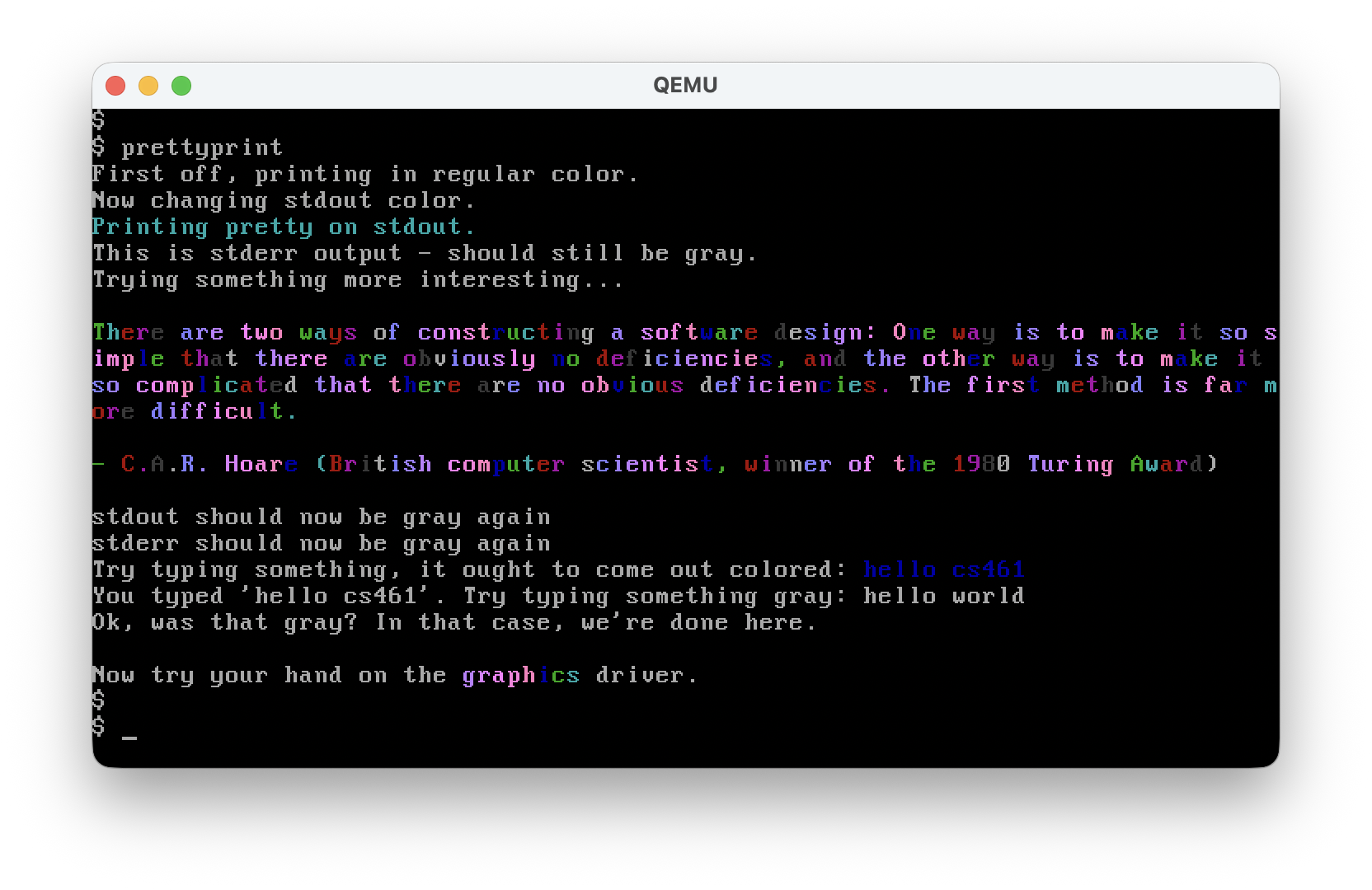
With prettyprint ("pretty-print"), a correct solution would display colorful text. Read prettyprint.c to see how it is intended to work.
Here, ioctl() (read "I/O control") is a classic Unix system call that was added to xv6 for this assignment. The purpose of ioctl() is to support various configuration settings for I/O devices. In the Unix model, I/O devices are represented by device files, notably the console and display, as seen in this assignment.
Hence, your job is to extend the functionality of the existing ioctl() system call to support the expected behavior of the prettyprint program. Remember the color configured by each call to ioctl(), and make sure this color is used to print subsequent characters on the appropriate file descriptor. There is a separate ioctl() mode for changing the "global" color, used when displaying input and cprintf output. Note that other output (say from cprintf, console input, or stderr) should not be affected by any color change to stdout, and vice versa. To help with this, the hw4 template includes changes to init.c, which opens /console a second time for stderr, rather than dup()ing stdout (switch to the hw4 branch, type: git diff origin/master init.c).
Study tip: Try to understand and follow the end-to-end life of a system call, how arguments are processed, how return values make it to the application, and so on. Read the console.c code and ensure you understand what's happening. How do characters make it from a keyboard interrupt to a reading process? For a more interesting example, what happens if the user presses backspace while a program is reading from stdin?
The "driver" of the console is initialized in consoleinit(). Your code for this task mainly goes to console.c, plus some declarations in defs.h.
Below is the expected output.
Hints
In struct file, you will find a new field void* dev_payload. This field may be used by device drivers to store driver-specific information in the struct file. This could be a pointer to a struct holding a lot of information, but in our case, we just need an int value to remember the color stored by ioctl.
Read prettyprint.c, console.c, and other related source code carefully. Don't rush to write code before understanding the expected behavior.
To output colored text, search the "gray on black" comment in cgaputc(). Try to experiment with printing a different color by editing that line of code.
How do you pass the color into that function? You need to change some functions' prototypes and/or add new functions to achieve it.
Debugging
When debugging, a good practice is to set the CPUS in the Makefile to 1.
Just add the interested kernel function names to .gdbinit.tmpl:
...
b consoleinit
b consolewrite
c
If the kernel panic()-ed, it will print out a list of addresses. That is the stack backtrace of the failed execution. Each address is the return address of a function call. You can find the corresponding line in kernel.asm, and the instruction before the address should be a "call" instruction.
New syscall: ioctl()
A new syscall ioctl() is added to the hw4 branch.
- User space:
user.handusys.S - Kernel space:
syscall.candsysfile.c sys_ioctl()->fileioctl()->consoleioctl()-> ?? what should be done here?
Read fileioctl() carefully to see what the three arguments are.
We use printf to print on the screen: (all user-space code)
printf()atprintf.cputc()atprintf.cwrite()-- starts the syscall
At the kernel side:
- After some .S and dispatching code...
sys_write()->filewrite()
cross-reference fails again. function pointers! grep 'devsw' *:
return devsw[f->ip->major].write(f, off, addr, n);
We want to see who set those function pointers:
- grep for "
write =" consoleinit()inconsole.c- This search is easy in xv6 because there is only one place where the "write" function pointer is assigned. It can be extremely painful to search in a big code base, such as the Linux kernel.
Now we know filewrite() effectively calls consolewrite():
consolewrite()->consputc()->cgaputc()-> ...crt[pos++] = (c&0xff) | 0x0700;
How to manipulate text/color in VGA Mode 3: https://wiki.osdev.org/Text_UI
Compare the arguments for consolewrite() and consputc(). Something is missing?
Submission
Please follow instructions on Gradescope to submit your solution.
Part 2: Implementing a VGA display driver
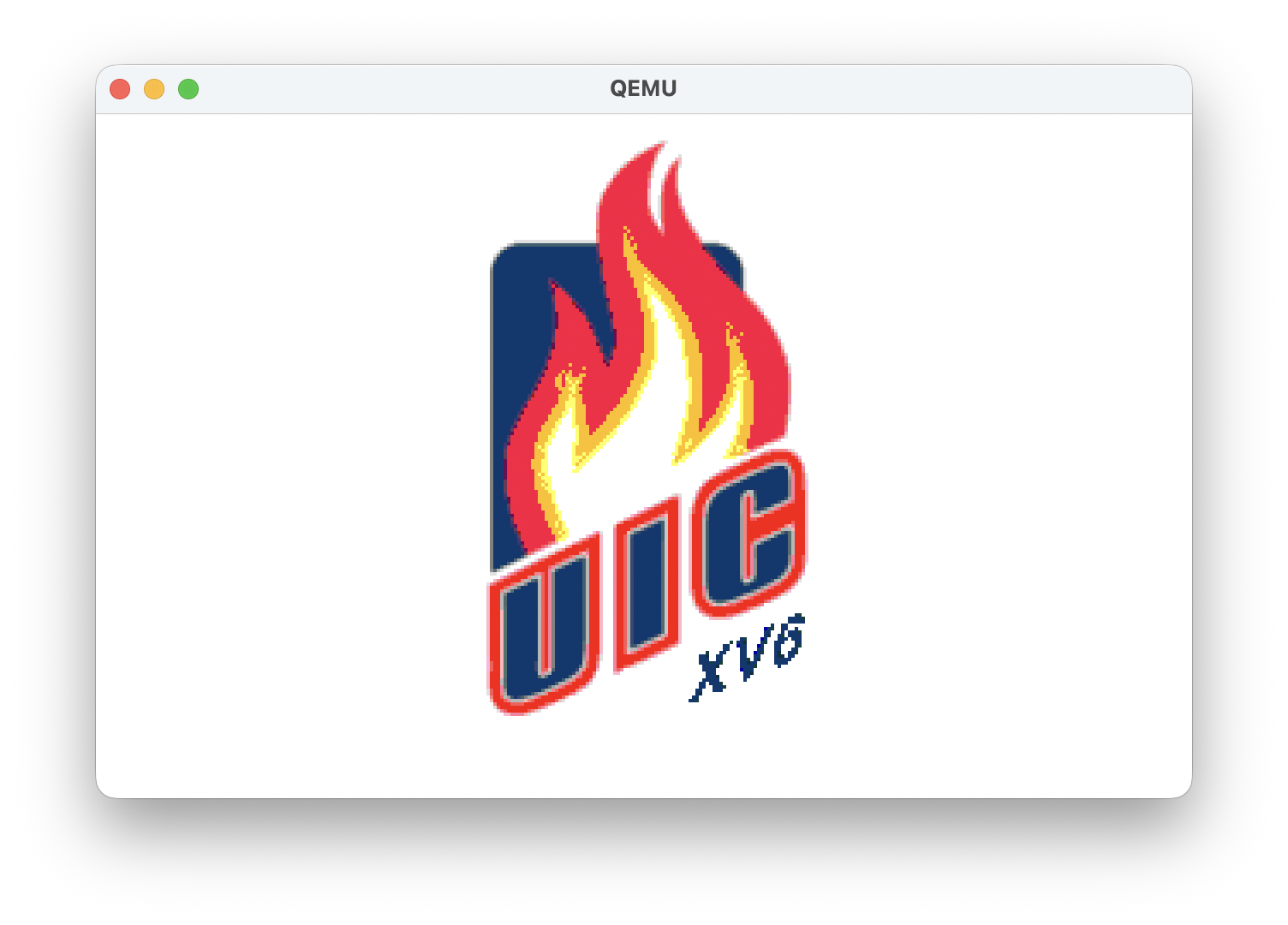
With imshow, a cover image should show up on the screen, change color, and disappear (return to text mode). To receive full points, make sure the original console text remains after the program finishes. (hint: switching video modes automatically clears the corresponding buffer).
While the console supports both read and write, your display only needs to support write (for showing pixels). Look at how the console driver is implemented and figure out how to implement a display driver.
Note that due to the virtual memory mapping, the virtual address 0xA0000 no longer maps to the video buffer (0xA0000 becomes user-space memory). Instead, you can find the buffer at KERNBASE+0xA0000.
Create a file display.c to hold the display driver code, plus "hooks" elsewhere. You'll need to implement driver initialization, writes to the display, and ioctls to change mode and modify palette colors. To change mode and palette colors, use the helper functions provided in vga.h. The Mode 13h is the graphic mode.
Below is the expected output.
Dig a little deeper
After executing imshow and returning to Mode 3, you will notice that prettyprint starts to show wrong colors. This is because the two VGA modes are supposed to use different palette settings. It's the driver's duty to configure the palette settings when switching modes. You need to "fix the bug" by restoring the correct palette settings after switching to the VGA mode 3. You only need to change vga.c to fix the bug. Implement cgaRestorePalette(). You can get clues about how to do this by reading the functions around it.
Hints
The display device file is created for you upon startup, in init.c. For sys_ioctl and sys_write, try to mirror how the console device is implemented.
In addition to your new code in display.c (should be less than 50 lines), you will also need to add/change a few lines in Makefile, main.c, and defs.h.
You DON'T need to call setdefaultVGApalette().
Submission
Please follow instructions on Gradescope to submit your solution.
Bonus Task: Super Simple Mario (s2mario)
Now that you have a working VGA display driver with mode switching and palette support, it's time to put it to use! In this bonus task, you will support a super simple Mario game that runs in xv6's VGA Mode 13h (320×200, 256 colors).
A starter file mario.c is provided in this patch — it contains the game loop, a 16×16 Mario sprite, and rendering logic. However, it won't work yet: the game needs raw keyboard input that the current console driver doesn't support.
What you need to do
The game calls ioctl(0, 3, 1) on stdin to enable raw input mode, and ioctl(0, 4, 0) to perform a non-blocking key fetch each frame. Neither of these is implemented in console.c — you'll find three TODO(hw4-bonus) markers showing exactly where your code needs to go.
- TODO 1 — Raw path buffering (
consoleintr): Wheninput.rawis set, each keypress should be enqueued directly intoinput.bufand readers should be woken up immediately — no line editing, no echo, no waiting for Enter. - TODO 2 — Raw mode toggle (
consoleioctl, param 3): Setinput.rawbased on the value argument. Don't forget to reset the ring buffer indices (input.r,input.w,input.e) so stale characters don't leak between modes. - TODO 3 — Non-blocking key fetch (
consoleioctl, param 4): If the ring buffer has data, pop one character and return it. If the buffer is empty, return −1 instead of blocking. Think carefully about which lock you need to hold.
Hints
Study how the normal (cooked) input path in consoleintr enqueues characters and wakes readers — your raw path is a simplified version of the same logic.
The ring buffer uses modular arithmetic: input.buf[input.r++ % INPUT_BUF]. Make sure input.e - input.r < INPUT_BUF before writing, just like the cooked path does.
The non-blocking fetch in param 4 must acquire input.lock to safely read and advance input.r. Without the lock, you risk racing with consoleintr on another CPU.
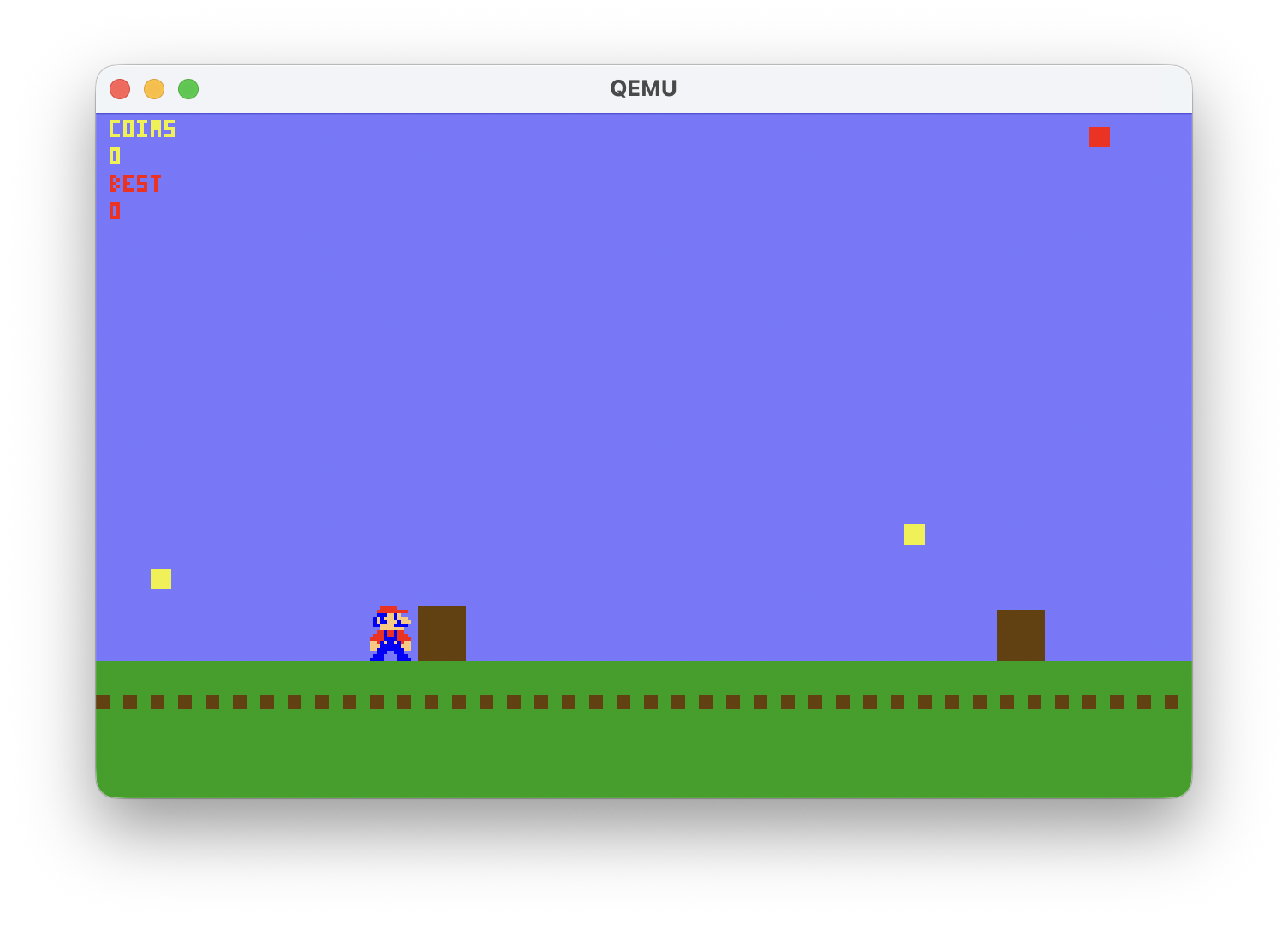
To test, run mario at the xv6 shell. Use A/D to move left/right, W to jump, and Q to quit. If raw mode isn't working, the game will hang waiting for input.
Applying the starter patch
If you haven't already, apply the starter patch to get mario.c and the console.c TODOs:
<switch to the hw4 branch>
git am hw4-s2mario-starter.patch
Upgrading to the full game
The mario.c included in the starter patch is intentionally simplified — just enough to verify that your raw input implementation works. Once you can see Mario moving with A/D and jumping with W, download the full version of mario.c from link and replace the starter mario.c file. Rebuild with make clean; make and run mario again — no additional kernel changes are needed.
Below is the expected game.
Submission
Please follow instructions on Gradescope to submit your solution.